
AI voice typing: A Practical Guide to Why Voice Input Stops Working: Step by Step Help
A step-by-step workflow for Why Voice Input Stops Working: Step by Step Help
 Voiskey Team
What Why Voice Input Stops Working means for this step by step help
To make AI voice typing useful for Why Voice Input Stops Working: Step by Step Help, start with one observable task rather than an abstract promise. Ask the people who perform the task to describe their current inputs, the decisions they make, and the final artifact they deliver. Pick a workflow that can be completed from start to finish during a short pilot. Write one sentence defining where that workflow begins and ends, then have both the operator and the owner approve it. Record assumptions separately from facts: a convenient demo is not evidence that the routine workflow is ready. If people disagree about the scope, split the request into smaller tasks before choosing tools. Keep a dated copy of the agreed scope so later changes can be compared with the original decision. This simple check prevents a team from measuring a different problem from the one it intended to solve.
Create a baseline from recent real tasks before changing the process. For each selected task, record its source, input format, person responsible, start time, completion time, and reason for any rework. Assign a stable identifier so an operator can retrieve the same example during review. Include ordinary tasks and at least one difficult edge case, rather than selecting only examples that already look clean. Ask a second person to reproduce two records using the current workflow and note any undocumented handoff, manual approval, or copy-and-paste step. Store the table and source references together in a location the project team can access. A baseline should show what actually happens, including incomplete inputs and interruptions, not just a single average assembled after the fact.
Turn the intended outcome into acceptance criteria that another person can check. Define what counts as a completed task, how to measure elapsed time, what constitutes an incorrect result, and when a human must intervene. Choose a fixed sample set and decide who will review it before starting the pilot. If there is no reliable historical measurement, run a baseline round first rather than inventing an improvement percentage. Separate hard requirements such as authorization and correctness from optional goals such as convenience or speed. Write the calculation for each measure next to the threshold, and keep the original examples available for audit. Ask the intended reviewer to apply the rules to one sample now; if two reviewers reach different conclusions, revise the criteria until the difference is resolved and documented.
Define the pilot boundary and an exit path before any production work begins. List the examples to be used, the environment in which they may be processed, the people who can approve changes, and the date on which the team will review the outcome. Save a copy of both the original input and expected output for every example. Mark disputed examples as pending instead of quietly treating them as successes. Describe exactly how an operator can switch back to the previous process when a dependency fails or the new output cannot be trusted. Have each participant restate the workflow boundary in their own words during a short kickoff. If their answers differ, update the written scope and reassign the examples before continuing. The deliverable for this stage is a signed-off baseline, sample list, acceptance sheet, and rollback instruction.
A practical sequence for voice input setup, practical troubleshooting, clearer spoken drafting, and repeatable AI voice typing workflows
Map the smallest viable chain from input to approval before configuring anything. For each step, name its source, required fields, transformation, output destination, and owner when something fails. Mark every point at which a person must make a judgment, rather than hiding it inside a supposedly automatic step. If a step uses an external service, record the account required, access limits, expected response, and manual alternative when that service is unavailable. Walk through the diagram with someone who actually performs the work; ask them to point to missing approvals, format changes, and handoffs between systems. Save the diagram with a version number and link it to the baseline examples. A workflow is ready to build only when an unfamiliar teammate can trace one real input through every decision to the final deliverable without having to guess who owns a step.
Prepare the inputs with a consistent naming and version policy. Attach a source, date, owner, and permitted use to each document or record, then isolate expired, duplicated, or conflicting material. Build a small evaluation set containing common cases and boundary cases such as missing fields, long content, ambiguous instructions, or limited access. Keep the expected result for each example separate from the inputs used by the process itself, so a later check is meaningful. Change one input rule at a time and record which examples were added or removed. Use representative sample inputs before sharing the set. Ask another team member to locate two examples using only the identifier and source log; if they cannot, fix the recordkeeping before running further experiments. The deliverable is a traceable inventory, not an undocumented folder of files.
Write processing rules as an operator-facing checklist, using verbs and observable conditions. Start by checking whether the input is allowed and complete, continue with each conversion, lookup, or review in order, and finish by verifying the required output fields. Add explicit stop conditions for missing evidence, conflicting sources, and results that cannot be explained; do not let the operator fill these gaps by guessing. For every stop condition, name the person who decides the next action and the information they need to see. Run the checklist against a few examples with known outcomes and compare intermediate outputs, not just the final wording. When a result differs, trace the first step at which it changed. Update the corresponding rule, rerun the same example, and record both versions. This makes later correction reproducible instead of relying on memory or a one-off prompt tweak.
Review access, operating cost, and recovery before the first live trial. List who may read source material, edit the rules, execute the workflow, and publish a result; remove permissions that are not essential for those roles. Check that the chosen environment is appropriate for the input and that the runbook captures the decisions needed to repeat a trial. Estimate the time or external resources a single run consumes, then set a modest limit for the initial trial. Put configuration details, owner contacts, and rollback steps in the same runbook, and have someone who did not write it perform a dry run. Require explicit approval before granting new access or raising the trial limit. If an operator cannot obtain authorization or complete the recovery exercise, pause that part of the rollout and write down the missing condition instead of declaring the system ready.
How to test the workflow without losing important context
Build one end-to-end path before adding every possible exception. Choose a representative sample, follow the documented steps from raw input to approved output, and save the input, intermediate results, final artifact, and time spent at each point. Include only components needed to verify the current objective; whenever you add a tool or integration, state which specific failure or manual task it removes and what new dependency it introduces. Ask a colleague who was not involved in setup to follow the runbook and reproduce the result. Note any step at which they ask for verbal clarification, then rewrite that instruction and repeat the trial. Keep the initial configuration together with the example identifiers so the same result can be tested after a later change. A complete path means a repeatable result under stated conditions, not a polished screen with an undocumented manual workaround behind it.
Make human review points explicit instead of treating them as invisible exceptions. For each review, define what passes, what fails, and what needs additional evidence. Attach an example from the pilot set and say where the reviewer records the reason for a decision. If the source is ambiguous, label the result pending and assign a person to resolve it before the output proceeds. High-impact outputs should require a named reviewer before publication; document the action that reviewer takes, such as comparing quoted facts with the original record. Keep decision notes alongside the version of the rules that produced them. During a walkthrough, deliberately present one clean result and one uncertain result to the reviewer, then check that they follow different paths. If both are accepted automatically, tighten the gate before increasing the trial size.
Rehearse failure handling with representative sample inputs. At minimum, try incomplete input, an unavailable dependency, a timeout, and an output that contradicts its source. For each case, specify what an operator sees, where the error is logged, who receives the alert, and what must be checked before a retry. Test duplicate submission and an interrupted run so a single request cannot silently create two published results. Set a response owner and a reasonable review window for each kind of failure. Document whether the system can resume safely or must restart from a recorded checkpoint. Ask a teammate to execute the rollback instructions without coaching and record what actually happened. If they cannot return to the previous process, treat that as a blocking issue rather than an optional improvement for the next release.
Freeze a version after each meaningful change and rerun the original sample set. In a change log, write the rule modified, the expected effect, the observed result, and any unresolved question; link every conclusion to the relevant sample identifier. Check whether an improvement for one type of input makes another type worse. If the reason for the difference is unclear, stop expanding the trial until it is understood. Record the execution date, configuration version, reviewer, and sample list together, so another person can recreate the comparison under the same conditions. Update the runbook when behavior changes instead of leaving the documentation for the end of the project. Before accepting a version, have the reviewer compare the outputs against the agreed criteria and sign off on exceptions. The deliverable is a reproducible version with known limits, not a claim that all possible cases have been solved.
Where AI voice typing supports clearer notes, prompts, and follow-up writing
During the pilot, let actual users complete ordinary tasks at their normal pace instead of asking implementers to choose only favorable examples. Explain the goal and feedback channel first, then record the identifier, outcome, time spent, manual corrections, and reason for each failure. Retain the original process as a comparison and keep the task mix as similar as possible between approaches. When the environment changes or the sample is too small to support a strong conclusion, state that limitation directly. Ask users to work from the written instructions rather than from hints given by the author. If a task cannot be completed, preserve the input and the point of failure instead of quietly excluding it. The pilot log should allow another person to reconstruct both successful and unsuccessful runs before anyone makes a rollout decision.
Sort findings by their effect on the final deliverable. Errors that prevent completion should block expansion, misleading output should require review, and minor wording or presentation issues can go into a scheduled improvement list. For every finding, save the steps to reproduce it, the example identifier, expected behavior, actual behavior, owner, and target date. After a fix, repeat the original failing case and check a nearby case that previously worked. Do not label a problem solved merely because it did not appear during one later demonstration. Keep a separate list of risks accepted for the pilot, with an explicit approver and an expiration date. If the risk is still present at that date, require a fresh decision rather than silently treating the old approval as permanent.
Collect feedback by observing how users make decisions. Ask them where they hesitate, which instruction they cannot interpret, and when they would return to the earlier process. Keep those observations apart from measured task outcomes so a positive impression is not reported as a correctness rate. For disputed results, bring the operator and business owner together, inspect the original source, and document the reason for the final judgment. Show pilot participants the known limitations before they rely on the output for real decisions. Where the result affects customers, finances, or compliance, keep the required human approval visible in the workflow and log who performed it. Finish each session by asking the user to suggest one concrete change to the instructions, then test whether that change helps a new participant complete the same task.
At the end of the pilot, calculate results using the criteria defined before testing. Include the full sample range, unfinished tasks, review effort, and cost of manual intervention. For each requirement, point to the evidence that supports a pass or explain why it failed and what to change next. If poor source material is the main obstacle, correct the inventory before redesigning the process; if the sequence of steps causes confusion, narrow the scope and run another controlled trial. Set a date and owner for the next experiment, and preserve the previous configuration so its results remain comparable. Expand only when the same team can repeat the outcome and explain how failures are detected. The decision record should identify what is ready, what remains restricted, and who will authorize the next stage.
A repeatable Voiskey workflow for the next task
Before inviting a larger group, prepare a one-page runbook with the appropriate use cases, checks to perform before starting, numbered actions, final verification points, and a contact for problems. Use mistakes seen during the pilot to illustrate when an operator should stop and ask for help. Give the document an owner and revision date, then store it where the team already looks for operating instructions. Have a new user work through a sample without assistance and mark every ambiguous step for revision. If the instructions depend on access that some users do not have, define an approved alternative or delay their rollout. A guide is complete when the intended audience can produce a reviewable result and recover from a common error, not when the author believes the instructions are self-explanatory.
Open access in small groups with a named contact for each group and a clear feedback channel. During early use, sample outputs regularly and pay special attention to unfamiliar input types, changed permissions, and updates to source material. Define in advance which signals require a pause, such as a missing approval or a result that cannot be traced to its source. When a signal appears, stop the affected step and use the documented earlier process while the owner investigates. Record the trigger, affected tasks, response, and condition for restarting. Communicate a restart decision to the people who actually perform the work, not only to project leads. This staged approach gives the team an opportunity to correct problems without assuming that one successful pilot covers every future situation.
Assign a maintenance rhythm rather than treating publication as the end of the project. Review failed examples on a regular schedule, revisit rule and source versions, and rerun the acceptance set after a major workflow change. Assign these checks to named roles and place the dates on a shared calendar. Remove unused configurations and outdated examples after checking what the team still needs to reproduce past results. When a recurring problem appears, link the new case to earlier incidents and decide whether to amend an instruction, change a rule, or narrow the allowed inputs. Record the decision and test its effect before closing the issue. This routine makes maintenance a specific responsibility with evidence of completion instead of an informal expectation.
Review whether work on Why Voice Input Stops Working: Step by Step Help should continue by comparing delivered outcomes, operating effort, user feedback, and unresolved risks in the same decision note. Identify one next action: extend a well-understood use case, fix the main bottleneck, or stop the current approach with a written reason. Attach example identifiers, the current runbook, approval records, and the latest acceptance report so the next owner can reproduce the findings. If the conditions for success have changed, write new criteria and collect a fresh baseline rather than revising old results after the fact. Schedule the next review before closing the meeting and state who will prepare each input for it. The handoff is successful only when someone outside the pilot team can locate the evidence and explain why the chosen next step follows from it.
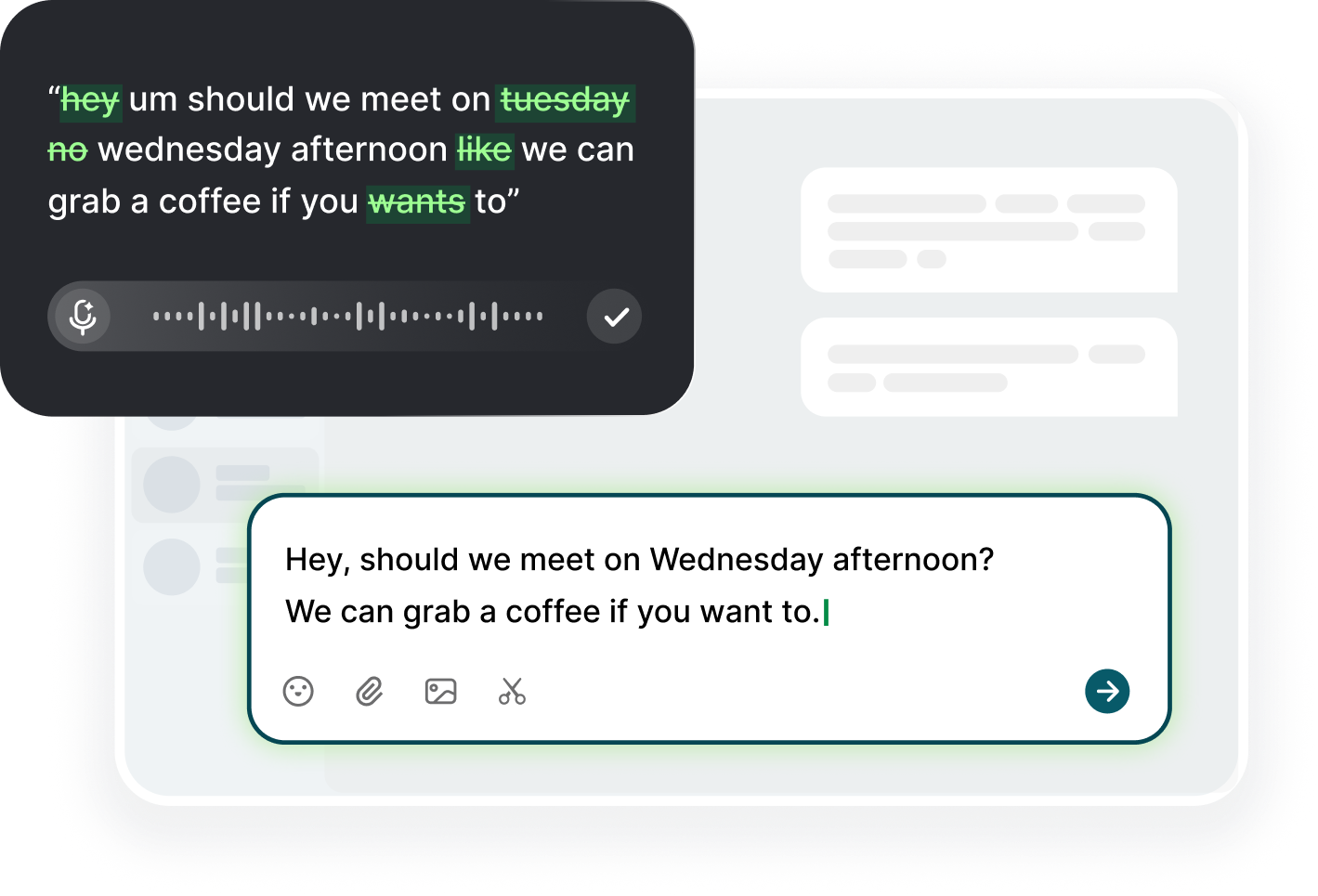
For the next task, use a simple voice-first routine: press the Voiskey shortcut, speak the working context in natural language, and review the inserted text before sending it onward. Voiskey removes filler words and false starts, adapts tone to the task, and inserts polished text at the cursor in the app already in use. Apply the same habit to a troubleshooting note, a prompt, a meeting follow-up, a document draft, or a project update. Voiskey works on Mac, Windows, iOS, and Android, supports more than 100 languages with translation, and can learn shared vocabulary for recurring terms. Start with one repeatable workflow, check the result, and expand only after the spoken context and final text are clear.
FAQ s
Install Voiskey, set the activation shortcut, and begin with one recurring task such as email replies or meeting follow-ups. Once that feels natural, expand voice typing to more of your daily writing.
Voiskey is an AI voice typing tool that turns what you say into clean written text. You press a shortcut, speak, and the finished text is inserted at your cursor in whatever application you are already using.
Voiskey works on Mac, Windows, iOS, and Android, so you can dictate the same way on a desktop at your office and on a phone while you are away from your keyboard.
Yes. Voiskey removes filler words and self-corrections as you speak, so the text that lands on the page reads like edited writing rather than a raw transcript of everything you said.


 Voiskey
Your voice, amplified.
Choose a real task, follow the steps, and review the results with your team before expanding the rollout.
Use it across macOS, Windows, iOS, and Android