
voice typing rsi recovery: A Practical Guide to Voice Typing for Repetitive Strain Injury Recovery
Keep the job, drop the load: voice carries your writing while your hands heal.
 Voiskey Team
Recovery Without Stopping Work
A voice typing rsi recovery plan does not ask you to abandon your job; it asks you to change the mechanics of how you do it. Repetitive strain injury is an umbrella term for pain and dysfunction in muscles, tendons, and nerves caused by repeating the same small movements, and for keyboard workers that movement is typing. Recovery from that kind of strain is mostly about load, and load can be managed while deadlines stay put. The practical lever is simple: the writing you would type, you now speak. Standard replies, follow-ups, notes, and updates were only ever on the keyboard because a keyboard was there, not because they needed fingers. One important boundary at the top: this article is informational, not medical advice. If you have persistent pain, numbness, or weakness, start with a clinician and build your plan around what they tell you.
Think about what rest actually means here. Tendons and nerves do not recover while you keep repeating the same motion at full volume, so recovery happens in the gaps between bouts of load. A typing day has almost no gaps: the next email is queued before the last one is sent. Voice input creates gaps without creating downtime. Instead of typing forty replies, you speak them, which drops the load from thousands of finger movements to a few hand-free minutes of speech. That is why this approach works for people who cannot take leave: you are not stopping the work, you are changing the motion that does it. Recovery and output stop being rivals and become the same activity.
Set expectations before you start, because recovery runs on weeks, not mornings. Week one is setup and small swaps: you learn the shortcut, you identify your heaviest writing, you move notes and draft replies to voice, and you do not judge progress by one day. Week two is volume: a meaningful share of your messages now come from dictation, and you notice your hands doing less before you notice anything else. Week three is rhythm: voice blocks, breaks, and typing windows become a routine you do not think about. If any stage feels wrong, slow down rather than push through, and if symptoms worsen at any point, tell your clinician. Recovery cooperates, it does not reward discipline, so pace yourself honestly.
Build the plan around your real workload, not an ideal one. List every writing task you did yesterday and sort them by volume: replies, status updates, meeting notes, forms, documents. The top of that list is what voice takes over first. Then decide what stays on the keyboard: anything exact, anything short and immediate, anything you do not want to hear yourself say out loud, like a password or a code snippet. For each task you keep, ask whether it can be shortened or moved to a less loaded hand posture. Write the plan on one page, date it, and show it to your care team if you have one. A written plan is easier to follow and easier to revise than a resolution.
Replacing Keyboard Load with Dictation
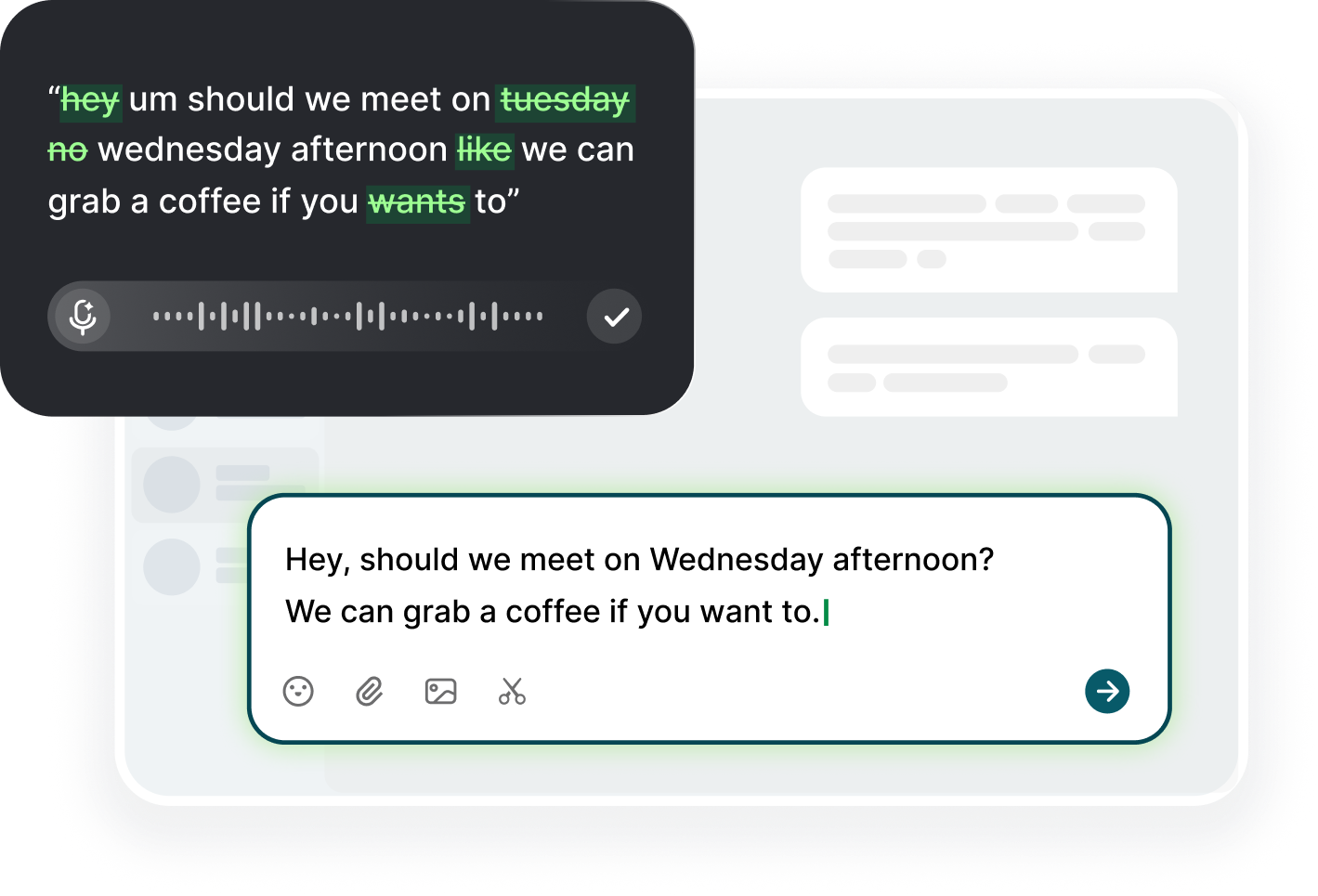
The first swap to make is the writing you already do by formula: replies, check-ins, notes, and follow-ups. These are the tasks where you type because the spot is empty, not because the words are hard. With Voiskey you click into the same field you always use, trigger your dictation shortcut, and speak; on a phone you add Voiskey as a keyboard and tap into any field. The app removes filler words and fixes punctuation as it transcribes, then you review the result yourself, because Voiskey never sends anything on its own. That review step is non-negotiable: a message you have not read is a draft, and a draft stays in the box until you approve it.
Position yourself for dictation before you push the button. Sit back with both forearms supported by the armrests or resting in your lap, which takes the load off your wrists entirely. A desk mic or a headset keeps the conversation natural without you holding anything; if you hold the phone, switch hands every few minutes. Speak in your normal voice and at your normal pace, and do not whisper or force a steady delivery, because a natural, unhurried voice transcribes more cleanly than a tense one. Dictate in sprints of ten to fifteen minutes, then place your hands flat and loose for a full two minutes. The sprints protect your voice the same way the swap protects your wrists.
Tune the workflow for the healing phase specifically. First, draft more than you need: dictate a longer version of the message, then trim it, because deleting is easier than inventing on the keyboard. Second, keep corrections brief. If a word mistranscribes, do not fix it mid-flow; note it, continue, and edit after the block. Third, use the review moment as your rest moment. After you finish speaking, drop your hands, close your eyes for ten seconds, then read the draft. That turns review time into recovery time without adding a single minute. Fourth, protect the boundary between dictation and personal time: when the workday ends, the mic goes off. Healing needs the load to stop, not just to move.
Know what the swap buys you. Speaking runs around 220 words per minute versus roughly 45 for typing, so the same message costs a small fraction of the time and a small fraction of the movements. On the free plan, Voiskey covers 2,000 dictated words a week, which is enough to shift a meaningful chunk of everyday writing off your keyboard; most recovered workers find two to three thousand words a week is the sweet spot for a mixed approach. Watch the weekly dictated count the way you would watch a budget. The point is not a contest, it is a baseline: you keep the number steady as tasks change, and you always know how much load you removed from your hands on a given week.
Adapting Your Setup During Healing
Your setup needs an adaptation pass, because dictation changes your geometry. You no longer need to lean forward into a keyboard, so bring the screen to eye level instead of the other way around, and let the keyboard sit slightly out of reach or on a tray. Rest your elbows on the chair's armrests, keep your shoulder blades down, and let your hands hang loose between blocks rather than hovering over the keys. If you wear a splint or brace, keep it on during dictation; voice needs none of your finger muscles. A small angled tray for the microphone or a clip-on headset means you never adjust your posture to speak, and distance from the mic matters far less than a quiet room.
Setting the room is cheaper than buying gear and often more effective. Move your desk so your back faces a busy corridor or open plan noise, because voice input punishes ambient chatter more than a modest keyboard hum does. Close the door for the fifteen minutes you dictate, schedule your heavy voice block when the office is quiet, and keep background music low. If you warm your hands before you start typing, warm them before you dictate too, since cold appendages are an aggravating factor for many people with strain symptoms. Keep a glass of water at the desk: speaking for a stretch of minutes dries the throat, and a tired voice will make you shorten your blocks and fall back to typing.
Guard against trading one injury for another. Voice work is not load-free: lengthy speaking sessions can strain your throat and vocal folds if you push, so structure dictates the way athletes structure reps. Speak for ten to fifteen minutes, rest your voice for at least as long, and never force volume to beat background noise; lean closer to the mic instead. If your throat gets scratchy or your voice sounds tired by midweek, you are pacing too hard, so shorten blocks or spread them across the day. Keep hydration handy and keep your head upright. A healing body has one spare capacity, and spending it all on voice is no better than spending it on typing.
Use the setup change to make the old habits structurally unavailable. Move the keyboard to a position where typing five hundred words takes actual effort to reach, and put the mic where your hand falls naturally. The goal is friction in the direction you are leaving and smoothness in the direction you are going: with Voiskey, the shortcut should work in every field, from your inbox to your notes app, so the voice path and the old path have equal convenience. If your work uses a laptop keyboard, an external quiet keystroke is a minor upgrade, but the bigger win is that the laptop can sit at a height where your elbows rest at ninety degrees and your wrists stay neutral. Comfort you do not have to think about is the only setup that survives a bad day.
Pacing, Breaks, and Rechecking the Load
Pace the day around recovery, not around the clock. A good structure is three deployments: a morning block for the heaviest writing, a midday block for notes and mid-task updates, and a late block for the things you would otherwise type before leaving. Each block is ten to fifteen minutes of speaking followed by a few minutes of hands-down rest. Between blocks, keep typing windows short and strictly separated: ten minutes of typing, then five minutes away from the desk entirely, not just away from the keyboard. This alternating pattern means no single movement gets a long uninterrupted stretch, which is exactly what strain needs. It also means the day has rhythm: output happens, load rotates, and rest is scheduled instead of hoped for.
Microbreaks deserve a timer, because they are the easiest habit to skip and the most protective one to keep. At the end of each dictation block, put both hands under the desk, open and close them slowly five times, drop your shoulders, and breathe for twenty seconds. At the end of each typing window, stand up, reach for the ceiling, and let your forearms hang as you shake them gently. Schedule a real walk at midday, and one stretch before the afternoon rush. None of these movements treat anything, but they interrupt the static hold that gives strain its chance to build. Pair each break with a visible cue, like the end of a voice block or a calendar reminder, so you do not rely on remembering it.
Recheck the load weekly, not daily, because daily data is noisy. Each Friday, record three numbers: how many words you dictated, how many you typed, and a simple 0 to 10 rating of discomfort at the end of the day. Compare the week to the week before, not to a target from a blog. A stable or improving pattern is the goal; if a week is worse, look for the cause in the numbers: did a report deadline pull you back to the keyboard, did you skip breaks, did the room noise make you abandon dictation? Identify the cause, change one variable, and try again. If discomfort trends worse for two consecutive weeks, reduce typing further and consult your clinician, because a plan that makes symptoms worse is a plan that needs changing.
Learn to read the balance honestly. When you recover, the tempting mistake is to ratchet keystrokes back up immediately and declare the problem solved, and the second mistake is to feel guilty about typing at all. Both are wrong. The healthy pattern is mixed, and it varies: a heavy report week will have more typing, a meeting-heavy week more voice. What stays constant is the structure. Voice remains the default for high-volume repetitive writing, brief gaps continue between blocks, and the weekly numbers keep telling you whether the load is trending down. If you ever find yourself in a month of almost pure typing again, notice it, and move one task back to voice. The routine, not the tool, is what protects you.
Going Back to the Keyboard Safely
Returning to the keyboard is a return, not a reset. Start with short typing windows of ten minutes, and only under two conditions: your symptoms have been stable or improving for a week, and your clinician has not told you otherwise. Use a timer, because ten minutes of typing is longer than it feels. When the window ends, switch to voice for the rest of the task and place your hands in neutral while you review. Increase only one step at a time: fifteen minutes next week, twenty the week after, and hold each level for at least a week before adding more. If symptoms rise, step back down for a week and try again more slowly. A graded return is slower on paper and far faster in practice than a relapse.
Judge each step by the next morning, not by the moment. The twenty minutes that go fine at 3 p.m. may still be loading tissue that complains at 7 a.m., so the rule of thumb is: type on day one, observe on day two. Keep the morning rating as your entry diary: if the next morning's discomfort is not worse than before the session, the level is acceptable for another week. If it is worse, treat it as data about the ceiling of that level, drop back, and let the clinician weigh in. This one-day-lag rule keeps you honest without turning every session into an experiment, and it is the core of why gradual return beats all-or-nothing.
Keep a mixed setup permanently rather than treating voice as a temporary crutch. In the long term the healthy configuration is: voice for volume, keyboard for precision. Draft replies, notes, and updates by voice, and use the keyboard for the short, exact, or private parts plus the editing you enjoy. That balance lets your hands recover daily while your output keeps its quality bar. Revisit the split every quarter: measure one week of typing versus dictating, and notice whether the balance crept toward the keyboard. Also keep the checkpoints from earlier: the weekly numbers, the stretch breaks, the neutral wrists. The goal is not a keyboard-free job; it is a job that stops challenging the same small tendons for hours at a time, and a mixed setup is the version of that goal that lasts.
Before you resume, decide what you will do again and what you never need to do the same way. The never list is short: the marathon all-day typing sessions, the keyboard as default for every message, the mouse wrist planted on the desk. Writing that list explicitly keeps the relapse honest, because a vague intention to be careful evaporates on a deadline. On the do list, write the three habits that got you here: dictation for the high-volume writing with Voiskey, a break at least once an hour, and a neutral wrist posture. Attach each habit to a trigger, such as the first email of the morning or the end of every meeting, so the behavior happens without a decision.
FAQ s
Yes, usually, if the load is managed. Repeating the exact motion that caused the strain at full volume blocks recovery, so the practical answer is reducing typing load with dictation, taking real breaks, and pacing the day. For persistent pain, numbness, or weakness, ask your clinician before building a work plan.
Start with the high-volume, formulaic writing: replies, follow-ups, notes, and updates. A quarter to a third of daily output is achievable within a few weeks. Take at least one full week at each level, and increase only when the weekly symptom trend is stable or improving.
Step back in gradually: ten-minute typing windows, held for at least a week, with the remainder of each task done by voice. Judge each level the next morning, not the same day. If symptoms rise, drop a level and resume medical guidance if they do not settle.
Prolonged speaking can strain your voice if you force volume, talk through noise, or skip hydration. Dictate in ten to fifteen minute sprints, rest your voice between blocks, and stop sessions when your throat feels tired. If your throat gets scratchy, shorten the blocks or lower your volume.


 Voiskey
Your voice, amplified.
Choose a real task, follow the steps, and review the results with your team before expanding the rollout.
Use it across macOS, Windows, iOS, and Android