
voice prompts chatgpt answers: A Practical Guide to Voice Prompts That Get Better ChatGPT Answers
Turn spoken requests into prompts ChatGPT answers with substance.
 Voiskey Team
Why Voice Prompts Feel Different
You already know the failure: you speak a question, ChatGPT answers with a shrug. The difference is that voice prompts chatgpt answers best when they carry the same four ingredients as a written brief. Talking changes the transaction because spoken language runs on rhythm and habit, so you end up with the conversational version of what you meant rather than the precise one. Compare a typed request, give me ideas for a campaign, with the spoken version a colleague might hear, can you think of some things we could do. The second is underspecified, and the model has no way to know the audience, the budget, or the deadline. Speaking is not the problem; the unstated context is, and voice makes it easier to hide.
A prompt is not a wish, it is a request with edges. When you dictate, you feel the temptation to ramble because the words flow free, and that flow masks missing detail. A typed prompt shows its gaps on the screen, while a spoken one hides them behind intonation. The practical fix is to treat every dictation like a short briefing: name the role, the material, the limit, and the shape of the answer before you describe the task. This takes one extra breath of speech and removes most follow-up turns. Test it on a question you ask often and note how the first answer improves. That improvement, not polish, is what your time buys.
There is also a trust effect. Typed prompts tend to come out clipped because people rush to finish, and clipped prompts make the model compensate with filler. Spoken prompts tend to come out fuller, with examples and caveats you would mention in conversation, and the model mirrors that richness. The literal words you say matter less than the completeness they naturally carry. So speak the way you would explain the task at a whiteboard: the goal first, the constraint second, the example third. Even without special structure, that ordering produces visibly better answers, because the model receives the same sequence of facts a human would want.
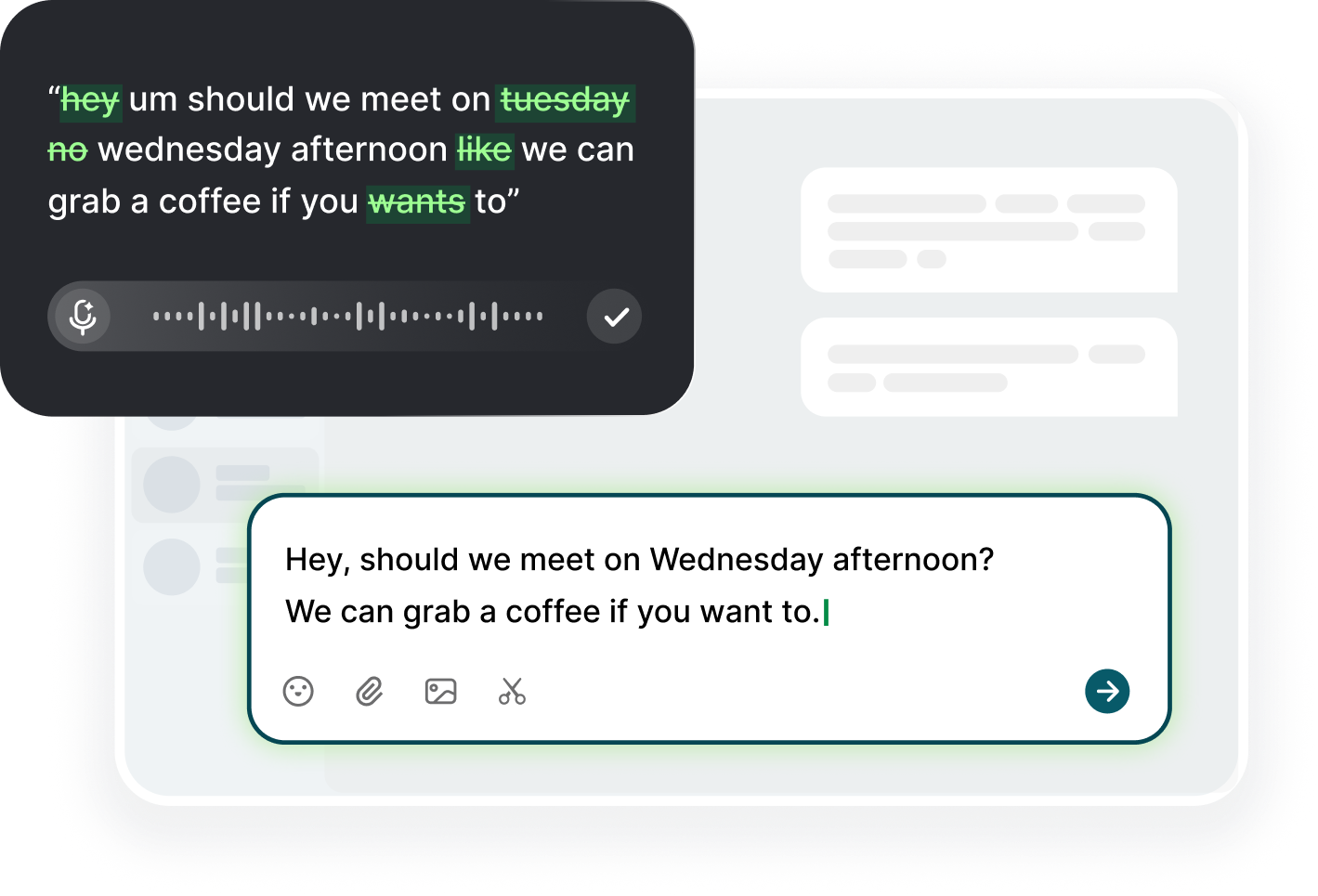
Resist the urge to apologize or narrate while you dictate. Sentences like I am not sure if this is right or I have a quick question before we start add noise that the model dutifully unfolds, and you then burn a turn correcting the misunderstanding. Dictate only the request. If you need to think, pause outside the field, then return and speak the actual instruction. Voiskey's dictation types exactly what you say into the prompt box, so a rambling preamble becomes literal prompt text, not a private thought. Keep your private thinking in a separate note or out loud in the room, and keep the field clean for the request itself.
The Four Parts of a Working Prompt
The first of the four parts is the role: who the model should be. Say you are a senior editor who has worked in B2B SaaS for a decade, then the task, and the answer arrives in that voice. Role is the cheapest accuracy boost available, since it sets depth, vocabulary, and assumptions without any detailed instruction. When you dictate, say the role first out loud and let it sit as its own sentence. Do not bury it mid-paragraph, because a long spoken prompt tends to blur boundaries. One clean role sentence at the top of the box turns a generic answer into a specialist one, and it takes under five seconds to speak.
The second part is the material: what the model may use. Name the source directly, such as use only the meeting notes below or base it on this error message. If the context came from a previous turn, point at it explicitly rather than assuming memory. Spoken prompts drift toward abstractions, so force yourself to name the artifact. When you dictate, holding a document on screen helps: mention it, then glance at the bullet you are referencing. The model cannot see the screen, so whatever you fail to say is genuinely unknown to it. Naming the source does more for answer quality than any synonym or tone word in the request.
The third part is the constraint: the limit that makes the answer usable. Say keep this under 120 words, use a table, avoid marketing language, or assume the reader knows nothing about the topic. Constraints are where spoken prompts typically go quiet, because they sound like afterthoughts in conversation. Say them at the end of the dictation so they arrive as a distinct instruction, and the model treats them as separate from the description. If you dictate several limits at once, number them: first, no jargon; second, three bullets; third, end with a question. Numbering turns a wall of wishes into an ordered set the model can follow.
The fourth part is the output shape: how the result should look. Ask for a table with columns, a numbered list, a two-paragraph memo, or the email ready to paste into Outlook. Dictating the shape takes one phrase and saves an entire exchange of formatting requests. Speak it explicitly rather than implying it, because what sounds obvious to you is a free choice to the model. Put the shape last, right after the constraints, so the request reads like a recipe: role, material, constraints, shape. Read the four parts aloud once in order and you will never send a wish again. The model rewards a fixed sequence with a fixed result.
Speaking the Context Without Rambling
Context is where spoken prompts wobble, because detail that feels essential in conversation is noise to a model. Before you dictate, decide what the model cannot know and say only that. The project history you assume everyone remembers is not visible to the chat, so state it in two clauses at most. The audience you picture, the deadline you fear, the tone the client expects, all belong in the prompt. What does not belong is your reasoning about why you are asking, your hesitation about the outcome, and your apology for the length. Dictate the facts, not the feelings, and keep the whole context under four sentences.
One trick keeps spoken context compact: announce the context as a label. Say context: we are a small publishing team, the reader is a first year student, the piece is an explainer about coral reefs, then pause, then deliver the task. The label tells the model where the background ends and the request begins, which matters because spoken dictation provides no paragraph breaks. When the text lands in the box, even if punctuation drifted, the labels survive as short words. Use the same trio every time: context, task, output. The repetition sounds mechanical for a week and then becomes second nature, and every answer arrives aligned with the brief.
If the context is long, prune it out loud before you speak it. Say the whole story once, then say it again in half the words, and keep the second version. This is a real exercise, not a formality: the first pass contains the connective tissue, and the second pass contains the decisions. Dictate the trimmed version and ignore the urge to restore detail. When one background fact is actually load-bearing, promote it into the constraints instead of leaving it in the story. The model uses constraints more reliably than narrative, so a fact you care about becomes a rule: the document must stay under one page, and it must end with a cost estimate.
A closing detail check takes ten seconds. After the text lands, scan for the who, the what, and the limit, the three things a stranger would need. If your prompt names a team only by its nickname, spell the client name. If it mentions a deadline as soon as possible, write the actual date. If the reader is vague, say the reader is an intern who just joined. These micro-additions are far more valuable than half a paragraph of scenery, because they turn a guess into a fact. With Voiskey you can select the weak clause and speak the fix, so the tightening takes less than a minute instead of a rewrite.
Prompt Templates You Can Dictate
Templates make voice prompts repeatable, and the good news is that dictation treats a template as plain text like anything else. Build one for the request you send most often, such as a weekly status summary. Write the skeleton once: role, three updates, one blocker, one next step, then dictate the variable parts each week. The structure lives in the box and you fill the blanks by voice, which removes the blank-page problem entirely. Start with one template, not five, and refine it after three uses. A template earns its keep when you stop reading it and simply speak into the gaps.
A strong template survives repetition because it trusts the model with narrow choices while planting the fixed facts. For an email draft, the template says audience, tone, length, and closing line, and you only speak the core message. For a lesson plan, the template says level, duration, objective, and activity type. Dictate the fixed parts once, save them, and reuse them without retyping. When you need a variant, speak it and the new structure replaces the old. Do not over-engineer the template; two or three fixed lines plus a description field beats a twelve-line monster that you have to edit every time.
When you dictate a template for the first time, read it back and keep the version that survived. Most people find their first attempt too wordy, and the second pass naturally tightens each slot. Preserve the comments you add for yourself, because they remind you what fills each gap. If a template fails on a real task, change one slot at a time and note which change fixed the answer; a full rewrite hides the lesson. After a month you will have a small shelf of templates for reports, emails, and summaries, and each one takes a single spoken session to produce. That shelf is the practical payoff of prompt discipline.
One final habit ties the section together: dictate the follow-up into the same chat rather than starting over. When the first answer is close but not right, say that is good, now shorten it to one paragraph and keep the strongest examples, and the model adjusts in place. This preserves the context you already supplied and makes each turn cheaper. Templates create the base, and follow-ups do the polishing, so a single spoken template session can yield three good results. Over a week the wins compound: faster first answers, fewer correction rounds, and a personal prompting style that sounds like you when it should.
Iterating on Answers with Follow-Up Voice
The first answer is rarely final, and the fastest way to close the gap is a spoken follow-up that points at the specific problem. Say the table is good, but replace the second row with numbers from the sketch, rather than asking for a general revision. Pointing is a skill in the answering phase, and it is where most people waste an entire turn asking for changes they cannot name. Read the answer, pick the single weakest part, and name it in one sentence. Dictate that sentence with the model's own words in mind, such as drop the third bullet because it repeats the first, and the edit lands exactly there. Precision beats volume in follow-ups.
Use the yes, but pattern to steer without restarting. Yes, keep the tone, but start with the recommendation instead of the background. The yes preserves what works and the but names the delta, which is exactly the information the model needs to adjust rather than regenerate. When you dictate, keep the yes and but as separate short clauses and do not pad them. If you are unsure what to keep, ask the model to list what it changed after each revision, so the next turn starts from a known state. Four or five of these small steering turns cost less than one full rewrite request and produce far more stable results.
When an answer misses entirely, diagnose before you re-prompt. Ask the model to restate the task in one sentence, which reveals what it understood and shows you the missing instruction. If the restatement drops your audience or your limit, that is a dictation gap, not a model flaw, so say the missing piece again and confirm the new restatement. This loop takes two turns instead of arguing with directions that were never received. It also trains you: after two weeks you will instinctively check what the other side heard. Voiskey makes the repeated note cheap, because you select the original brief and speak the single added condition.
Finish every session by capturing the follow-up that worked. Once you get the answer you wanted, look at the messages that led there and note the pattern: what you added, what you cut, and which sentence turned the result. Make it a one-line log or a sticky note, not a document. After a month, three patterns will be visible, such as the model responds well when the length limit comes first, or that naming the reader always improves the draft. Those patterns are your private instruction set, learned from actual use. The last follow-up of the week is the most valuable one, because it tells you what to say next week without thinking.
FAQ s
Spoken prompts tend to carry less structure because conversational rhythm hides missing detail. The fix is a fixed sequence: name the role, the material, the constraints, and the output shape. That brief is four sentences long and turns a vague wish into a request with edges, so the model stops guessing what you meant.
Pause before you speak and decide what the model cannot know, then state only that. Announce the context with a label, such as context:, then say the task, then the limit. If a fact matters, promote it to a constraint. Trimming the first pass into a second, shorter version out loud works better than editing the final text.
Yes. Write the skeleton once in the prompt box, then dictate only the variable parts each time. Keep one template per frequent task, refine it after three uses, and change one slot at a time. The structure survives because dictation types plain text into the field like any other input.


 Voiskey
Your voice, amplified.
Choose a real task, follow the steps, and review the results with your team before expanding the rollout.
Use it across macOS, Windows, iOS, and Android