
voice input desk workers: A Practical Guide to Voice Input for Desk Workers with Hand Pain
Deadlines stay, keystrokes drop: a plan for desk work when your hands hurt.
 Voiskey Team
The Desk Worker's Catch-22
The catch-22 that makes voice input desk workers a real solution is that the work does not stop when the hands hurt. The tasks were there before the symptoms, the deadlines are the same, and the emails still arrive at the same rate; what changes first is your ability to type them. So one path is type anyway, and pay in the evening; the other is stop, and watch the work pile up; the third is change the instrument. Voice input is the third road: the same output, the same applications, the same deadlines, and a different movement. Before you deploy any plan, notice the caveat that has to come first: this article is informational, not medical advice. Persistent pain, numbness, or weakness means seeing a clinician, not reading another guide.
Why the catch-22 is real and not just stress: desk work is uniquely persistent in its load. The typing is small-movement, thousands of repetitions, held for hours in a nearly static posture, and the workload tends to climb faster than the recovery window. Meanwhile, modern work is also uniquely textual: replies, tickets, documents, chats, forms, and reports, all of which are keystrokes before they are anything else. When a hand hurts, every one of those becomes a negotiation. That is the exact moment the tool matrix matters, and voice sits in it as the load averse member: it keeps the writing and removes the motion. The rest of this article is how to choose what moves, and how much, so the desk keeps working on the days that matter.
Start with what you know: the load is not uniform across your day. An hour of replying to tickets is one kind of load; an hour of composing a plan is another; ten minutes of filling in a form with exact values is a third. The catch-22 gets easier to solve when you treat these differently, and that differentiation, not a blanket switch to voice, is the plan. The high-volume repetitive writing is the obvious candidate for voice, the precise entries are the honest candidates for the keyboard, and the middle is where you will find the most daily relief for the least disruption. The strategy has a name you can remember: voice for volume, keyboard for precision, and breaks for both.
Know what success looks like before the first day. This is not a tool comparison exercise and it is not a test of endurance; the goal is a day you can repeat, with the same output, without the end-of-day price. On day one you should be able to measure three things: how many messages you moved to voice, how much time you spent on each block, and how the hands felt at the close. Write those three down, and write them again every Friday, because the honest metric of this plan is the trend line of the third one and the steady line of the first. That kind of small, personal experiment is exactly what the rest of this article sets up, so you can run it without designing it in the middle of a busy day.
Voice First for High-Volume Tasks
Rank your tasks by keystroke volume before you touch a setting, because the ranking decides the swap. Take yesterday's tasks and sort them: the replies, the chat, the notes, the report draft, the forms, the tickets. Then ask of each: how many words, how exact, how repetitive, how much of my thinking does it contain? The first three are physical volume, the fourth is the creative cost, and the volume is what your hands are paying. Messages, notes, updates, and routine tickets usually top the list: high word count, low exactness, high repetitiveness, low thinking cost. That combination is the sweet spot, the writing you can fully speak in one pass. Everything exact, private, or one-off stays on the keys.
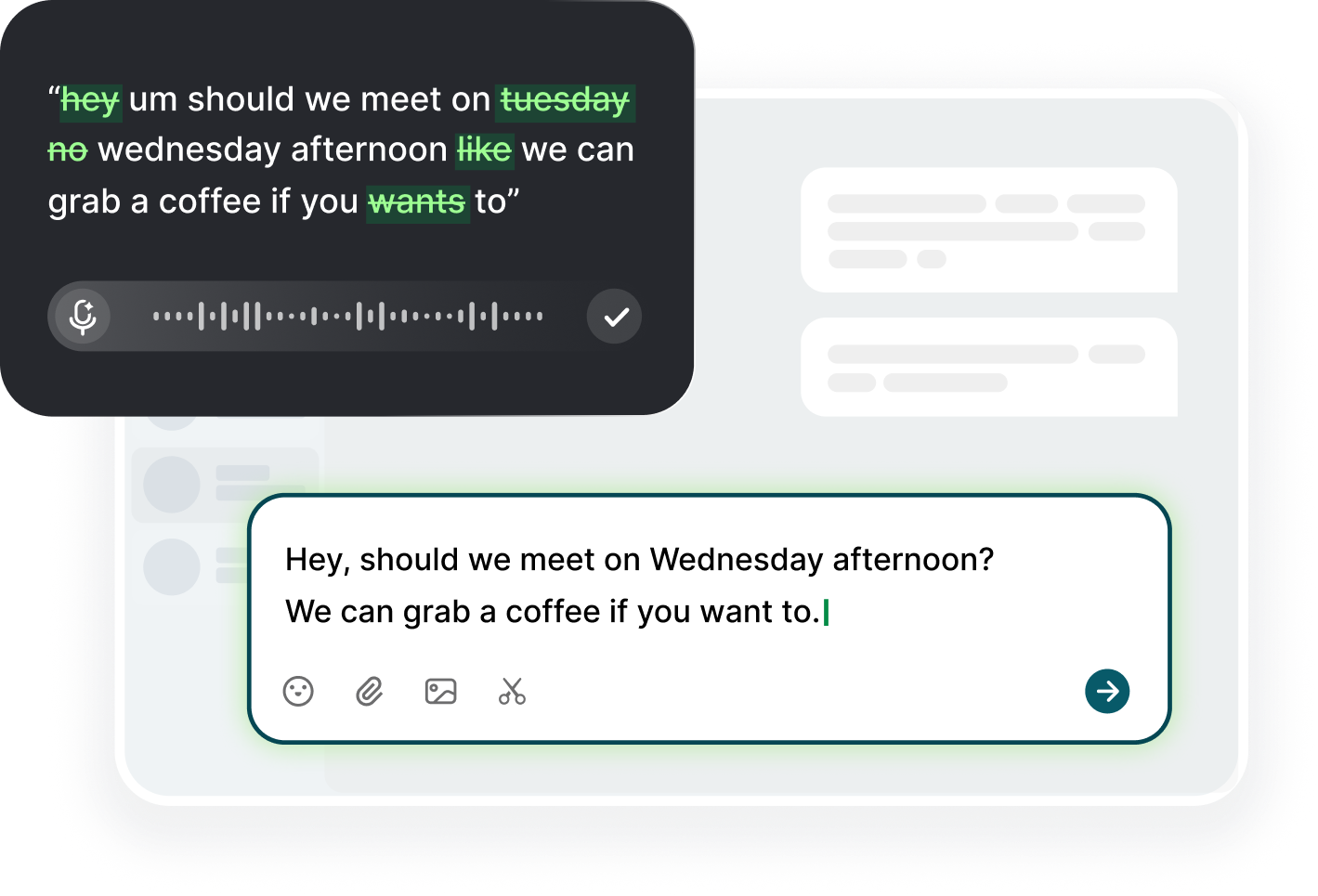
Deploy voice for the top of the list and keep the mechanics boring. On the computer, download Voiskey for macOS or Windows, click into the same fields you always use, trigger your dictation shortcut, and speak. On the phone, add Voiskey as a keyboard and tap into any field, which covers replies away from the desk. Speak naturally and let the app remove filler words and fix punctuation as it transcribes; you review the result before sending, because Voiskey never sends anything on its own. The point of the mechanics is that they are one step from typing: the same inbox, the same notes app, the same ticket tool, and only the input changes. If the voice path adds friction, the plan fails on a busy Tuesday, so keep it frictionless by design.
The shared rhythm: batch by type, not by time. Instead of dictating one reply now and one later, sit down and speak the whole reply queue in one block, then the note queue in the next. Batching removes the race you feel when you are mid-flow and forces you to give the queue proper attention; it also protects your hand by concentrating the load-free time instead of fragmenting it. After each batch, place your hands flat and loose for two minutes, then move to the next. If you hold the phone, switch hands every few messages. This small pacing plan is what transforms the experiment from a novelty into a habit, and the hands are the ones who remember why the habit remains.
Quality control is not a compromise; it is the contract of the swap. The rule to write on a sticky note: never send a voice draft unread. Dictated text is a draft, excellent at word choice and structure, fallible at names, acronyms, and exact numbers. Your review is the gate, and it is also the moment of rest: hands off the desk, eyes on the field, and a quick fix if needed. When a term mistranscribes, say it again slowly or type it once; you do not need to retype the sentence, and you do not need to let a wrong name slip through. For names, product terms, and jargon common in your day, keep a small cheat list and add to it, which drops the fix rate to near zero.
Keyboard Time You Cut Without Losing
The honest question is not what can you voice, because almost everything can be voiced; it is what is worth voicing at your specific desk. The worth is decided by the ratio of keystrokes saved to correction cost, and it breaks cleanly. High worth: greetings and sign-offs, routine replies you have answered a hundred times, status updates, meeting notes, standup lines, ticket follow-ups, and the boilerplate paragraphs you type into every report. These are exact in intent and repetitive in form, and the correction cost is near zero. Medium worth: new emails, proposal drafts, review comments, and documentation, where voice helps the thinking even if you still edit carefully. Low worth: exact values, code, URLs, account numbers, and anything typed in a hurry or a meeting. The plan keeps the low share on the keys without guilt.
The hidden typing to look for: the churn that never appears in your word count. You retype the same link, you nominate the same five names in ten bold messages, you copy a summary from one tool and reformat it into another; all of it costs your hands, none of it shows in the statistics. Cut the churn with structure instead of willpower: keep snippets of common boilerplate in a paste list, put the formulaic lines into a saved draft, and dictate the first version of anything longer than a sentence, then edit. The churn is often a bigger real load than the survey tasks, and a voice-first habit plus a good snippet list is its answer. You will notice the evening difference and the weekly log will show it.
The desk writing you should keep: anything where the sentence is shorter than your breath. Ten words, a header, a one-line reply, a quick form, a sign-off; the load it adds is small, the correction cost of voicing it is real, and the interruption to your flow is worse than the typing. Save your voice minutes for where they matter: the paragraphs, the notes, the follow-up that runs five lines, the plan summary. Saving the small stuff keeps the attention for the swaps that move the needle, which stops the voice plan from feeling like a chore. If you can type the last line of an email faster than you can say it, type it; the plan is for the long middle of your book of work, not for the last mile.
Budget the time you cut: the arithmetic is genuinely favorable and worth seeing. A day with forty messages averaging sixty words is 2,400 words; a third of those terms move to voice, you remove 800 words, roughly 3,500 to 4,000 key presses, and at 220 words per minute of speech against 45 for typing, those same 800 words cost about four minutes of speaking rather than eighteen minutes of typing. That is not a race; that is a resource shift, from your tendons to your breath, with the same output in the same day. And the week's total is the better figure: 20,000 keystrokes moved, roughly a hand's daily volume. Compute your own numbers for one week and write them where you will see them; that number is the proof the plan worked.
Workday Pacing Around the Flare
Plan for flares the way you plan for deadlines, because both arrive without asking. A flare plan starts with a label: what does a bad day look like for you, in observable terms, rather than in feelings? It might be a specific ache that starts before noon, a certain numbness after the first long block, or a particular drop in your ability to hold the phone. Write it down, and write down what you will do when you see it. The plan should be simple enough to run on the worst day: switch the remaining writing to voice, skip the long typing block, take the extra break, and if the symptom persists through the day, tell your manager and your clinician. A written flare plan takes the negotiation out of the hardest day.
Respect your body clock in the plan. Morning fresh, day-body tired: schedule the heavy loading early when you are strong, and the voice blocks later when your hands are weakest. In practice this means the report you have to compose starts at 8:30, by voice if it helps; the replies you know cold happen mid-morning; the typing you keep is spread thin across the day rather than stacked on the end, which is where your fatigue and your hands both bottom out. When the afternoon is the flare zone, flip the day: voice for the inbox, voice for the notes, and the small keyboard moves for the exact things that cannot move. The schedule is a lever, and a half-hour shift can make a full-day difference in how your hands close the day.
The difficulty of a flare is monotony plus volume: signals appear in a uniform day. So the plan also varies the texture: move the click-heavy part of the day away from the typing-heavy part, so your wrist never does one thing for hours; put a document read between two typing windows; walk between the two if you can. The rotation is not a luxury, it is the exact opposite of the constant same-position task load you are trying to avoid. When you can walk a voice block standing at the counter, do it; when the flare has started, standing and speaking beats sitting and tap-tap-tapping. The texture is the medicine for the rhythm that causes the problem.
When a flare hits, prioritize by impact, not by urgency. First, the people and the work that are already waiting: respond and acknowledge. Then the tasks with a deadline. Then everything else moves to voice, or moves to tomorrow, or disappears. This triage is faster than thinking about it and it protects the hours when your hands have the most value. Make the list the task, not the comfort: if the pain is sharp enough to distract you from the words, stop the typing and take the break; the work will still be there in twenty. A flare that passes without notice is a flare that teaches you nothing; a flare that you log and respond to gives you a real axis of your own pattern, which is the data your clinician will want.
Rebuilding Handload Slowly
Rebuilding handload after a flare or a straining period is a return, not a reset, and it deserves the same respect as a return from injury. The target is not full typing; it is a sustainable ceiling: a level of keystrokes you can maintain without the symptoms moving backward. Find that ceiling through a step-up test. Start at whatever level is comfortable now, say ten-minute typing windows, with everything else by voice. Hold that for a week and check the morning-after, not the same-day. If the trend holds, add five minutes and hold another week. The goal is the stable plateau where the pattern stays green for a few weeks; the number is personal, and the routine of testing for it is the only honest measurement you have.
Judging by the next morning is the correction that most rebuild plans miss. The typing session at 3 p.m. may load tissue that complains at 8 a.m.; the same session may be perfectly fine and the sloppiness is only on your mind. So the rule is: observe tomorrow, not today. If tomorrow's hands are no worse than they were before the step-up, the level is okay to hold for another week; if they are a notch worse, step back a level and hold a week before re-testing. That one-day lag rule is the difference between a plan that adapts to your body and one that guesses at it. Write the rule on the plan sheet: type today, observe tomorrow, adjust next week.
Keep the voice share as the floor that does not move, even when the typing windows return. The structure you built in the flare phase, dictation carrying all the high-volume writing and notes, is the permanent part of the routine; the typing is the part that gets rebuilt on top. If you rebuild by going back to typing everything, the ceiling you found collapses and the flare returns, usually with interest. Instead, rebuild by growing the keyboard's share only for the tasks you missed most, and leaving the formulaic volume with voice. A typical recovered split keeps a third to a half of the day's writing on the keys and the rest on the voice: proof that the structure, not the keyboard, is what holds the load.
The broader support tasks matter too, and they are cheap: the chair at elbow height, the forearm parallel to the floor, the neutral wrist, the monitor at eye level, the stretch break at the end of every hour, the walk at midday, the phone held in the other hand. Keep the setup from hardening into a habit you stopped noticing: check it monthly, because chairs sink and desks creep. And keep the week in balance: heavy typing days followed by voice-only days, and deadlines backed by recovery, not by another round of keystrokes. The rebuild succeeds not because you found a magic level but because you built a mixed week that can carry itself indefinitely.
FAQ s
Yes, for most desk writing. Messages, notes, updates, and reports are things you can already say. Speaking runs near 220 words per minute versus roughly 45 for typing, and you review the draft before sending, so the output quality stays your own. Exact text and code stay on the keyboard.
Start with the repetitive, high-volume writing: replies, follow-ups, status updates, and meeting notes. Leave short one-line replies, exact values, and anything private on the keyboard. Add tasks one at a time, keep the ones that feel effortless, and hold each new section for a week before adding another.
Use the next-morning rule: if typing a longer block tonight makes tomorrow morning worse, you have exceeded your current ceiling. Log the daily trend and step back a level for a week before re-testing. If the trend worsens for two weeks, see a clinician.
No. Pain management is a work process, not a confession. A short, solution-oriented message to your manager, such as moving to voice dictation this week while tasks stay on track, is usually all that is needed. Persistent symptoms still deserve a clinician conversation.


 Voiskey
Your voice, amplified.
Choose a real task, follow the steps, and review the results with your team before expanding the rollout.
Use it across macOS, Windows, iOS, and Android