
After the Call Center, Voice AI Walks Into Every Employee's Workspace
The call center taught voice AI to listen; the desk is where it learns to write.
 Voiskey Team
The Call Center Proved the Model
Contact centers were the first workplace where voice AI had everything it needed: high call volume, repeatable intents, measurable outcomes, and a workforce already used to speaking for a living. That combination let teams tune models against real traffic instead of benchmarks. It also gave buyers a way to compare before and after without argument, because the metrics were already on the wall. Years of call recordings, transcripts, and quality scores became training material and evaluation data. The call center did not just adopt voice AI; it taught the technology how to behave in production, under load, with real customers on the line.
The operational lessons from that environment transfer well. Agents learned that latency matters more than polish, that turn-taking must feel natural, and that a graceful escalation is more valuable than a confident wrong answer. Those lessons apply to any voice system that sits in a live conversation. They also apply to voice input, where a person expects their words to appear with minimal lag and maximum fidelity. The call center proved a model can hold up under load. The next question is whether the same reliability survives contact with the messy, varied writing of an ordinary desk. That is a harder test than any scripted call.
Reliability on a call is also simpler than reliability in writing. A call has one channel, one speaker at a time, and a clear end. Writing at work has many surfaces, each with its own tone and format, and the sentence you speak may need to become a bullet, a subject line, or a paragraph. A system that transcribes a service script perfectly may still fail at turning a rambling thought into a crisp status update. The call center proved capture. The desk requires composition, and composition is a different problem with a different set of failure modes. Capture and composition are not the same skill.
Still, the proof matters because it changed expectations. Executives who watched voice agents handle thousands of conversations no longer ask whether the technology works; they ask where else it can work. That question is the doorway to the rest of the company. Once voice is credible for customers, it becomes credible for employees, and the rollout logic shifts from a single channel to a layer that sits under every application. That is the move from call center to workspace, and it is already underway in organizations that treat voice as infrastructure rather than as a feature of one department. Infrastructure is judged by whether everything else can build on it.
From Service Scripts to Daily Writing
Service scripts are predictable by design. They anticipate the questions, constrain the vocabulary, and end in a known outcome. Daily writing is the opposite. An email to a frustrated client, a project update for a skeptical stakeholder, a note explaining a delay: each requires judgment about tone, context, and what to leave out. That is why the call center's success does not automatically transfer. A model that excels at structured dialogue is not thereby good at producing a paragraph a manager will forward. The second job needs a different capability, one built around expression rather than response. Response answers a question; expression delivers a message.
The difference shows up in the shape of the output. A call transcript is a record; a work message is an artifact with a purpose. It needs a subject that tells the reader what to expect, a first line that states the point, supporting detail in an order that respects the reader's time, and a clear next step. Speaking can produce all of that if the tool understands structure, but not if it only understands words. The desk demands a system that can take a stream of speech and return something that looks like it was written deliberately, because in most workplaces it was.
Tone is the other variable the call center never had to optimize. A script can be friendly and neutral; a manager writing to a peer needs to be direct without being blunt, warm without being vague. Those choices depend on relationship, history, and the politics of a specific moment. No transcription engine models that, and no generic cleanup pass preserves it. Expression intelligence has to keep the speaker's intent while adjusting the register, which is why polished voice output can feel more like the writer than a typed draft does. It carries the voice, not just the vocabulary. That is why readers can often tell when a message was spoken well.
The practical conclusion is that daily writing needs a tool designed for it, not a repurposed contact center stack. It needs to live where the writing happens, understand the surface, and produce text that is ready to send. It also needs to be fast enough that people choose it over the keyboard for the hundred small messages that fill a day. Those requirements point away from a platform and toward a layer, one that works across applications rather than inside a single channel. That is the shift from service scripts to the workspace, and it is what the next section examines.
Where Employees Lose Hours to Typing
The hours do not disappear in one dramatic block. They leak in fragments: a two-line reply, a ticket update, a thread comment, a chat message that has to be phrased carefully, a prompt typed into an AI assistant, a note added to a system of record. Each takes under a minute, which is exactly why nobody counts them. But a knowledge worker produces dozens or hundreds of these a day, and each one carries a small cognitive cost: context switching, composing, editing, and sending. Multiply that by a team and the fragments become a structural drag on how fast the organization moves.
Some of the loss is mechanical. Typing is slower than speaking for most people, and the gap widens when the text is unfamiliar, non-native, or full of names and numbers. Some of the loss is cognitive: composing at the keyboard forces you to hold the whole message in working memory while your hands catch up. Speaking lets you externalize the thought first and shape it second. That difference matters most for long or delicate messages, where the effort of drafting at typing speed discourages people from writing at all. The result is less communication, not just slower communication. Fewer updates mean slower decisions downstream.
The loss is unevenly distributed, which is why it stays invisible. People who type quickly absorb the cost without noticing. People writing in a second language, people with motor difficulties, and people whose jobs involve constant context switching feel it every hour. A manager may see the symptom, a thread that never got updated or a summary that never got written, and attribute it to priorities. Usually the priority was real and the friction was simply too high. Voice input changes that calculation by lowering the cost of the first draft, which is the step where most messages are abandoned.
Fixing the fragments requires a tool that is always available, not a separate app that demands a new workflow. It has to work in the window where the cursor already sits, insert text in the format that window expects, and stay out of the way when the user prefers to type. That is a system-level capability, and it is the reason voice input belongs in the operating system rather than in one product's chat box. When the tool is ambient, the fragments stop feeling like friction. When it is not, people use it for a week and quietly return to the keyboard.
A Voice Layer for Every App
The phrase voice layer is literal. It sits beneath the applications and turns speech into text wherever the cursor happens to be. On Mac and Windows, that means Gmail, Outlook, Slack, Cursor, and any other app that accepts typed input, without plugins or per-app setup. The advantage is not just convenience. A single layer produces a consistent habit: the same hotkey, the same polish, the same review step, regardless of which window is open. Consistency is what turns a capability into a reflex, and a reflex is what actually saves time over a year. A single habit beats a drawer full of shortcuts.
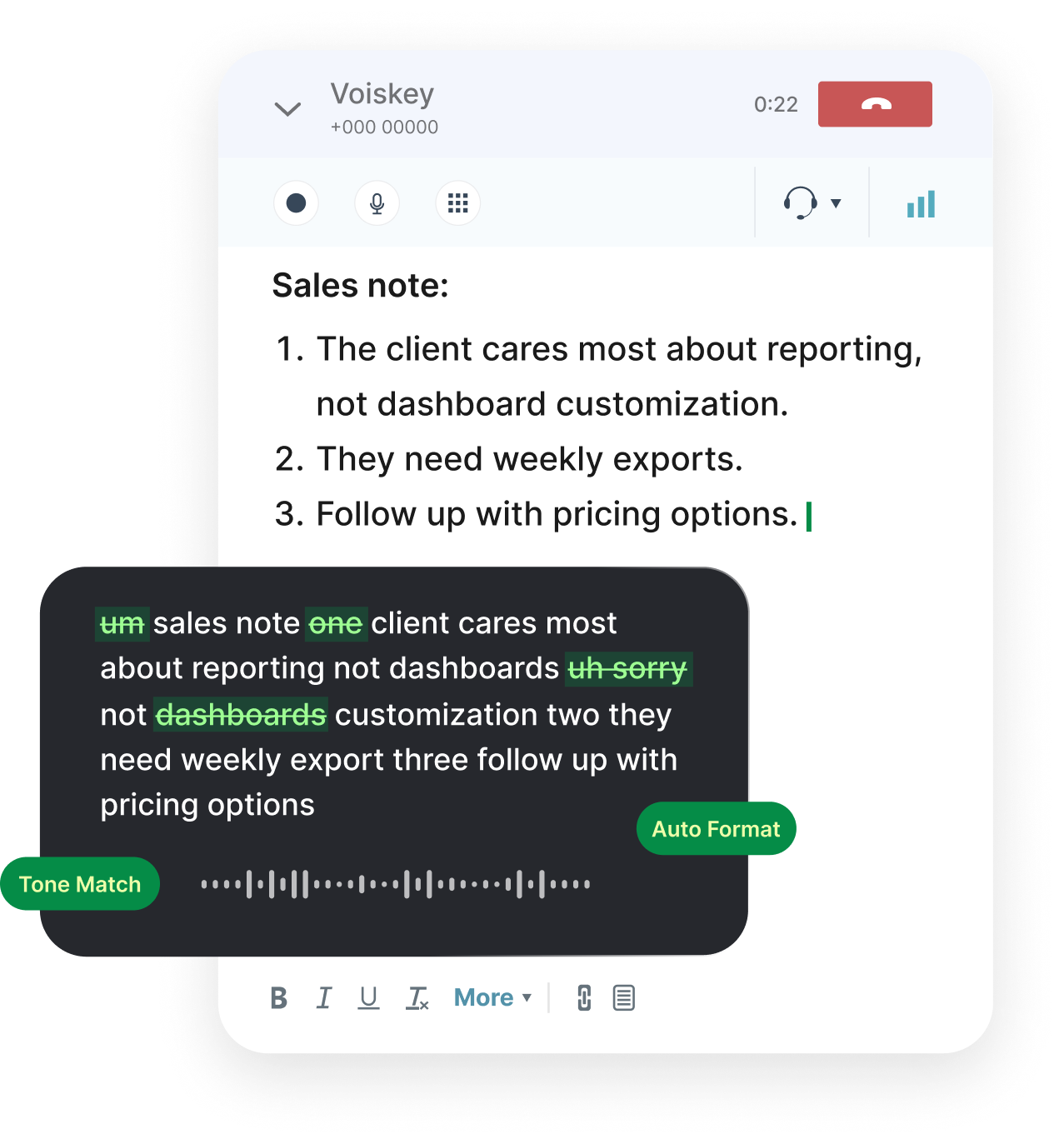
The workflow inside that layer matters as much as its reach. Speak, Polish, Type, Edit describes a loop: you speak naturally, the system produces a polished draft, it types into the active field, and you edit before sending. The order is deliberate. Speaking first preserves your natural phrasing. Polishing second removes the fillers and repairs without flattening meaning. Typing third removes the copy-and-paste step that breaks concentration. Editing last keeps you in control of the final message. Each stage addresses a different failure of raw dictation, and together they produce text that reads like writing. The sequence is the product, not any single step.
Working across apps also means working across formats. The same spoken sentence may become a paragraph in a document, a bullet in a chat thread, a subject line in email, or a comment in a code review. A good layer adapts punctuation, capitalization, and structure to the surface rather than dumping identical text everywhere. It also respects the privacy of each context: an internal note and a customer email should not be treated the same way. Local processing by default, with zero retention, is what makes it acceptable to speak sensitive work into a tool that touches every window. Trust is a feature, not a compliance checkbox.
Language coverage completes the picture. Teams that operate across regions need to write in the language their reader expects, not the language of the original thought. Support for more than one hundred languages means a single layer can serve a global team without a patchwork of tools. The layer also fits the way people actually work: they switch apps constantly, and they should not have to switch modes with them. One habit, many surfaces, consistent quality. That is the practical meaning of a voice layer, and it is the version that survives contact with a real workday. Anything less gets abandoned by Friday.
Measuring the Productivity Lift
Measurement starts with a baseline, and the baseline should be honest. Pick the messages a team already writes, record the time from intent to sent, and note how often a draft is abandoned or rewritten. Do this for a week before introducing voice input. The number you want is not keystrokes per minute; it is elapsed time to a message the writer is willing to send. That distinction keeps the measurement focused on outcomes rather than activity. It also prevents the classic mistake of celebrating usage volume while the quality of communication quietly declines. Activity is a means; sent messages are the end.
Then compare like with like. Use the same task types, the same people, and the same review standard before and after. Sample outputs and have a reader judge whether they are sendable without edits. A lift that only exists at the speed layer, while readers keep rewriting the output, is not a lift at all. Track the share of messages sent without heavy editing as a quality guardrail. Time savings and quality should move together; if they diverge, the rollout needs a closer look at training or at the workflows where voice input is being misapplied. Getting faster at the wrong task is not progress.
Adoption is the third measure, and the easiest to misread. A tool can show high usage in week one and near zero in week four if the habit does not stick. Look for sustained use in a specific workflow rather than a spike across everything. Ask people which tasks they now default to voice for, and which they still type. Those answers tell you where the real value sits and where the tool needs work. They also identify the champions who can teach the habit, which matters more than any dashboard when a rollout reaches the second team. Peer teaching scales better than central training.
Finally, translate the numbers into something a manager can act on. Hours returned per person per week, reduction in rewrite cycles, faster response times to customers, fewer meetings booked to clarify a message. Each of these connects voice input to an outcome the business already tracks. That connection is what turns a productivity experiment into a budget line, and it is what protects the program when priorities shift. The lift is real when the evidence is legible to someone who never used the tool, and that legibility is a design requirement, not an afterthought. Write the results in the language of the budget.
FAQ s
Open Voiskey settings and choose the language you want from the dictation language menu. You can change it whenever your task changes, such as writing to a colleague in another language. Select the language, close settings, then use the hotkey as usual. If you work in two languages often, pick one as your default and switch only when you need the other.
Voiskey supports more than one hundred languages, covering most major business and regional languages. You pick one at a time for dictation, so the text matches the language you are speaking. This lets you write to customers, partners, and colleagues in the language each reader expects without retyping. Check the current list in settings, since coverage may grow as more languages are added.
Yes. Type with your keyboard as usual, then trigger Voiskey when you would rather speak, and the polished text joins what you already wrote at the cursor. Move to another spot and type again, then dictate once more. Everything stays in the same document, so you can choose speaking or typing for each part based on what feels faster.
Speak in natural chunks and pause between them, or say new paragraph when you want a break. Voiskey adds punctuation and can start a fresh block on your spoken cue, so a long message does not arrive as one dense wall of text. If a section feels rushed, stop, breathe, and continue. Review the structure before sending and reorder or split anything that reads poorly.


 Voiskey
Your voice, amplified.
Give every desk a faster input layer and let the writing keep up with the thinking.
Use it across macOS, Windows, iOS, and Android