
ergonomic typing alternatives writers: A Practical Guide to Ergonomic Alternatives to Typing for Writers
Separate the writing from the keystrokes so the craft outlasts the strain.
 Voiskey Team
Writers and the Typing Trap
Whatever the blog posts call it, the honest description of ergonomic typing alternatives writers find useful is that they separate the writing from the keystrokes. Professional writing is the rare job where the output is literally the repetitive motion: every article, chapter, and newsletter is tens of thousands of finger presses, often sustained for hours in a fixed posture. That is why writers show up so often in stories about repetitive strain, and why the usual advice to take breaks only goes so far. Breaks help, but the volume stays the same. The alternative is to decouple the two layers: think and shape the words with your voice, use the keyboard for the precision moments, and let the craft survive an injury that would otherwise end the career.
Look honestly at a writer's day before you redesign it. A working session of 2,000 words is somewhere around 9,000 to 11,000 key presses, and a busy week of drafts, revisions, emails, and pitches can pass 60,000. Writers also tend to sit still while they compose, so the tendons do repetitive small work under static posture for hours at a stretch, and recovery happens only between sessions. Add the mouse work of moving paragraphs, and the total load on the hands is closer to a manual trade than a desk job. None of this means writing is dangerous; it means the volume deserves a plan. The plan starts by asking which of your keystrokes are actually doing craft work and which are simply transport.
Sort your usual output by how much thinking it contains. A direct message, a reply to an editor, a status update, a pitch summary, and a chapter draft all cost keystrokes, but only the last one needs sustained deliberate thought. The formulaic share, replies and updates and notes, is the easiest thing to move off the keyboard, because you already know exactly what you want to say; the only cost of the keyboard there was physical. The creative share is the reason you write, and voice helps there too, but differently: talking a first draft out loud often improves it. The plan that survives a deadline moves the volume to voice and keeps your thinking, not your fingers, in charge of the craft.
Set the boundary before the busy week decides it for you. Decide that first drafts of anything over a paragraph come from dictation, that edits come in short keyboard windows, and that anything exact, short, or private stays on the keys. Write this on a sticky note until it becomes automatic. Also decide the caution rule: this article is informational, not medical advice, and if your symptoms have already moved past a twinge into persistent pain, numbness, or weakness, see a clinician before adopting a tool as your main strategy. A tool plan built on an unexamined symptom will not end well; a clean bill of health or a clear medical plan first changes everything.
Voice as the Writing Instrument
Your first draft is a thinking process, and thinking runs at the speed of speech, not the speed of fingers. Speaking runs around 220 words per minute versus roughly 45 for typing, so a voice draft covers a full page while a typed one is still looking for the opening line. The rhythm helps too: talking forces you to finish sentences, which is the fastest cure for the blank page. You can draft an essay out loud at a walking pace, talk through the awkward middle paragraph in the shower, and then sit down with a transcript that already has ideas in the right order. The keyboard then does what it does best: editing, polish, and the final cut.
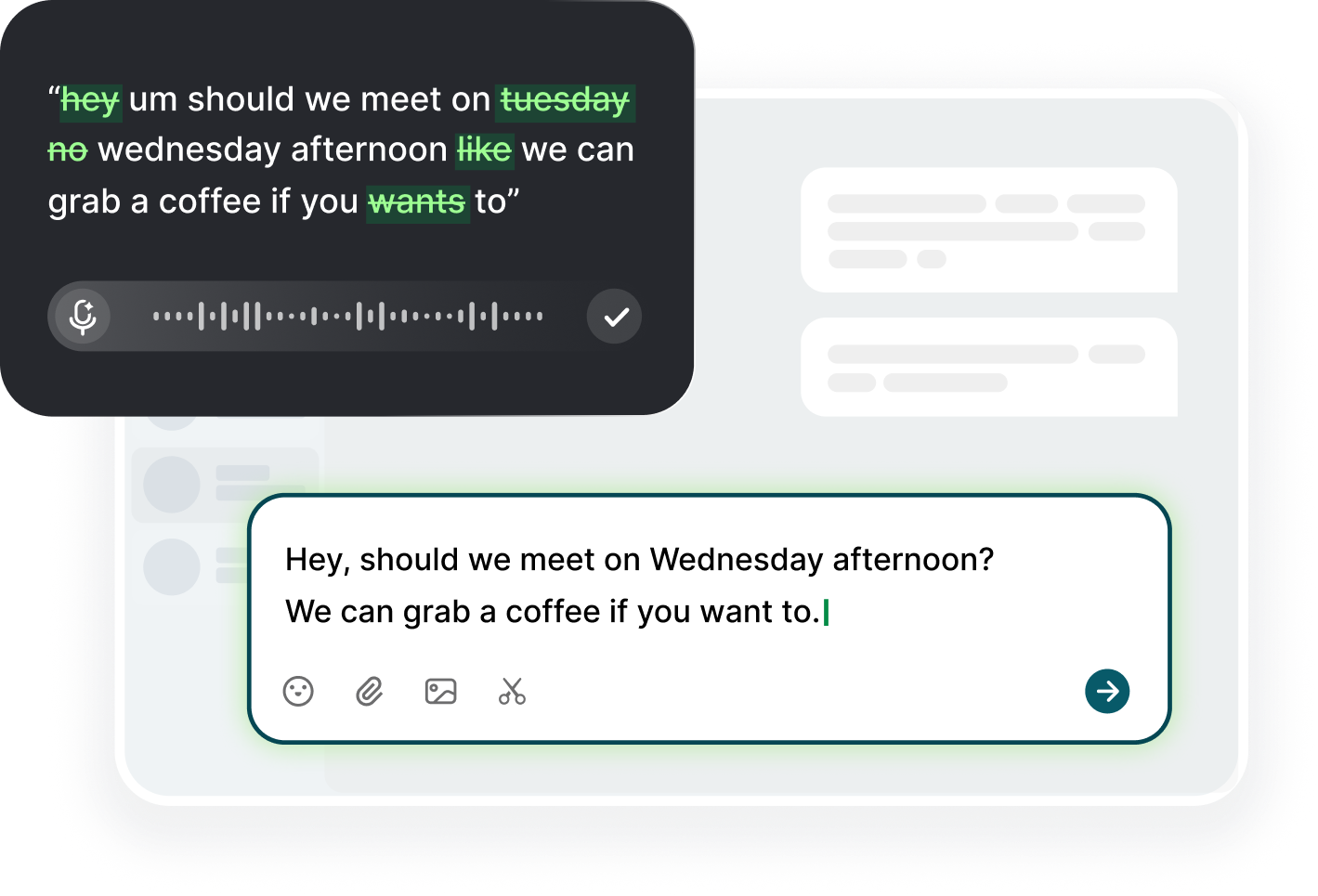
The mechanics are simple enough to set up in five minutes. On your computer, download Voiskey for macOS or Windows, click into any text field or your writing app, trigger your dictation shortcut, and speak. On your phone, add Voiskey as a keyboard and tap into the notes app when an idea arrives on a walk. The app turns natural speech into clean text, removing filler words and fixing punctuation, and it never sends anything on its own, so the draft stays in your document until you decide what to do with it. Everything you would normally type into a doc now starts as speech, which means the conversation you were going to have with the page becomes a conversation you actually have.
Use speech as a thinking instrument, not just an input method. When you are stuck on a paragraph, say out loud what the paragraph is supposed to do, then let the transcript catch the messy version while you talk it into shape. When you outline a chapter, walk and narrate the structure, then cut the transcript into placeholders you can write into. When you finish a piece, dictate a message to yourself summarizing what you just wrote; describing the argument in one breath usually reveals whether the piece actually makes it. Writers who internalize this habit stop seeing dictation as transcription and start seeing it as a second draft that happens before the first one is typed.
Manage the machine dials as you go. Voiskey supports 100+ languages and the free plan covers 2,000 dictated words a week, which is enough to test the habit on a column or a pair of newsletters; the paid plan handles a full draft load without a second thought. Keep the shortcut visible so the habit survives a deadline: a single key trigger beats fumbling with menus at 4 p.m. If a sentence comes out wrong, do not retype it; say it again in simpler words. And review everything before you share: the point of dictation is to preserve your voice, not to replace it, and a read-aloud pass beats any transcription setting for keeping a draft true to the writer.
Editing Passes Without Wrist Stress
Editing is where writers actually spend more time than drafting, and edit passes are the place to protect your wrists with structure. Separate the passes: first, content and structure, which you do out loud; second, line editing, which you dictate; third, mechanical checks, which can be swift and keyboard-bound. When you separate them, you stop the endless reorganize-then-retry loop that wears hands and attention at the same time. Dictate the content pass as what you want the piece to become; the limitations of transcription push you toward simpler sentences. Then pass the result to your keyboard only when the skeleton is already right, which means the hands do far less work for the same final polish.
The first pass is best done by voice and by reading aloud. Open the transcript of your draft, and read it in the same voice you would read to a friend: where you hesitate, that is the weak sentence; where you speed up, the writing works. Then dictate the revision of the weak spots immediately, saying the better version rather than typing it. This pass does double duty, fixing rhythm and cutting load, and it catches the awkwardness that eyes forgive and ears do not. If you find yourself rereading the same paragraph four times, stop and say the problem sentence aloud as a question; the answer usually arrives in the same breath as the transcript.
The second pass is structural, and it is the one that tempts you to hover on the mouse for an hour. Do the structure work with your keyboard and your hands on the keys only for the moves that matter: select, cut, paste, reorder, duplicate. Learn the shortcuts for your editor and use them; a paragraph moved with four keystrokes costs nothing compared with drag-selecting with the mouse. If you are rearranging whole sections, narrate the order you want and let the structure grow in the transcript rather than dragging blocks around. Every move that can be described can be spoken, and every move you speak is a move your hands did not make.
The third pass is mechanical, and it should be the shortest one. Punctuation, spelling, names, numbers, and formatting are exact work, and exact work is the honest domain of the keyboard; dictation for these details costs more correction than it saves. Keep this pass under fifteen minutes, wrists neutral, and then stop. If the piece needs more mechanical work than that, the structure was not finished, so go back a pass. The discipline here is not perfectionism; it is the difference between an edit session that ends with the piece improved and one that ends with an hour of wrist strain on top of a draft you liked anyway. Three passes, each small, beat one endless one.
Options: Steno, Voice, and Hybrids
Understand the real options before choosing one, because each addresses load differently. Ergonomic keyboards, split and tented keyboards, standing desks, trackballs, voice dictation, steno machines, and hybrids all exist, and they are not interchangeable. A keyboard that changes your angle reduces static strain but keeps the raw keystroke count. Voice removes the movements almost entirely but requires a different drafting style. Steno is a new interface with real speed that still uses your hands, in a different way. Trackballs and mice reduce travel but keep you pointing. The honest comparison is about which part of your day costs the most, and the answer for writers is almost always the long, low-force stretch of drafting prose.
Steno deserves a fair look and an honest warning. Plover-style stenography is famously fast, faster than typing once trained, and it is a real alternative for people who need raw volume in a focused block. The warning is that it is a genuine skill: months of daily practice before it is workable, hardware considerations, and a specialty that pairs poorly with casual half-sessions. It is also still a hand activity, firing small movements at high rate in a new pattern, which for someone with existing strain is a question to put to a clinician, not a blog. For many writers it becomes a second discipline, valuable for transcription-heavy work and fun for its own sake, but it is not the same play as adopting voice.
Voice has the lowest adoption cost of any option and the broadest coverage of daily writing. You can start within the hour, on any computer or phone, in any text field. Voiskey turns speech into clean text that you review before anything happens, and because it works across your apps, it covers the emails, the pitches, the notes, and the drafts in one habit. The trade-off is precision: characters, code, and exact strings are best typed, and some writers find that voice edits push them toward simpler sentences, which is usually a feature. Set the expectation right and voice is the only alternative that starts paying you back in week one, at roughly 220 words a minute of speech against 45 of typing.
The hybrid is what most working writers end up with, and it is the strongest default. Draft by voice, edit in short keyboard windows, use the mouse only for layout, and keep an ergonomic keyboard if you like the feel; the combination beats any single tool. Choose your split by craft: long-form people live mostly in the voice pass, journalists doing lots of precise quoted material keep half on the keys, and technical writers may keep the most typing of all. Then run a two-week trial of the hybrid before buying anything: one week of pure voice drafts, one week of your current set-up, and compare completion times and hand fatigue honestly. The tool that wins the trial goes in the desk; the rest gets donated.
Sustaining a Long Career of Writing
Write like a professional and you write for decades, so the long view beats the single project. Cap your keyboard hours like you cap your coffee: a personal daily limit, say four to six hours of actual typing, with the rest of the writing carried by voice and pen and paper. Set a weekly review of the split and ask whether the balance drifted. Schedule walks at the end of every draft block, and let the voice handle anything you can carry outdoors: dictation on a walk is the writer's version of a change of scenery. The habit that keeps a career working is the one you can still do on the worst deadline day, because the worst days are exactly when you most need protection you do not have to remember.
Rotate media the way athletes rotate movement. Not every idea needs the keyboard, and not every draft needs the screen. Interview on the phone, dictate notes while walking, outline chapters on a whiteboard, revise printed pages with a pen. The rotation is not nostalgia; it is load management, and it keeps a busy writing decade from being one continuous tendon load. It also improves the work: ideas composed away from the keys often come back more original. As you rotate, keep a simple diary of what you wrote where and how your hands felt at the end of the day. After a month you will know your personal best patterns, and you can design the routine around them instead of around somebody else's.
Run a quarterly review of the physical setup and the load split. Thirty minutes, four questions: has my typing share crept up, has any symptom shifted, does the desk still fit my current posture, and what one thing changes next quarter? Check the chair heights, monitor distance, and keyboard angle, all of which drift. Ask the medical question plainly: if symptoms have changed, book a clinician and do it before the voice habit becomes the only thing between you and an injury. The review is not about optimization for its own sake; it is the difference between a practice that quietly adjusts and a practice that quietly fails. Writers who review twice a year rarely have to review a career.
Trends worth watching at your desk: if the draft blocks run long, you're typing too much; if the edits drag, your pass structure has collapsed; if the hands ache at the sight of the keyboard, the voice plan should be covering more than it is. Notice what these three say about your system: the first is volume, the second is structure, the third is the signal to rebalance or talk to a clinician. When a project ends, do a clean reset of the split rather than letting the old mix carry over. And when a good week arrives, resist the urge to declare the problem solved and go back to typing everything; let the weekly log, not the mood, decide when the mix changes. The long game rewards the consistent medium game.
FAQ s
For many writers it is better than typing for first drafts. Speaking runs near 220 words per minute against roughly 45 for typing, and talking forces you to finish sentences. Review and clean up after, and keep exact text, names, and numbers on the keyboard.
Start with voice plus a short keyboard pass: it is the only option you can adopt in a day, covers every text field, and the free plan covers 2,000 dictated words a week. Add a split keyboard, trackball, or steno only if a specific bottleneck demands it.
Use voice for the drafts and see whether the volume problem goes away first. Steno is faster at raw volume but needs months of practice and is still hand-intensive. If symptoms persist, ask a clinician which practice is appropriate before committing.
Almost never for professional writers, and it does not need to. The working split is voice for drafting and daily prose, keyboard for precision and mechanical edits. That mix keeps both your output quality and your recovery time intact, and it gives the hands genuine rest.


 Voiskey
Your voice, amplified.
Choose a real task, follow the steps, and review the results with your team before expanding the rollout.
Use it across macOS, Windows, iOS, and Android