
speaking prompts better quality: A Practical Guide to Improving Prompt Quality by Speaking Instead of Typing
Talk your prompts into sharper answers on the first try.
 Voiskey Team
What a Better Prompt Actually Changes
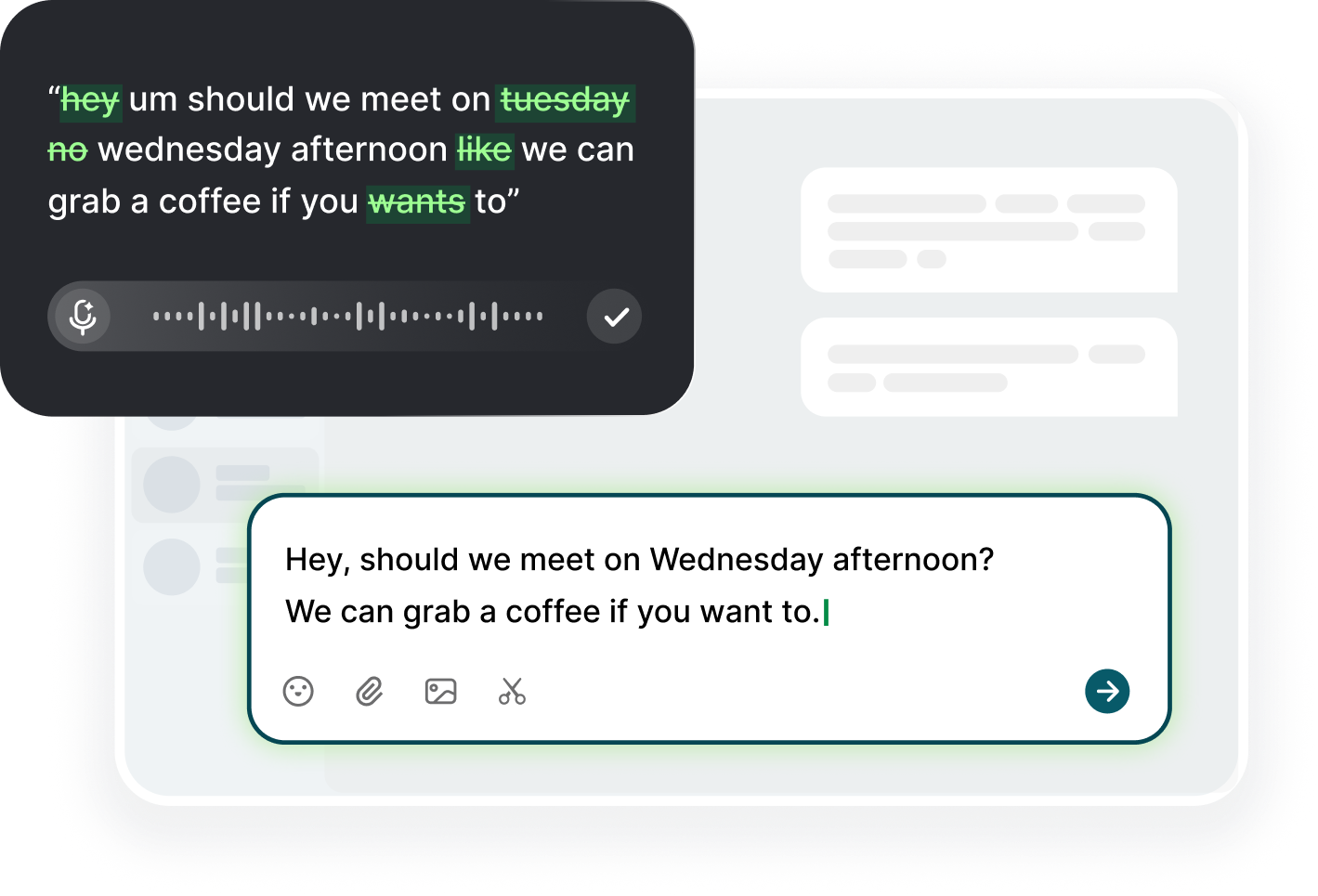
The claim that speaking prompts better quality answers comes down to what you include, not how it sounds. When you dictate, the keyboard stops limiting you, so you no longer strip a request down to shorthand before sending it. A typed prompt tends to arrive as a fragment: the goal but not the background, the request but not the format, the topic but not the thing to avoid. A spoken prompt arrives as what you actually mean, which is longer, richer, and more specific. The difference is visible in the model's first answer, because a complete request leaves less room for guessing, and guessing is where most weak answers come from.
The change is coverage, not magic. A good prompt names the role, the goal, the context, the constraints, and the shape of the output, and every element costs words. When you type, each extra clause is a decision and a moment of friction, so people quietly drop the parts they consider obvious, and the model treats them as absent. Speaking removes that cost, and the full request comes out in one breath without you noticing the effort. The payoff is an answer that matches your intent on the first pass instead of a reply you correct, clarify, and re-ask over three turns. The richer prompt is cheaper, not more expensive, when your mouth does the work.
The second effect is the review pass. A dictated prompt sits in the box as plain text, and you read it before you send, exactly as you would read a typed one, and that scan catches the clause you forgot. With dictation the fix is also spoken: select the phrase and say the replacement, and the new words drop into place without touching the keyboard. This is why speaking does not trade clarity for chaos, because the text is still yours to edit and the edit is now fast enough that you actually do it. People who dictate and send without reading trade the benefit away, so pair the two: speak the whole request, scan it, fix one clause, send.
The clearest way to see the change is on a task you already do: a draft, a plan, or a comparison. Dictate the request the way you would explain it to a colleague, send it, then dictate the version you would have typed and compare the two answers. The second one is usually thinner, and the difference is the proof. With Voiskey the experiment costs nothing, because the shortcut types at your cursor inside the prompt box, so the switch is one held key. Keep the better version, note what it added, and make that the standard for your next prompts.
Speech as a Thinking Tool
Saying a request out loud forces a structure that thinking alone does not. When the goal is vague, your voice stalls, because you cannot speak a sentence that has no subject and no verb. That stall is useful: it is the moment where a fuzzy intention becomes a testable sentence, and the sentence is what the model needs. Typing allows you to write fragments and trail off, and the model will guess what you meant. Speaking does not allow it, and the result is a prompt that arrives complete. The thinking benefit is the same one people get from explaining a problem out loud to a patient listener before they solve it themselves.
The pause you take while planning the next clause is the whole trick. Talking is slower than typing for most people, but the extra time is not waste, it is articulation. You naturally front-load the background, the tone, and the limitation before you state the request, because that is how spoken explanation works. A typed prompt often begins with the ask and adds context later, if at all. The model reads in order, so the version with context first produces a better answer. Slow is not the enemy; the silent gap between what you meant and what you typed is.
Speaking also surfaces assumptions you did not know you were making. The moment you try to describe the audience, the definition of done, or the format you expect, you realize which of them you never decided, and that realization is a prompt improvement on its own. You can say a sentence, hear it, and correct it in the same breath, which typing does not make easy. The loop of talk, hear, revise is the fastest way to a sharp request, and it happens before the model ever sees the text. Articulating what you want is the skill; dictation is just the conveyor that carries it.
The habit transfers beyond the prompt box. Once you are used to saying the problem aloud, you start doing it before a meeting, before a difficult email, and before you open a ticket, and every one of those benefits from the same clarity. The input method stays at the cursor, so it works in all of those fields, and the thinking habit travels with it. It is the rare case where the tool changes the behavior, not just the speed, because you keep the artifact: a record of how you said what you meant. A week of speaking prompts leaves a trail of written thinking you can review.
Translating the Way You'd Ask a Colleague
You already know how to ask a colleague for work well. You open with the situation, give the background they need, say what you tried, and state what you need in return, and you do all of it before you stop talking. Nobody emails a colleague with a single sentence and no context and expects a good result, yet the same person types a one-line prompt to an AI. The fix is to treat the model like a capable person with the same information gap: translate the way you would ask, not the way you would query. The words are the same; only the habit of skipping them was different.
The translation has one deliberate step: turn your explanation into instructions with an output shape. When you ask a teammate for a summary, you say what it should include and how long it should be, and you rarely say it twice. Dictating lets you do the same in one pass, because you can hold the whole instruction in your head and deliver it in a few clauses. Say the role, the deliverable, the format, and the deadline, and the model receives the same briefing a human would. The difference from a typed prompt is not the instruction, it is that you finally included it.
A spoken request naturally includes the small things you would forget to type, because your voice hedges, clarifies, and repeats in ways that sound casual but carry information. The model reads them as constraints. A quick spoken add-on like avoid marketing language or keep it under a hundred words is exactly the kind of constraint that a typed prompt loses when you shorten yourself. With dictation there is no reason to shorten, so the constraint survives. The whole prompt costs you one sentence, and the sentence does the work that three correction rounds used to do. That is the delta people report, and it is reproducible on the first try.
One boundary worth knowing: a dictation tool types at your cursor, and it does not read your screen, your files, or your browsing history, so all of the context must come from your mouth. That is a feature for a prompt writer, because it means the request is complete on its own and the model is not being silently fed data you did not choose to include. You decide what the model knows, and you can hear it in the transcript before you send. The self-contained prompt is also the one you can reuse next week, save, and hand to a teammate without loss.
Small Deltas: Format, Scope, and Constraints
The first delta is format, and it is the easiest one to add by voice. Say what the answer should look like: a table with these columns, three bullet points, an email under a hundred and twenty words, a list of pros and cons. Typed prompts often stop at vague, and the model picks its own shape, which is rarely the one you wanted. Stating the shape takes two seconds of speech and removes the single most common cause of a rewrite. Format is the habit that makes a dictated prompt feel professional rather than long, and it is the delta with the most visible payoff.
The second delta is scope, and it keeps the answer from wandering. Name the boundaries: only the last quarter, just the failures, no history this time, focus on two customers. When you talk, scope comes out naturally, because you say what you are not asking for as easily as what you are. Typing tends to drop the negatives. The model, reading only positives, widens the answer, and you spend a turn narrowing it. Saying the boundary in the same breath as the request is the cheapest way to keep the first answer in range of what you actually need from the start.
The third delta is the constraint list, the do-nots. A spoken prompt can hold three of them comfortably, and they are the reason the output comes back usable. Say the tone is neutral, do not use jargon, no tables this time, cite the source. Each constraint travels as part of one sentence, so none of them are dropped for cost, which is the failure mode of typed constraint lists. The model weighs them in order, and the first answer reflects the full set. This is the delta that turns a good first answer into one you can publish without a rewrite.
The last delta is vocabulary, and it is where a dictation tool earns its setup. Technical work is full of names that sound like other words, and a speech engine will guess the common one: a library, an API, a codename, a client's name. Add those terms to your custom vocabulary once, and they come out spelled right every time. The list does not change the model, it changes the transcript, and a clean transcript is what makes the format instruction and the constraint list land exactly as spoken. Twenty terms cover most of the corrections in a month of prompting.
Measure the Difference in Your Own Work
Measure the difference on one task, not in theory. Pick a prompt you send weekly, one whose answer you know well enough to judge, and run it twice: once typed as you usually would, once dictated as a full spoken briefing. Save both answers and count the differences in completeness: what the spoken one covered that the typed one missed, and how many follow-up turns each one needed. The comparison takes one session and ends the debate, because you are comparing your own output rather than an abstract claim about voice. Keep both versions and read them side by side before you change anything. The evidence is yours.
Two numbers worth tracking are rounds and edits. Rounds are the number of messages before the answer is useful, and edits are the number of times you correct the prompt between them. A richer first prompt usually cuts both, and the improvement shows within a week if you track it. Keep the count in a note with the date and the task, and let the pattern emerge. When the numbers move, the habit is proven on your work, with your vocabulary, not on a blog's example, which is the only kind of proof that changes what you do. Write the two numbers down.
The third metric is retention: how much of the exchange survives. A short typed prompt and its corrections leave a thread of pieces, while one good spoken briefing leaves a single text you can reuse, reprompt, and hand to a teammate. Because dictation happens at the cursor, the prompt itself is a document you can save wherever you keep your work, and the model's answer pairs with it. Over a month, the saved prompts become a library of how you ask at your best, and that library is worth more than the speed you gained. Save the ones that worked.
Start with a small rule rather than a full workflow change: for the next five prompts you write, dictate instead of type. Do not pick the short ones, pick the ones that matter, the ones where the answer has a reader. Read each transcript once before you send, and add one missing detail when you find it. After five, compare the answers against your usual ones and decide for yourself. The habit either earns its place or it does not, and the test is short. What you will likely find is that the prompts you were truncating were never short, they were only typed that way.
FAQ s
Both, but the quality effect is the larger one. Dictation removes the cost of adding context, so you include the background, the format, and the constraints you would otherwise drop. The model receives more of what you meant, and the answer is closer on the first pass. Speed is the bonus; the coverage is the result.
Pick one you already send regularly, where you can judge the answer: a weekly summary, a draft, or a comparison. The prompt should be the kind you typed thin before, because it will show the difference. Dictate it as a full spoken briefing, read the transcript once, add anything you missed, then send and compare with your usual result.
Rambling is usually a missing format, not too much content. State the shape early: three bullets, a table, under a hundred words. Pin the scope by naming what to ignore, and keep the do-nots to a few. You need not be robotic; just give the boundary before the detail, then read the transcript and cut one clause if it drifted.
No. A dictation tool types at your cursor, and the model receives plain text exactly as if you had typed it. What differs is the content, because spoken prompts carry more context. The model cannot tell the difference, and the only change it can see is that the prompt is more complete. The benefit is yours, not the model's.


 Voiskey
Your voice, amplified.
Choose a real task, follow the steps, and review the results with your team before expanding the rollout.
Use it across macOS, Windows, iOS, and Android