
Salesforce and Five9 Put Agents on Every Call. Who Helps the Rep Type?
Help reps write call notes, follow-ups, and updates without the typing.
 Voiskey Team
Agents Take the Call
The enterprise agent story has moved from pilot to production. Salesforce, Cresta, Five9, and Level AI all now describe agents that can handle parts of a customer conversation, from triage to resolution. The pitch is consistent: agents absorb volume, follow policy, and free human reps for the cases that need judgment. On a conference stage, the demo is compelling. A call comes in, an agent greets the customer, gathers details, and routes the issue. The human rep appears only at the moment a decision is required, and even then the agent has already assembled the context. It is a polished picture of a changing job.
There is real value in that framing, and it is not only marketing. Contact centers handle enormous volumes, and many interactions are repetitive enough for an agent to manage. When an agent takes the first pass, wait times drop and simple issues resolve without a queue. Leaders understandably focus on those numbers, because they are easy to measure and easy to present. The agent becomes the visible hero of the story, the part of the workflow that gets the slide and the applause. The rest of the workflow, quieter and less glamorous, tends to stay out of the spotlight. That is where the hidden cost lives.
But a call is not a single event. It has a beginning, a middle, and an end, and the end is where a surprising amount of work lives. After the conversation, someone has to record what happened, note what was promised, and set up whatever comes next. An agent can help with some of that, especially the structured parts. The unstructured parts, the summary in plain language and the note a colleague will read tomorrow, remain stubbornly human. That is not a flaw in the agent story; it is simply the part the story tends to leave out. The omission is easy to make and expensive to carry.
So the question worth asking is not whether agents can take a call. They increasingly can. The question is what happens to the person on the other side of the transfer, the rep who inherits the conversation and its aftermath. If the agent handles the talking, what is left for the rep to do, and how much of that remaining work is still performed by ten fingers on a keyboard? The answer shapes whether the agent rollout actually saves time or just moves it around. A saved minute on the call means little if it reappears as a typed note afterward.
The Paperwork After the Call
The aftermath of a customer call is a writing task in disguise. A rep needs to log the outcome, summarize the customer's concern, and record the next step. They may draft a follow-up email, update an opportunity record, or leave a note for a teammate who will handle the account later. Each of these is short, but they arrive back to back, and their combined weight is substantial. Reps often describe the post-call period as the part of the job that never quite fits into the schedule, even when the calls themselves are well organized. The writing is invisible on a dashboard and heavy on a person.
The writing is demanding because it must be accurate and fast. A note that omits a promised discount creates a problem for the next person. A summary that misstates the customer's priority sends the account in the wrong direction. Reps know this, so they write carefully, and careful writing takes time. Multiply that time by the number of calls in a shift, and the paperwork becomes a major share of the working day. It is the kind of cost that is easy to overlook from the outside and impossible to ignore from the inside. The rep feels it in every hour.
This is where the agent story and the rep's reality diverge. An agent can transcribe and even generate a first draft of a summary, but a rep still has to review it, correct it, and adapt it to the account's context. The review is the part that resists automation, because it depends on knowing the customer, the history, and the stakes. So the rep becomes an editor of machine-generated text, which is faster than writing from scratch but still requires presence at a keyboard, reading and revising after every call. The keyboard did not go away; it just changed its role.
The pattern is familiar from other knowledge work. Automation removes the bulk production and leaves the judgment and the fine-tuning, which are often the parts that take the most attention. For a rep, that means the day is a sequence of conversations followed by a sequence of edits. The talking has a rhythm; the typing does not. And the typing is where the shift stretches, the queue builds, and the rep who wanted to focus on customers ends up focused on a text field. The job quietly drifts from selling to drafting, one note at a time. That drift is slow and hard to notice.
Reps as Writers
Ask a sales rep what they do and they will say they talk to customers. Watch what they actually spend time on and a different picture emerges. A large share of the role is writing: emails, notes, updates, and internal messages. The customer conversation is the visible performance, but the writing is the connective tissue that holds the account together. Reps who write well are remembered by their colleagues, because a clear note saves everyone time. Reps who write slowly feel the cost every day, because the queue does not wait for a perfect sentence. The writing is the job hiding in plain sight.
This writing has particular demands. It must be brief enough to be read quickly yet complete enough to be useful. It must sound professional without sounding stiff. It often must be produced under time pressure, between calls, when the previous conversation is still fresh and the next one is already waiting. These conditions are not ideal for careful composition, and yet the output is judged as if they were. The rep is effectively asked to be a fast, accurate writer while doing several other demanding things at once. That is a tall order for anyone. Most reps meet it anyway, at some cost.
The traditional answer has been templates. A good template reduces the blank page to a few fields, and reps learn to fill them quickly. But templates are rigid, and real calls rarely fit cleanly. The rep ends up adapting the template on the fly, which is writing again, just with a head start. Templates help, but they do not remove the core task: turning a conversation into a clear written record that another person can rely on. That task still belongs to the rep, and it still happens at a keyboard. A template is a starting point, not a solution.
Reframing the rep as a writer changes what a good tool looks like. If writing is a core part of the job rather than an administrative leftover, then tools that speed up writing deserve the same attention as tools that speed up calling. A rep with a faster path from thought to text can spend more of the shift on customers and less on the keyboard. That is a modest claim, but it points to a practical improvement that the agent conversation has largely ignored. It is a small change with a daily payoff. Small changes are often the ones that stick.
Voice Input for Call Notes
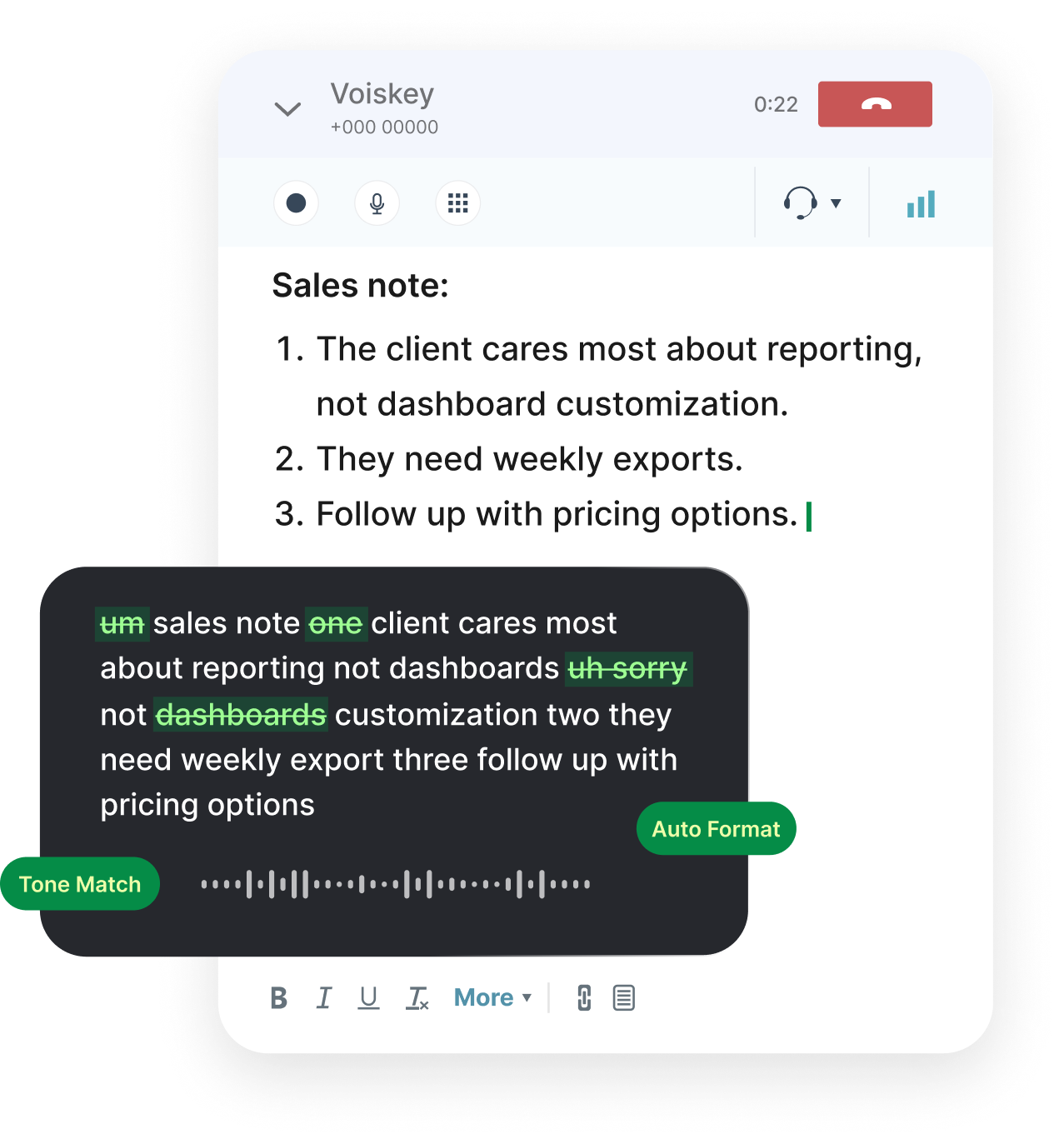
That improvement is voice input, and it fits the rep's situation closely. A rep already spends the day speaking. Capturing notes by speaking is more natural than switching to a keyboard the moment a call ends. Voiskey lets a rep hold a hotkey and talk through what happened, and it turns that speech into a clean written note. The Speak-Polish-Type-Edit loop means the first draft comes easily from speech, and the rep spends their attention on checking the facts rather than producing the sentences. The hard part and the easy part are finally in the right order. That reordering is the whole benefit.
The quality of the note often improves. When a rep types a summary, they tend to compress, because typing is slow. When they speak, they include the context that made the call matter: what the customer asked, what was promised, and what should happen next. Expression intelligence helps turn that spoken account into readable text, so the note is both fuller and clearer. A colleague reading it later gets the story, not just the outcome, which is exactly what a good handoff needs. Fuller notes save the next person a follow-up call. Better notes also make the rep look organized and reliable.
Voiskey fits the tools a rep already uses. It works at the system level on Mac and Windows, so it reaches Gmail, Outlook, Slack, and the CRM fields where notes are recorded. Support for 100+ languages helps teams that serve customers across regions. Custom vocabulary keeps product names, account names, and internal terms spelled correctly, which matters when a note will be searched or shared. None of this asks the rep to change how they work; it simply gives them a faster way to write the parts that used to slow them down. The workflow stays familiar and the writing gets quicker.
The practical benefit is time returned to the conversation. A rep who can speak a note in a minute instead of typing it over several minutes can take the next call sooner or spend a moment preparing for it. Download Voiskey for Mac or Windows and try it on your next task. When the paperwork shrinks, the job looks more like what the rep signed up for, and the agent rollout delivers the time savings it promised rather than shifting the burden to the keyboard. The saved minutes add up across a shift and across a team. A minute here and there becomes an hour.
Download Voiskey for Your Desk
Start with the note you write most often. Install Voiskey, set a comfortable hotkey, and speak that note after your next call instead of typing it. Read the result and correct anything that needs it. Most reps find that the spoken draft is close enough to send after a light edit, and that the time saved is immediately noticeable. Doing this once is enough to see whether voice input fits the way you work, and the setup takes only a few minutes. The first attempt usually answers the question better than any explanation. You will know within a few minutes whether it fits.
Then make it routine. Use voice for the follow-up email, not just the call note. Speak the internal message that updates your team. Keep the same hotkey across apps so the action becomes automatic. Add the names you say every day, such as products, accounts, and internal shorthand, to your custom vocabulary so they arrive correctly. These small habits are what turn a useful tool into a default behavior, and defaults are what actually reduce the time a shift takes. A habit built in a week can pay off for years. The effort is small and the return is steady.
Sales teams can standardize the approach. The Team plan adds shared vocabulary and shared workflows, so everyone spells the same account names the same way and structures notes consistently. That consistency makes notes easier to read and easier to hand off, and it shortens onboarding because a new rep starts from the same patterns as everyone else. For a team that lives on written records, agreement on language is not a small thing; it is part of how the group stays coordinated under pressure. Consistency is a feature, not a formality. It is what lets a team trust its own notes.
The agent era does not remove the rep from the loop, and it should not. It changes what the rep spends time on, moving the balance toward judgment and conversation. Download Voiskey and give the writing side of the job a faster path. Speak your notes, speak your follow-ups, and keep your attention where it belongs: on the customer in front of you and the next call waiting in the queue. The tools can handle more of the talking and the writing, but the rep still brings the judgment, and that is worth protecting. Make the rest faster so the human part has room.
FAQ s
Yes. After a call, open the notes field or the customer record and use the Voiskey shortcut. Speak the summary naturally, including next steps and names, and Voiskey turns it into clean text at the cursor. The rep can then edit the draft and save it without typing the whole note by hand.
Voiskey works at the system level on Mac and Windows, so it fits the text fields in the tools a rep already opens. That includes email, chat, customer records, and many other apps. There is no separate integration for each one; the same shortcut works wherever the cursor is placed.
Voiskey is designed for natural speech, so it catches fillers, stumbles, and small grammar slips as it converts your words to text. The result reads more like a written summary than a transcript. You still review the draft, because names and numbers matter in sales notes, but the cleanup removes most of the obvious noise.
Each person downloads Voiskey for Mac or Windows and completes the short setup. For consistency, the Team plan shares vocabulary and workflows, so the group can align on product names and phrasing. Because Voiskey works in the apps reps already use, there is little new software to learn beyond the shortcut and the editing habit.


 Voiskey
Your voice, amplified.
Download Voiskey for Mac or Windows and let reps speak call notes, follow-ups, and updates instead of typing them.
Use it across macOS, Windows, iOS, and Android