
reduce typing prevent rsi: A Practical Guide to Reducing Typing Load to Prevent RSI at Work
Measure your keystrokes, move heavy writing to voice, and protect your wrists.
 Voiskey Team
The Strain That Builds Quietly
The honest starting point for any reduce typing prevent rsi effort is that strain builds quietly, one keystroke at a time. A knowledge worker can log tens of thousands of key presses in one ordinary day across email, chat, documents, and forms, often in the same posture for hours. Repetition, the force used to press keys, and a static wrist angle all stack up, and because the load arrives in small doses it never feels urgent. That is why prevention starts with typing less, not with a better chair first. The plan here turns that idea into a measurable process: find where the keystrokes pile up, swap the heaviest writing to voice, and fix the posture of the hours you keep typing. Note: this article is informational, not medical advice. If you already have persistent pain, numbness, or weakness, see a clinician.
Begin with a one-week audit instead of guessing. For five working days, keep a running tally of everything you write: emails sent, chat replies, meeting notes, forms, comments, and reports. You do not need keystroke-level precision; a count of messages plus an estimate of words is enough. A 300-word update is roughly 1,500 key presses, and a day of forty short chat replies is a day of quiet, unlogged typing. Write down which tasks felt repetitive and which had unique content, and note how many hours you sat in one position. The goal is a ranked list by volume, not a perfect spreadsheet. After one week, add up the categories and you will see where the real load lives. Most people find that email and chat dominate, which is good news, because that writing moves to voice easily.
Now decide what you will not type anymore. The rule of thumb is simple: if you can say it out loud in one pass, you can dictate it. Routine replies, status updates, follow-ups, notes from meetings, and short internal messages all qualify. Anything that needs precision character by character, like a code snippet, a password, or a part number, stays on the keyboard for now. Write that boundary down and keep it visible, because the urge to switch back mid-task is strongest when you are tired. For each task you move to voice, estimate how many words it represents in a normal week, then add the numbers. That total is your first target, and it should be unambitious: ten to fifteen percent of weekly writing is a strong start. A smaller goal you actually hit beats a large goal you abandon by Friday.
Finally, set a check-in date and a way to compare. Mark the calendar two weeks out and plan to review three things: your word volume, your hand comfort, and your behavior changes. Did the voice swap actually happen, or did old habits creep back? Did the typing hours shrink, and did you notice anything about how your forearms feel at the end of a day? Keep the original audit sheet so the comparison is honest, and keep the reason for each change written down, because a plan without reasons gets dropped in the first busy week. Use that check-in to decide whether to swap more tasks or hold steady. If discomfort is growing rather than shrinking, reduce typing further and talk to a clinician. Prevention only works as a weekly practice, not as a one-time project.
Where Your Keystrokes Actually Go
Trace where the keystrokes actually go before you change anything. Open your email client and chat tool and look at the last five days with fresh eyes. Divide everything you wrote into four buckets: short replies under fifty words, medium messages between fifty and two hundred words, long documents and reports, and everything else such as forms and comments. The buckets matter because they behave differently. Medium messages usually carry most of your keystrokes, and they are almost always things you already know how to say. Short replies are quick individually but they add up, because you answer thirty of them a day. Long documents are the heaviest per unit, but you write them less often. Counted across a week, most people find a surprising share of total output is messages they could have spoken while standing up.
Measure the share that is formulaic rather than original. A thank-you that opens and closes every email, a status update that follows the same structure, a weekly report that repeats last week's skeleton with new numbers, a project note that restates the previous message. In many jobs this formulaic share lands between a third and a half of all output. That is the honest target for a voice swap, not email in general, because formulaic writing has no thinking cost, only keystrokes. Take one real formulaic message from your own inbox, split it into fixed and variable parts, and dictate a replacement out loud. If you can speak it in thirty seconds, the keyboard is doing only physical labor there. Count those messages across a week and you have a concrete, defensible swap list.
Now look for the hidden typing: the churn that never shows up as a finished document. You retype the same URL three times, you fix the same name in ten replies, you copy a table from one tool and reformat it into another, you rewrite a sentence because a teammate asked for clarification. This churn is invisible in a word count but it is real and repetitive. Two adjustments remove much of it. First, dictate the first version of anything longer than a sentence, then edit instead of composing by hand. Second, keep boilerplate snippets where you can paste them, so the same phrasing is never typed twice. Neither change is glamorous, but both reduce the number of movements your hands make per completed task, and movement count is what matters for strain.
Do the same trace for clicking. Much of a working day is not typing at all: switching windows, scrolling, opening apps, resizing, and tab-hopping to find a file. Mouse work is repetitive too and it shares the same wrist tendons, so it belongs in the audit. Count how many clicks a typical task requires and ask which of them you could remove. Pin the files you need, close the apps you are not using, and trigger your dictation shortcut with a keypress instead of reaching for the mouse mid-thought. The point of this section is not to banish the keyboard. It is to see clearly which movements are necessary and which are habit, so the typing you reduce is the typing that costs you the most.
Swapping High-Volume Work to Voice
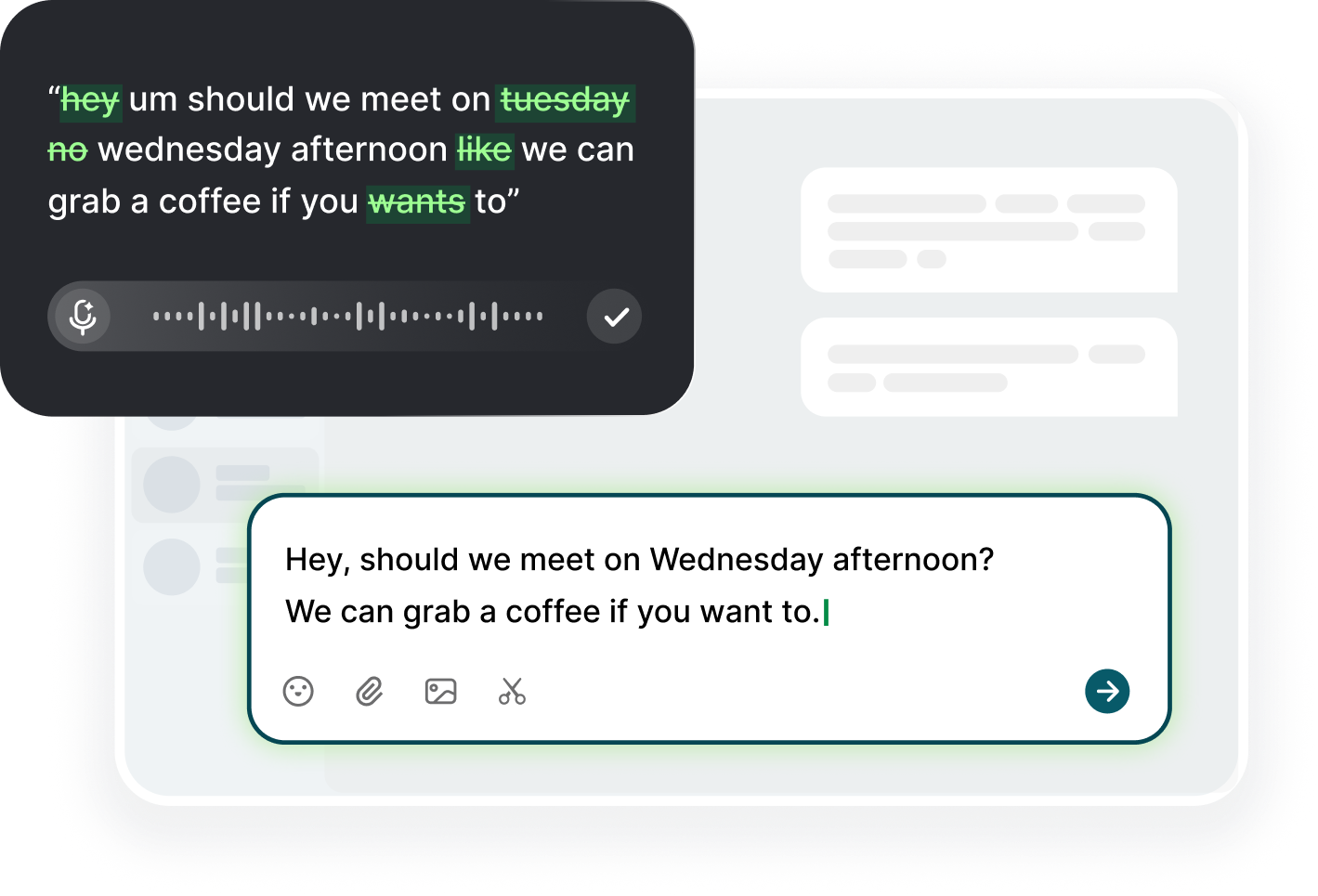
The swap itself is mechanical and quick with Voiskey. Download it for macOS or Windows, click into any text field you normally type in, trigger your dictation shortcut, and speak. On a phone, add Voiskey as a keyboard and tap into any field, which covers the replies you send on the go. Two things make this work day after day. First, keep the shortcut one step away, because every extra step you add is a reason to fall back to typing. Second, speak at your natural pace and let the app remove filler words and fix punctuation as it goes; your job is to think and talk, not to perform. You always review the result before sending, because Voiskey never sends anything on its own. That review is the safety net that makes a voice draft as reliable as a typed one.
The rhythm matters more than the tool. Instead of dictating one email now and one next hour, batch them: answer three chat replies, walk to the kitchen, and on the way back finish the queue in one voice session. Equally good is the standing block. Try this for one week: after a long typing stretch, stand up and dictate the notes you were going to type anyway, with your hands resting loose instead of reaching. Your hands stay neutral and the work still gets done. The strongest structure is a twenty-five minute typing block followed by a five to ten minute voice block, repeated through the day. That pattern protects you twice: your hands alternate between heavy and light work, and your brain alternates between focused editing and relaxed speaking.
Expect a short adaptation phase and plan for it. The first two days feel slower because you notice every misheard word and correct more than you would while typing. By day four the corrections drop sharply, because you learn to speak in clean sentences, finish the thought, and let the text arrive. Reserve the first week for low-stakes writing only: internal notes, drafts, and messages where a wrong word is not embarrassing. Move to client-facing email after you have reviewed a handful of drafts and liked what you saw. If a sentence comes out garbled, do not retype it by hand; say it again more slowly, because repeating yourself is free while keystrokes are not. Keep a small list of correct spellings for names and jargon beside you.
Close the loop by counting. For one week, note how many words you dictated versus how many you typed, then compare with your baseline audit. The comparison tells you whether the swap happened and where the next five percent is hiding. Most people who follow this path find that messages, notes, and report drafts move to voice quickly while forms and spreadsheets stay on the keyboard, and that is exactly the right split. When the numbers look good, hold the habit for two more weeks before adding a new task category. When the numbers fall, the problem is usually batching, not ability, so go back to dictating the whole queue at once. The goal is a daily rhythm where voice carries most of your repetitive writing and the keyboard carries the precision work.
Ergonomics for the Surviving Less-Typed Hours
The hours you keep typing deserve better ergonomics, and the basics are free. Set your chair and desk so your forearms sit roughly parallel to the floor and your wrists stay neutral rather than bent up or down. Your elbows should rest near your sides at about ninety degrees, and your feet should be flat rather than tucked under the chair. Put the keyboard at a height where your shoulders stay relaxed, then move the monitor so you look slightly down, not forward and up. Adjust once in the morning, then resist the urge to slouch by noon. These tweaks are the difference between a wrist angle that adds strain all afternoon and one that adds almost none, and they cost you five minutes of setup.
Because you type less now, the remaining hours include more non-typing activity, and those activities have their own posture traps. When you dictate, you stop typing and start sitting still, so check that your back is supported and your head is not craned toward the phone. When you edit a voice draft, you use the mouse a lot, so do not rest the heel of your hand on the desk while you scroll; keep the wrist floating or use the keyboard shortcut for the same action. When you read long documents, use a larger zoom level instead of leaning closer to the screen. The general principle is simple: every position, whether typing, pointing, or reading, should keep your wrists straight and your shoulders low.
Rest is what actually repairs tissue, so build gaps into the day. Take a short break at least once an hour, step away from the screen periodically, and stretch your fingers and forearms gently when you return. A simple sequence: open your hands wide and hold, make loose fists, rotate your wrists slowly, then drop your shoulders and take three slow breaths. None of these stretches is a treatment; they are small pauses that give tendons time to recover between bouts of load. Pair the breaks with a timer or with a natural signal like the end of a call, so they happen without willpower. On a long writing day, schedule two real walks: one at midday and one before the afternoon rush, and let the walk be the end of a dictation block.
Balance load across the rest of your setup too. If one hand does all the mouse work, the typing reduction helps one side while the other stays tired, so alternate hands when you can or use keyboard shortcuts for navigation and editing. Keep frequently used text as snippets so you paste rather than retype. On bad days, let dictation carry almost everything: with Voiskey, notes, updates, and replies become speaking tasks, and you keep only the short burst of precision typing that genuinely needs fingers. The combination of voice, breaks, and neutral posture attacks the load from three directions at once. None of it is a cure, but together they give overworked tissue the conditions it needs to recover.
Signs, Checkpoints, and Early Action
Prevention needs a feedback loop, and the signs are easy to spot if you look for them. RSI usually announces itself quietly: a dull ache in the forearm after a long day, stiffness in the fingers first thing in the morning, or a burning feeling across the wrist that fades overnight at first. Tingling, weakness in your grip, or pain that lingers into the evening are stronger signals. Notice: this article is informational, and it does not diagnose anything. If you have persistent pain, numbness, or weakness, see a clinician rather than guessing at exercises from the internet. A ten-second end-of-day scan is enough to catch the quiet signs: touch each fingertip, make a loose fist, and note where your body is asking for attention.
The pattern matters more than any single symptom. One ache after a heavy day is normal; the same ache arriving earlier each week is not. If discomfort shows up before lunch now when it used to wait until evening, if it takes longer to fade, or if it starts interrupting sleep, treat it as a signal to change how you work, not as a reason to push through. Write those three observations down weekly: onset time, fade time, and sleep impact. That small log turns a vague feeling into data you can act on, and it is exactly the kind of evidence a clinician will ask for later. Catching strain early makes it far more manageable than waiting until typing hurts all day.
Set two hard checkpoints in your calendar. The first is a weekly Monday scan: five minutes to review last week's log, note whether the pattern is stable, better, or worse, and decide one change for the coming week, such as moving another task to voice or adding a standing block. The second is a monthly desk review: check your chair height, keyboard position, monitor angle, and break cadence against the basics, because setups drift over time. Log the changes you make as well, so you can tell what actually helped. If a weekly scan shows a pattern getting worse two weeks in a row, stop the guesswork and book a clinician appointment before the symptom grows bigger than the plan.
Early action is concrete and boring, which is why it works. Cut one more task from the keyboard, shorten your longest typing block, add one extra break, and fix the posture issue you have been ignoring. Then let the week pass without judging it. Rest is the active ingredient in recovery, and for typists the most direct form of rest is typing less, giving tendons the recovery gaps they have been missing. Keep dictation in the mix for the high-volume writing, keep breaks in the mix for the gaps, and keep the log so you can see the trend. A prevention plan that runs quietly in the background, reviewed weekly and adjusted monthly, is the only kind that survives a busy quarter.
FAQ s
Most people can move a quarter to a third of their daily writing to voice within a few weeks, because messages, notes, and follow-ups are exactly the kind of writing you already know how to say. Start at ten to fifteen percent, hold it for two weeks, then add one task category at a time.
No. This article is informational and not medical advice. Reducing typing is a helpful daily habit, but it is not a diagnosis or a treatment. If you have persistent pain, numbness, tingling, or weakness, consult a medical professional, especially if symptoms appear before the day's work begins.
Watch the pattern rather than a single ache: same discomfort arriving earlier each week, taking longer to fade, or starting to interrupt sleep. Log onset time, fade time, and sleep impact weekly. If the pattern worsens two weeks in a row, see a clinician.
No. A quiet room and the built-in microphone are enough to start with Voiskey's free plan, which covers 2,000 dictated words a week. A simple USB mic or headset helps mainly in noisy offices or when you dictate for long stretches.


 Voiskey
Your voice, amplified.
Choose a real task, follow the steps, and review the results with your team before expanding the rollout.
Use it across macOS, Windows, iOS, and Android