
narrating onboarding workflows: A Practical Guide to Narrating Workflows for Onboarding Documents
Narrate the real walkthrough once and the onboarding doc writes itself.
 Voiskey Team
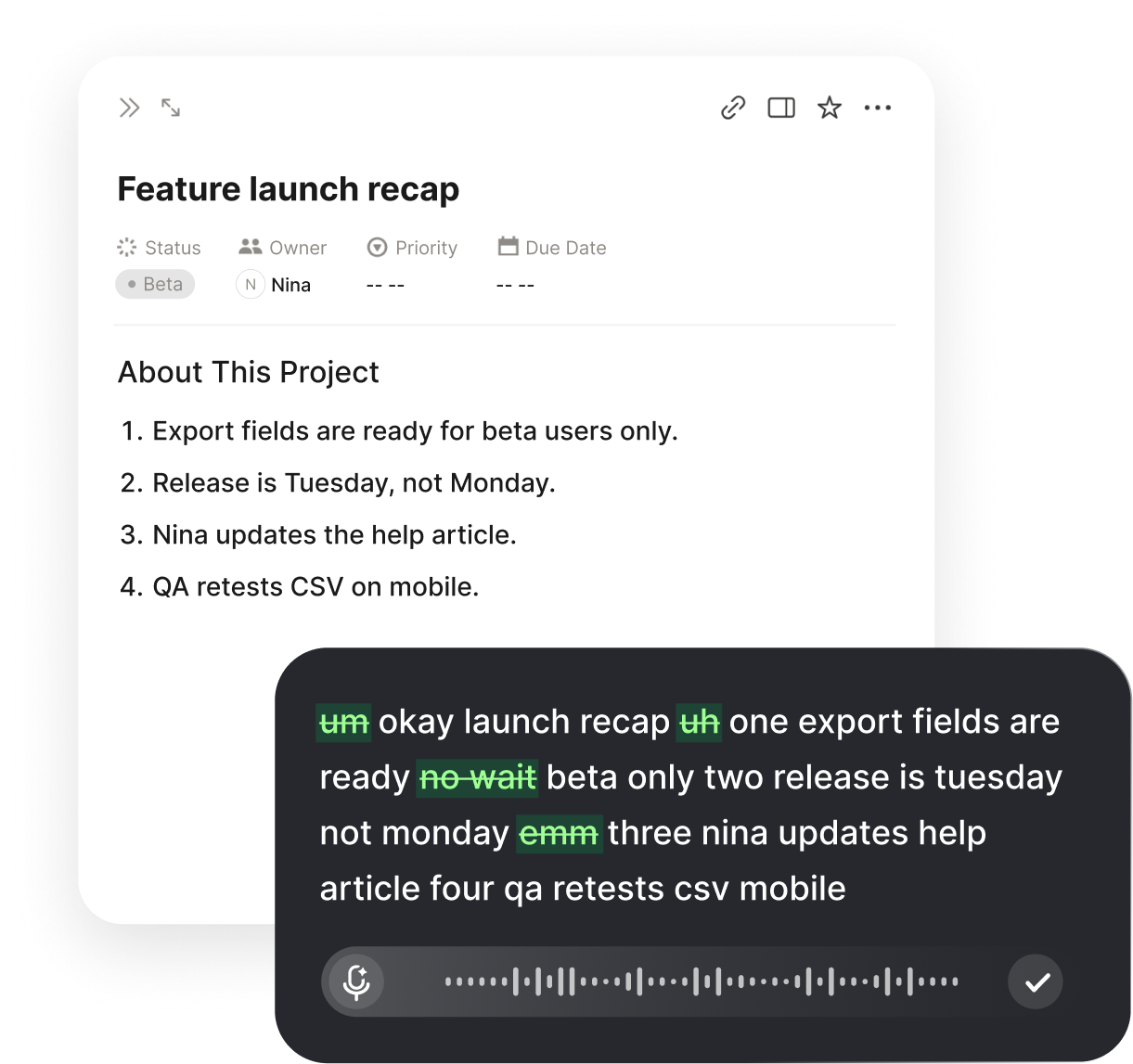
Onboarding Docs That Get Read
Most onboarding docs get opened once, skimmed for a minute, and quietly ignored. The problem is not that new hires refuse to read; it is that the docs were assembled from memory days after the training, so they describe a tidy version of the process instead of the messy one a new hire actually meets at nine a.m. Narrating onboarding workflows flips the order. You walk the real first-day path while you talk, and Voiskey records what actually happens: the account that takes a day to activate, the second login screen, the channel that answers fastest. The document stops being a memory and starts being a transcript of the week, which is the only kind of onboarding doc a new hire finishes reading.
The usual doc fails for a specific reason: it is written by someone who already knows, for someone who knows nothing, and the writer skips what they consider obvious. You write request access, but the new hire does not know what that means, where the form lives, or how long it takes. You assume the tools list is the order they are needed. The result is a page that looks complete to you and reads like a crossword to them. You cannot fill that gap by trying harder at the desk; you fill it by walking the path and saying everything you do, including the obvious parts, because the obvious parts are the only parts they are missing. The details are small and they are everything.
There is also a location problem. New hire guides are often put in a folder the trainee never hears about, and they describe the process the manager believes happens rather than the process the team actually runs. Ask two people how the first week goes and the answers will disagree in the details: who sends the invite, when the intro call happens, which account is needed first, who resets the password. A narrated walkthrough settles those disagreements, because it is not secondhand reporting. It is the run itself, captured in the order it happened, with the pauses and the waits still visible, and it is captured by the person who performed it, not by the person who intends to write it.
A good onboarding doc has one test: a new hire can finish their first real task from it without asking anyone. Not a complicated task, just the first one, confirming their accounts work, joining the right channels, and producing something small. If the doc can carry them through that, it can carry them through the month. Narrating the walkthrough is the shortest route to that test, because you are not inventing a guide, you are recording one that already exists in the way you do the work. The record just needs a cleanup pass to become a handout, and the cleanup pass is minutes, not days.
Walk Through, Narrate, Capture
Book a walkthrough slot and do it for real, with your own calendar and a fresh test account if you can get one. Sit where you would sit on a normal day, open the doc where the guide will live, start Voiskey, and walk the first day out loud from the very beginning: the invite that lands, the link it opens, the screen that asks for single sign-on, the permissions you grant. Narrate each step in the order it happens, name the exact buttons and fields, and say what a correct result looks like on screen. Do not tidy as you go. The messy parts, the waits, the failed logins, are precisely the parts that save a new hire ten minutes each, and they only survive if you speak them while they happen.
Capture the bits that are invisible to you, because those are the ones missing from every typed guide. The name of the first person to ping, the channel that handles access requests, the time when the account actually activates, the tool that must be set up on day one rather than day two, the weekly meeting that happens whether or not you are ready. As you narrate, these details drop in naturally, and Voiskey writes them down in your own words. Later, when you shape the handout, they show up with names and times instead of vague instructions like set it up soon. That is the real difference between a transcript and a checklist: the transcript kept the sequence and the waiting, and the waiting is what a new hire always underestimates.
Say what not to do, because new hires try to be helpful in the wrong ways. As you walk, you will hit decisions: do not create the ticket yourself, ask the account owner; do not restart the session or you lose the settings; do not paste the link into the shared channel until the account is active. Narrate those boundaries in the moment, in plain speech, and they land in the doc as warnings. Also narrate the half-state: you can start the setup today, but the second step will not work until the account is approved. That sentence is worth a hundred words of preface, and it is exactly the sentence that never survives in a doc written from memory, because from memory you remember the finish, not the wait.
If you cannot run the walkthrough live with a real account, do a dry run on a scratch account or an old email address, but still perform it rather than recall it. Your hands remember the click path better than your head does, and the clicks are what you want recorded. Then, ideally, ask a second person to sit with you, someone who started recently and still remembers being new: their memory of confusion is more useful than yours. Let them interrupt with what they would not have known, where that link came from, what that acronym means, why this tool exists. A guide co-authored by last quarter's hire is usually better than one polished by this month's leads.
Screenshots vs. Spoken Steps
Stop taking a screenshot of every step. Screenshots rot: the button moves, the menu renames, the redesign lands, and the perfectly captioned image now teaches the wrong click. They also answer the wrong question: a screenshot shows what a screen looks like, not what a step is supposed to achieve. A spoken step survives UI changes, because it describes intent rather than pixels. Say open the Activities menu and choose the third item, Time Entries. The day the menu moves, that sentence still works. The day the layout changes, the image is wrong, and so is every new hire who follows it. This is the reason narrated steps age far better than a page of captures.
Keep screenshots where they genuinely carry information, and keep them few. The useful ones are not step captures; they are the end-state images that show what done looks like, the approval email, the dashboard with the number correct, the calendar with the invite on it. For these, dictate the caption as part of the same session: say this is the confirmation you wait for, and you will see the status change to completed, and Voiskey writes the words beside the image. One annotated image per section beats eight generic ones. End-state images age far better than click-by-click captures, because a done state is a done state, and the recent redesign did not change what success looks like.
Prefer words for anything that can be described as a condition rather than a layout. If the step is about a number, a filter, a dropdown choice, or a threshold, dictate it: the filter shows only accounts with a balance over zero. If the step is about where something sits, a screenshot earns its place. That split is the whole policy, and it is worth writing into the doc so the next person who updates it follows the same rule. Your dictation naturally produces the conditional sentences, because when you perform the task you think in conditions, not in pictures, and the conditions are what carry through every redesign of the interface.
When the screenshots do change, treat it as an update moment, not a chore. The narrated version of the same step is already in the doc, so you re-dictate one sentence: the menu is now called Activity, and it is the first item. Voiskey types it in place, and the doc is current again in under a minute. That speed is why the spoken-first guide stays fresher: maintaining a typed doc with screenshots is a twenty-minute job, so it never happens, and every day it does not happen the doc gets older. Maintaining a narrated doc after a small UI change is a one-minute job, so it happens constantly, and the freshness compounds.
Turning a Narration into a Handout
Turn the narration into a handout in one cleaning pass, and do it within a day while it is still familiar. Read the transcript and shape it: a title with a time estimate, a short prerequisites line, the numbered steps in order, a box of names you will hear for the internal jargon, and a final line about who to ask when stuck. Keep the warnings in your own phrasing; they read more naturally than anyone's rewrite. Trim the thinking out loud, keep the decisions. The goal is a page that can be read in five minutes and followed for an hour. If it cannot be read that fast, split it into day one and week one, and the split will match how new hires actually consume it.
Add the delta between what you expected and what actually happened, because that is the real training. When you narrated, you noticed that the second tool could not be opened until the first approval cleared, or that the intro meeting moves without warning, or that the shared drive needs a separate permission from the drive where tasks live. Put those observations at the top of each section as a one-line note. New hires read docs for what will go wrong as much as for what to do, and small honesty costs nothing. The timestamp matters too: write the date you walked through it at the top and a line saying last verified, so future readers know how fresh the guide is before they trust it.
Give the handout a physical order that matches the week: hour one, day one, week one. Hour one is the accounts and the first tool; day one is the first task and the first meeting; week one is the project kickoff and the first review. New hires search a guide by where they are in time, not by chapter number, so an hour-by-hour structure beats a tool-by-tool one. Dictate a one-line intro for each segment, this is the part people skip and regret, and it will feel like a real guide rather than a pile of instructions. The ordering is what makes the doc feel designed instead of collected.
Finish with a small self-check appendix: five questions to confirm the setup worked, such as can you log in to each tool, are you in the right channels, can you find yesterday's handover note. The new hire reads through, confirms five boxes, and knows they are done. That same list becomes your onboarding completion checklist for the first week, so the doc and the process are the same object. Narrate the answers to the five questions once, and the appendix is written by the same voice as the rest. You have now produced a guide, not a manual: a guide says what to do in five minutes, and yours will actually get read.
The New Hire Test That Validates It
The guide is not done until a real new hire has tested it. Hand it to the newest person before you polish anything, then stay in the room and say nothing. Watch where they pause, where they click the wrong thing, and where they reach for their phone instead of the doc. Count the stalls; if it is three or more in the first hour, the doc is still an outline. Their hesitation is not a failure of the hire; it is a complete, specific list of edits. Note every place they ask a question, and every one of those questions is a paragraph you forgot to write. This is the cheapest user research your team will ever run.
Ask the tester where they felt lost, not whether the doc was good. People rate good when they were lost politely, so ask them to mark the page: the line where they had to guess, the step where the screen looked different from the words, the tool name they did not recognize. Then fix only what they marked and hand it to the next hire. Two clean runs in a row is the validation threshold; after that, freeze the version and start a changelog. Every future update goes through the same test, not through a review meeting, because review meetings test agreement and the walkthrough tests comprehension.
Run the closure check with a timer. A trainee with no context should be able to complete the first-day tasks in roughly the time you wrote down in the heading. If it takes twice as long, the doc is too dense or the steps are in the wrong order, and the fix is usually to cut rather than to explain more. If it takes the stated time, you have a guide that predicts reality, which is rare enough to be worth protecting. Re-dictate the sections they found heavy in simpler sentences rather than adding steps to them, and let the timer decide: the doc is ready when the time matches the promise.
After the hire's first week, ask them to dictate what was missing. They have just lived the experience the doc claims to describe, and they will name the gaps without any tenured-teammate filter: the meeting invite that never arrives, the tool that needed the permission nobody knew about, the phrase no one explained. Turn their list into the next revision, and note the narrator in the change log. A validation loop that includes the newest voice keeps the guide current, and it gives the new hire the founding experience of one ownership: they changed the doc on day eight, which is the fastest anyone has ever become part of the team's memory.
FAQ s
About as long as the walkthrough itself. A first-day path that takes you an hour to walk takes about an hour to narrate, plus twenty minutes to shape into a handout. That replaces the days it usually takes to draft the same guide from memory, and the result describes what actually happens instead of what you intended to happen.
Only a few, and only end-state ones rather than click-by-click captures. Words survive UI changes; images do not. Keep one image per section that shows what done looks like, dictate the caption during the walkthrough, and re-dictate the accompanying step the day a menu moves. The narration itself is the instruction; screenshots are confirmation.
Narrate the changed step only, not the whole walkthrough. If the access request form moves, walk that step, dictate it in place, and bump the last verified date. The rest of the guide stays untouched. A monthly ten-minute refresh beats a quarterly three-hour rewrite that never happens.
The person who actually runs the task day to day, with a recent hire to interrupt. The recent hire remembers what was confusing and can narrate the parts they had to figure out. The manager's job is to approve the boundaries and the tone, not to be the voice of the guide.
Leave your natural phrasing in place. Dictation keeps the sentences you would actually say, which is warmer than the passive voice people use when they type formal documents. Cut the filler, keep the warnings and the reasoning, and the guide reads like a person explaining, which is exactly what a new hire needs on day one.


 Voiskey
Your voice, amplified.
Choose a real task, follow the steps, and review the results with your team before expanding the rollout.
Use it across macOS, Windows, iOS, and Android