
Voice to Text for Hearing Impaired Students With Voiskey
Voiskey is voice to text for hearing impaired students: a teacher or classmate speaks and their words turn into clean, readable text the student reads in real time, so lectures, questions, and group work are easy to follow.
 Voiskey Team
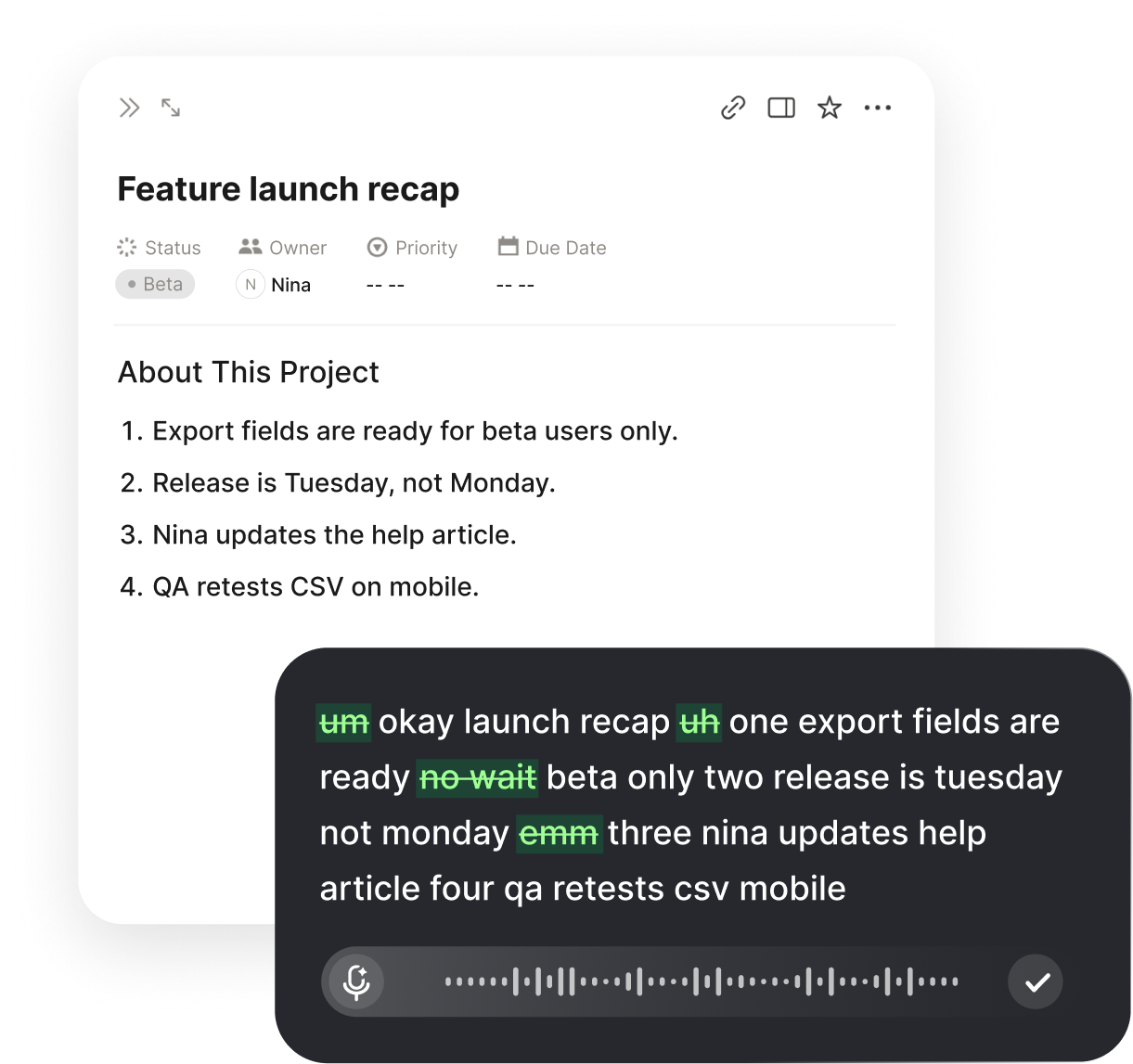
What Voice to Text for Hearing Impaired Students Does
Voice to text for hearing impaired students does one clear thing: it takes what a teacher or classmate says out loud and shows it on screen as clean, readable text while they speak. Instead of straining to hear across a classroom, lip-read a teacher who keeps turning to the board, or piece a lecture together from fragments, the student reads the words. The person talking uses the microphone and teaches as usual; the student watches the words appear and follows the lesson by reading. The sound may be hard to catch, but the content arrives in full as text.
This matters because a classroom is one of the hardest places to hear. Teachers move around, students speak from all corners, rooms echo, and much of the teaching is spoken aloud rather than written down. A hearing impaired student who misses a definition, an instruction, or a due date can fall behind on material they are perfectly able to learn. Reading the words removes that risk: the text is there to read, re-read, and keep, so attention goes to understanding the subject rather than to decoding the audio.
Voiskey makes the text ready to read rather than a raw transcript of sound. It trims the ums and false starts, adds punctuation, and shapes loose talking into clean sentences, so a glance tells the student what was meant without untangling a mess. The aim is a clear, readable version of the lesson as it happens, one the student can trust in the moment and review later when studying.
How It Works in Class
Setup is a one-time task of a couple of minutes. Install Voiskey, allow the microphone and accessibility permissions it asks for on first launch, and the student is ready. From then on the teacher presses a single key and speaks, and their words land as text wherever the student's cursor sits, punctuated and formatted, with no separate window to arrange and no mode to turn on first. The teacher talks, the student reads, and the screen keeps pace with the lesson.
Because Voiskey works at the system level, that same key turns speech into text anywhere on the student's laptop, in a notes app, a document, a chat window, or a form in the browser. There is no special classroom tool to set up and no copying text between apps, so a lecture, a quick instruction, and a group discussion all use the exact same habit. One key covers every moment the student needs to catch what is said.
The flow fits how a class actually runs. The teacher speaks and the student reads the text; when the student wants to ask or answer, they can type a question or, if their own voice is clear, speak and let Voiskey turn their words into text too. Because the transcript stays on screen, the student can scroll back to a definition, a date, or an instruction they want to confirm rather than interrupting to ask again, which keeps them in step with the room.
Where It Helps Across the School Day
Lectures
Read the teacher's words as clean text in real time, so definitions, explanations, and instructions come through even from across the room.
Class Discussion
When classmates speak, let each one turn their words into text, so the student follows a back-and-forth that would otherwise blur into noise.
Office Hours
Read what a teacher says one-on-one as clean text, so questions get answered clearly without the pressure of mishearing.
Study Notes
Because the text stays on screen, save it as notes, so the student reviews an accurate record of the lesson instead of scrambled fragments.
Taking Part, Not Just Keeping Up
Reading the lesson solves the listening half of class; a student also needs to take part. Voiskey keeps that side open by letting the student respond however suits them. If their own speech is clear, they can talk and let Voiskey turn their words into text, so they answer a question or join a discussion out loud like anyone else. If they would rather type, they type, and the exchange stays one clean, readable thread the teacher and classmates can follow.
This matters because being hearing impaired affects what a student catches, not what they know or can contribute. The hard part is the incoming speech, not the student's own ideas. By turning what others say into text and giving the student an easy way to respond, Voiskey lets them participate fully rather than sitting quietly because keeping up with the spoken flow took all their effort.
Having the lesson as on-screen text also removes the small errors that quietly hurt grades. A misheard due date, a half-caught formula, or a guessed instruction can cost marks on work the student understood perfectly. When those are written down instead, the student acts on what the teacher actually said, and that accuracy carries straight through to homework, revision, and exams.
Getting Clean, Readable Text in Class
A few habits make the on-screen text noticeably cleaner, which counts when reading is how the student follows along. A steady, conversational teaching pace helps most, because Voiskey uses the surrounding sentence to punctuate and to pick the right spelling for names and words that sound alike. Natural talking reads better than slow, clipped speech, so a teacher does not need to change how they normally present a lesson.
The microphone built into a laptop is usually enough for close work, and a simple clip-on or desk mic helps when the teacher moves around or the room is large. The speaker does not need to raise their voice, since Voiskey handles quieter, close-mic speech, so an ordinary classroom transcribes well without anyone having to shout to be captured.
For the words that come up constantly, teacher names, subject terms, and course vocabulary, add them to the custom vocabulary once. That dictionary syncs across devices, so the same terms are recognized on a laptop in class or a phone while studying, and the text keeps getting more accurate on the vocabulary the course actually uses, which means fewer confusing gaps in the notes.
It Works With the Support a Student Already Has
Voice to text does not replace hearing aids, cochlear implants, note-takers, or interpreters; it adds another reliable route for the moments those fall short. Aids and implants help, yet echoey rooms, distant speakers, and overlapping voices still let words slip past. Reading the text alongside what the student hears fills those gaps, so they catch the sentence they would otherwise lose without having to choose between listening and understanding.
It is also not all-or-nothing, which suits school life. A student might read the text only during fast lectures, rely on it fully for a dense new topic, or keep it running through every class as a steady record to study from later. Because the shortcut is the same key each time, bringing it into a lesson fits naturally alongside the accommodations and habits the student already relies on. Where a school has formal rules for assistive tools in exams, it is worth checking those separately, but for everyday classes, study, and discussion it simply helps.
Related workflows:
- Read the teacher in real timeSpeech to on-screen text
- Ask and answer in classTwo-way participation
- Keep lessons as study notesSaved transcript
Which Students It Helps Most
This helps any student who misses spoken teaching and would rather read it than guess. Those with partial hearing loss who struggle in noisy or echoey rooms, students who hear fine one-on-one but lose fast group discussion, and anyone whose hearing makes a long lecture tiring to follow all gain the same thing: the words on screen instead of a sound they have to reconstruct. The common need is to learn the material without the constant strain of filling in gaps.
It matters just as much for the quick, passing parts of class as for formal lectures. The offhand instruction, the changed deadline called out at the door, and the quick exchange between classmates are exactly what a hearing impaired student tends to miss, because they come fast and unannounced. Turning those into text means the student stays in the loop for the small things that shape a grade, not only the scheduled teaching.
Because the habit is one key in any app, it fits a real school day rather than demanding a separate routine. A student can read a lecture in the morning, follow a discussion after lunch, and review the saved text while doing homework in the evening, all through the same key press. Over a term, the lessons that once left them anxious about what they missed become ones they follow fully, and keeping up stops being a daily battle with the acoustics of the room.
FAQ s
The teacher or classmate speaking uses the microphone. They press one key and talk, and their words appear as text on the student's screen to read. The student does not have to speak to make it work; they follow the lesson by reading.
Yes. The student reads what is said, then responds by typing a question, or by speaking if their voice is clear, in which case Voiskey turns their words into text too. It all stays one readable thread, so they take part fully.
Yes. Group discussion is exactly where words blur together. Having each speaker turn their words into on-screen text lets the student follow a fast back-and-forth that would otherwise be hard to catch across the room.
Yes. Because the text stays on screen, the student can save it, so they review an accurate record of the lesson later instead of scrambled fragments, which helps with homework and exam revision.
Add the teacher names, subject terms, and course vocabulary that come up often to the custom vocabulary once. It syncs across devices, so those words are spelled correctly in class and while studying, which keeps the notes clear.
For everyday classes, study, and discussion it simply helps. Formal exams have their own rules for assistive tools, which vary by school, so it is worth checking those specific allowances separately before any assessment.


 Voiskey
Your voice, amplified.
Speak naturally, write effortlessly, and move faster. Turn your voice into polished, ready-to-use text wherever you work.
Use it across macOS, Windows, iOS, and Android