
Voice to Text for Hard of Hearing: See Every Word With Voiskey
Voiskey is voice to text for hard of hearing people: a hearing person speaks and their words turn into clean, readable text on your screen in real time, so you follow conversations by reading instead of straining to catch every sound.
 Voiskey Team
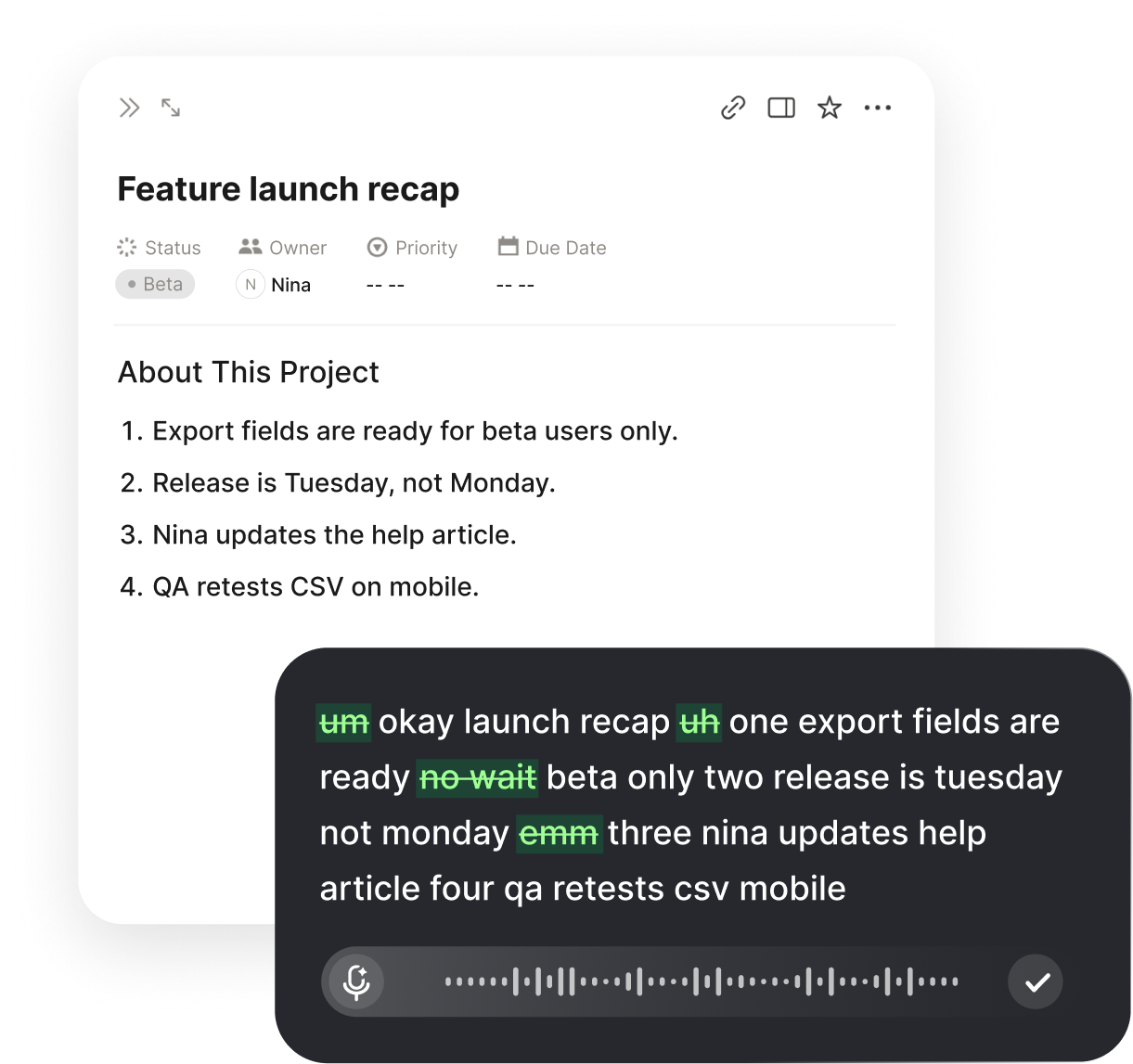
What Voice to Text for Hard of Hearing Does
Voice to text for hard of hearing people does something simple and direct: it takes the words a hearing person says out loud and shows them on your screen as clean, readable text while they talk. Rather than piecing a sentence together from the parts you caught, you read the whole thing. The person speaking uses the microphone and talks normally; you watch their words appear and follow along. The sound may be unclear, but the meaning lands in full as text you can trust.
This helps because being hard of hearing is rarely about total silence. You catch most of a sentence, lose a key word, mishear a name, and then spend energy guessing what filled the gap. In a quiet room one-on-one you often manage, but add background noise, a soft talker, or several voices at once and the gaps multiply fast. Reading the words removes the guesswork: the text is there to read and re-read, so your attention goes to the conversation instead of to decoding the audio.
Voiskey makes the text ready to read rather than a raw transcript of sound. It clears out the ums and false starts, adds punctuation, and shapes casual talking into clean sentences, so one glance tells you what was meant without untangling a mess. The aim is a readable version of the conversation as it unfolds, not a rough stream you have to work through twice.
How It Works in Everyday Talk
Setup is a one-time job of a couple of minutes. Install Voiskey, grant the microphone and accessibility permissions it asks for on first launch, and you are set. After that, the person speaking presses a single key and talks, and their words appear as text wherever your cursor sits, punctuated and formatted, with no separate window to position and no mode to turn on first. They speak, you read, and the screen keeps pace.
Since Voiskey works at the system level, that one key turns speech into text anywhere on the computer, whether in a notes window, a chat box, a document, or a form in the browser. There is no dedicated captioning app to launch and no copying text between tools, so a quick question at your desk and a long meeting both run on the very same habit. One key handles every moment someone needs to tell you something.
For a genuine back-and-forth, the flow stays easy. The other person speaks and you read their words; you answer by typing, or by talking yourself if your own voice is clear, and they read or hear your reply. Because the text stays on screen, you can scroll back to a number, a name, or a detail you want to confirm rather than asking for it again, which keeps things moving at a comfortable pace.
Where It Makes the Biggest Difference
Noisy Rooms
In a cafe, a busy office, or at a gathering, let the person talk into the microphone and read their words, so background noise stops swallowing the conversation.
Appointments
Read what a doctor, teacher, or adviser says as clean text, so you walk away with instructions right instead of half-remembered.

Calls and Video
Have the person on the line speak and watch their words land on screen, turning a hard-to-follow call into one you read with ease.
Group Conversations
When several people talk, let each speaker turn their words into text, so you keep up with a discussion that would otherwise blur together.
Replying Without the Strain
Following what others say is only half of a conversation; you still have to answer. Voiskey keeps your side simple by letting you reply however fits the moment. If your own speech is clear, which it often is for people who are hard of hearing, you can talk and let Voiskey turn your words into text the other person reads. If you would rather type, you type, and the exchange stays one clean, readable thread either way.
This matters because being hard of hearing affects what you catch, not what you can say. The difficult part is the incoming half, not the outgoing one. By turning the other person's voice into text and letting you respond by voice or keyboard, Voiskey balances the exchange, so nobody has to repeat themselves three times or drop to an awkward, slowed-down crawl just to be understood.
Keeping the whole exchange as on-screen text also clears up the small mix-ups that add up when you are hard of hearing. A mis-caught time, a half-heard name, a number you guessed, each can send a plan sideways. When those are written down instead, you act on what was genuinely said, and that reliability makes you more willing to join conversations you might have sidestepped before.
Getting Clean, Readable Text
A few habits make the on-screen text noticeably cleaner, which counts when reading is how you keep up. Ask the speaker to talk in full thoughts at a steady, conversational pace rather than in clipped fragments, because Voiskey uses the surrounding sentence to punctuate and to pick the right spelling for names and words that sound alike. Natural talking reads better than slow, broken speech, so nobody needs to over-enunciate or perform.
A laptop or phone microphone is usually enough, with a simple external mic helping when the speaker is farther off or the room is loud. The speaker does not need to raise their voice, since Voiskey handles quieter, close-mic speech, so an ordinary indoor conversation transcribes cleanly without anyone straining to be heard.
For words that come up again and again, names, places, medical or work terms, add them to your custom vocabulary once. That dictionary syncs across your devices, so the same words are recognized on a desktop or a phone, and the text keeps getting more accurate, which means fewer moments where a misspelled name makes you pause and wonder what was said.
It Pairs With Your Hearing Aids
Voice to text does not replace hearing aids or the listening strategies you already use; it supports them where they run out of room. Aids do a great deal, yet crowded spaces, fast talkers, and bad acoustics still let words slip by. Reading the text alongside what you hear closes those gaps, so you catch the sentence you would otherwise lose and never have to pick between listening hard and actually understanding.
It is also not all-or-nothing, which keeps it realistic. You might read the text only in a loud venue, rely on it fully in an important appointment, or keep it running quietly through a long meeting as a backup you glance at when a word gets past you. Because the shortcut is the same key each time, switching it on and off folds into however you already manage your hearing day to day.
Related workflows:
- Read the speaker in real timeSpeech to on-screen text
- Answer by voice or keyboardTwo-way conversation
- Save what was saidReadable transcript
Who Voice to Text for Hard of Hearing Helps Most
This helps anyone who catches some of what is said but not all of it. People with mild to moderate hearing loss who struggle mainly in noise, those who hear fine one-on-one but lose the thread in groups, and anyone whose hearing has slipped with age all gain the same thing: the words on screen rather than a sound they have to reconstruct. The shared need is to follow a conversation without the constant work of filling in gaps.
It counts just as much for quick daily exchanges as for formal settings. The steady run of short questions, quick directions, and offhand comments can be as easy to miss as a long talk, because they arrive fast and without warning. Turning those into text you read means you stop losing the small things that keep a day on track, from a changed time to a quick ask from a colleague across the room.
Because the habit is one key in any app, it fits real life rather than demanding a separate routine. A partner can talk at home in the morning, a coworker can talk at a desk in the afternoon, and a specialist can talk in an evening appointment, all turning into text you read through the same key press. Over a week, the conversations that used to leave you nodding along and hoping become ones you genuinely follow, and asking people to say it again stops being the cost of staying included.
FAQ s
The hearing person talking uses the microphone. They press one key and speak, and their words appear as text on your screen for you to read. You do not have to speak to make it work; you are the reader following along.
Yes. Groups and noisy rooms are exactly where words slip past. Having each speaker turn their words into on-screen text lets you keep up with a discussion that would otherwise blur, without asking everyone to slow down.
Yes. You read what the other person says, then reply by speaking if your voice is clear or by typing if you prefer. It all stays one clean, readable thread, so the exchange works in both directions.
Yes. Because Voiskey works at the system level, the same key turns speech into text in a notes window, a chat box, a document, or a browser form, so it covers one-on-one talks, meetings, and phone or video calls alike.
Add the names, places, and medical or work terms you hear often to your custom vocabulary once. It syncs across devices, so those words are spelled right everywhere, which means fewer moments where a wrong name makes you stop and wonder.
No, it supports them. Aids do a lot, but noise, fast talkers, and poor acoustics still let words slip by. Reading the text alongside what you hear fills those gaps, so you can use both together.


 Voiskey
Your voice, amplified.
Speak naturally, write effortlessly, and move faster. Turn your voice into polished, ready-to-use text wherever you work.
Use it across macOS, Windows, iOS, and Android