
Voice to Text for Deaf Communication That Works With Voiskey
Voiskey is voice to text for deaf communication: a hearing person speaks and their words turn into clean, readable text a deaf reader follows in real time, so a conversation between hearing and deaf people flows in both directions.
 Voiskey Team
What Voice to Text for Deaf Communication Does
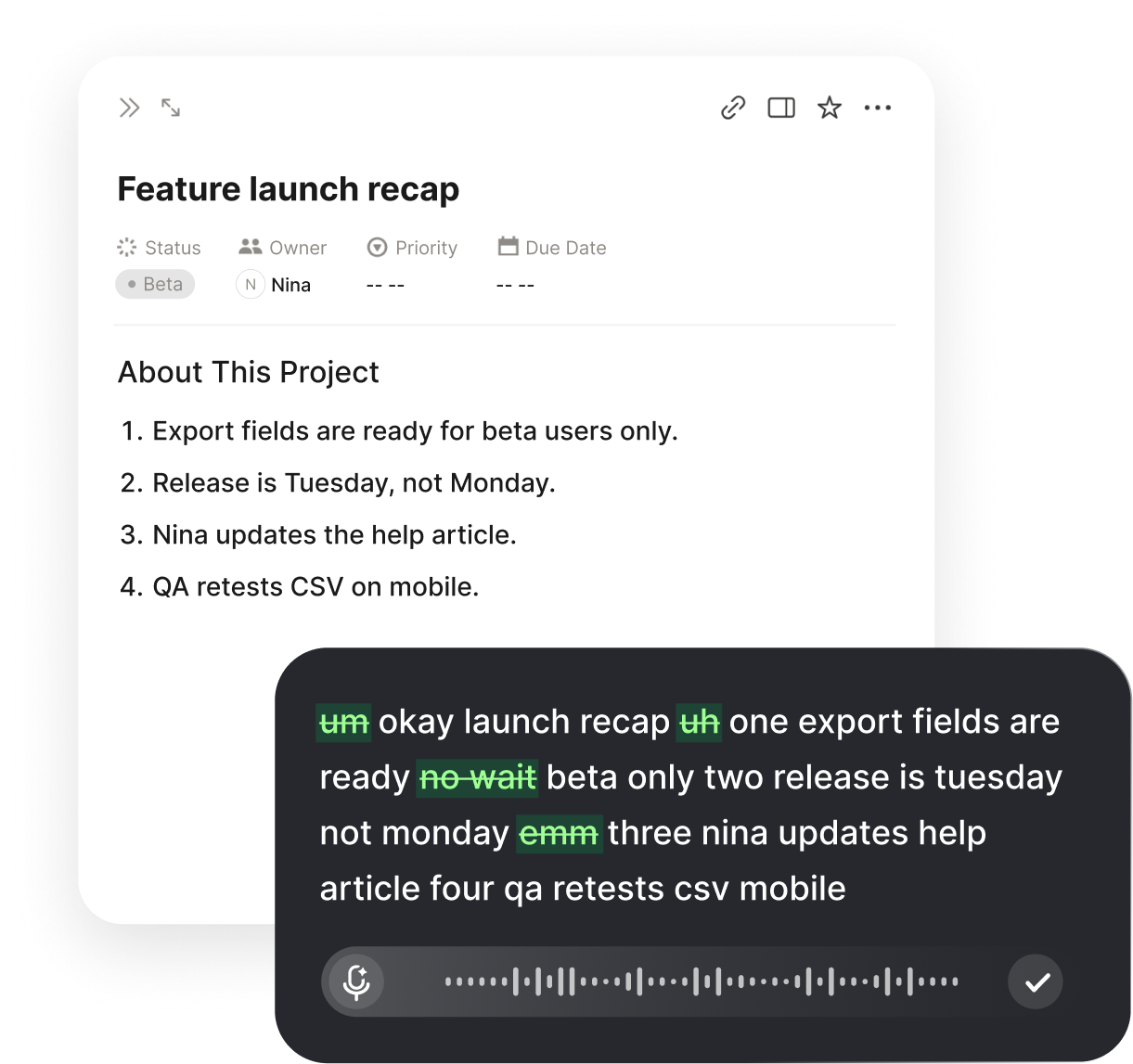
Voice to text for deaf communication bridges a simple gap: a hearing person speaks, and their words appear on screen as clean, readable text that a deaf person reads in real time. The hearing speaker uses the microphone and talks as they normally would; the deaf reader watches the words land and follows the conversation by reading rather than by hearing. No sign language is required of the hearing side, and no lip-reading guesswork is required of the deaf side, because the spoken words are simply shown as text.
This matters because so much everyday communication happens through speech that a deaf person cannot access directly. Writing notes back and forth is slow, lip-reading is tiring and error-prone, and not everyone around you signs. A tool that turns the hearing person's voice into instant text removes that friction: the words are there to read the moment they are spoken, so a deaf reader takes part in ordinary spoken exchanges without waiting for someone to write things down.
Voiskey is built so the text arrives ready to read, not as a raw transcript. It trims the ums and false starts, adds punctuation, and shapes loose talking into clean sentences, so a glance conveys what the speaker meant without decoding a messy stream. The goal is a clear, readable version of the conversation as it happens, one a deaf reader can trust and keep, rather than a rough dump that needs a second pass.
How a Conversation Flows
Setup is a one-time step of a couple of minutes. Install Voiskey, allow the microphone and accessibility permissions it asks for on first launch, and it is ready. After that, the hearing person presses a single key and speaks, and their words appear as text wherever the cursor sits, punctuated and formatted, with no separate window to arrange and no mode to switch on first. The hearing side talks, the deaf side reads, and the screen keeps up in real time.
Because Voiskey works at the system level, that one key turns speech into text anywhere on the computer, in a notes window, a chat box, a document, or a form in the browser. There is no special app to open for each situation and no copy-and-paste between tools, so a quick exchange and a long sit-down conversation both run on the same habit. One key covers every moment a hearing person needs to say something to a deaf reader.
The exchange runs both ways. The hearing person speaks and the deaf reader reads the text; the deaf person replies by typing, and the hearing person reads the answer on the same screen. If the deaf person prefers to speak and their voice is clear, they can do that too, and Voiskey turns their words into text as well. Because the full thread stays on screen, either side can scroll back to a name, a time, or a detail rather than starting the point over.
Where It Opens Up Conversations
At Work
Let a hearing colleague speak and read their words as text, so meetings, quick desk chats, and instructions no longer depend on someone stopping to write.

Appointments
Read what a doctor, clerk, or adviser says as clean text in real time, so important details come through exactly as spoken.
With Family and Friends
Have hearing relatives or friends who do not sign speak into the microphone, so casual talk flows without everyone switching to pen and paper.
A Record to Keep
Because the text stays on screen, save the parts that matter as a record, so names, dates, and instructions stay clear long after the talk ends.
Making Communication Genuinely Two-Way
Reading what a hearing person says covers one direction; real communication needs both. Voiskey keeps the deaf reader's side open by letting them reply in whatever way suits them. Typing a response keeps the whole exchange as one clean, readable thread the hearing person reads back. If the deaf person prefers to speak and their voice is clear, they can talk and let Voiskey turn their words into text too, so the conversation never depends on the hearing side guessing at speech.
This two-way flow is what separates real communication from one-sided captioning. A deaf person is not only receiving information; they are answering, asking, and steering the conversation like anyone else. By turning the hearing voice into text and giving the deaf reader a clear way to respond, Voiskey puts both people on the same footing, reading and writing the same thread rather than one person waiting on the other.
Having the entire exchange as on-screen text also removes the misunderstandings that creep into deaf and hearing conversations. When a name, a number, or an instruction is written rather than mouthed or scribbled in a rush, both sides act on what was actually said. That shared, accurate record builds trust on both ends, so conversations that once felt effortful become ordinary.
Getting Clean, Readable Text
A few habits make the on-screen text noticeably cleaner, which is what counts when reading is how the deaf person follows along. Ask the hearing speaker to talk in full thoughts at a steady, conversational pace rather than in clipped fragments, because Voiskey uses the surrounding sentence to punctuate and to choose the right spelling for names and similar-sounding words. Natural talking reads better than slow, broken speech, so there is no need to over-enunciate.
A laptop or phone microphone is usually enough, with a simple external mic helping when the speaker sits farther away or the room is noisy. The speaker does not need to raise their voice, since Voiskey handles quieter, close-mic speech, so a calm indoor conversation transcribes cleanly without anyone straining to be loud.
For the words that come up again and again, names, places, medical or work terms, add them to the custom vocabulary once. That dictionary syncs across devices, so the same words are recognized on a desktop or a phone, and the text grows more accurate over time, which means fewer moments where a misspelled name makes the reader stop and wonder what was meant.
It Works Alongside Signing and Lip-Reading
Voice to text does not replace sign language, interpreters, or lip-reading; it adds another route for the many moments those are not available. Not every hearing person signs, interpreters are not always on hand, and lip-reading only goes so far. Reading the hearing person's words as text fills those gaps, so a deaf person can communicate with anyone who can talk, not only with people who already know how to sign.
It is also not all-or-nothing, which keeps it flexible. A deaf person might use it only with hearing people who do not sign, lean on it fully in an important appointment, or keep it running through a long meeting as a reliable thread to read and reference. Because the shortcut is the same key every time, bringing it into a conversation fits naturally alongside signing, interpreting, and the other tools someone already uses.
Related workflows:
- Read the hearing speaker liveSpeech to on-screen text
- Reply by typing or voiceTwo-way conversation
- Keep the exchange on recordSaved transcript
Who Voice to Text for Deaf Communication Helps Most
This helps any deaf person who needs to communicate with hearing people who speak. Those who sign but deal with hearing people who do not, people who grew up oral and rely on reading rather than signing, and anyone who simply wants spoken words shown as text all gain the same thing: the hearing side's words on screen instead of a sound they cannot access. The shared need is to take part in spoken conversations without waiting for someone to write things down.
It matters just as much for quick daily exchanges as for formal settings. The steady stream of short questions, quick instructions, and passing remarks is exactly what tends to get skipped when communication is effortful, because stopping to write each one is impractical. Turning those into instant text means a deaf reader stays in the loop for the small things, from a changed plan to an offhand comment, not just the scheduled conversations.
Because the habit is one key in any app, it fits into real life rather than demanding a separate setup. A hearing colleague can speak at a desk in the morning, a clerk can speak at a counter in the afternoon, and a relative can speak at home in the evening, all turning into text the deaf person reads through the same key press. Over a week, the conversations that once needed an interpreter, a notepad, or a lot of patience become ones that simply happen, with both sides reading and writing the same clear thread.
FAQ s
The hearing person uses the microphone. They press one key and talk, and their words appear as text on screen for the deaf person to read. The deaf reader does not have to speak to make it work; they follow the conversation by reading.
By typing, which keeps the whole exchange as one readable thread, or by speaking if their voice is clear, in which case Voiskey turns their words into text too. Either way the conversation runs genuinely in both directions.
No. That is the point. The hearing person just talks normally and their words become text, so a deaf reader can communicate with anyone who can speak, not only with people who already sign.
Anywhere you can place a cursor. Because Voiskey works at the system level, the same key turns speech into text in a notes window, a chat box, a document, or a browser form, so it covers work, appointments, and conversations at home.
Add the names, places, and medical or work terms that come up often to the custom vocabulary once. It syncs across devices, so those words are spelled correctly everywhere, which means fewer moments where a wrong name makes the reader stop and wonder.
Yes. Because the text stays on screen, you can save the parts that matter, so names, dates, and instructions are there to check later instead of fading the moment the talk ends.


 Voiskey
Your voice, amplified.
Speak naturally, write effortlessly, and move faster. Turn your voice into polished, ready-to-use text wherever you work.
Use it across macOS, Windows, iOS, and Android