
Voice to Text ChatGPT Extension Explained
Voiskey is a voice to text ChatGPT extension that turns everything you say into clean, accurate text right inside the ChatGPT box.
 Voiskey Team
What a Voice to Text ChatGPT Extension Actually Does
A voice to text ChatGPT extension does one deceptively simple thing: it lets you speak instead of type, and it puts the resulting words directly into the ChatGPT message box. Voiskey listens through your microphone, converts your speech into text in real time, and drops that text into the field you are already working in. There is no copy and paste, no switching to a separate transcription app, and no waiting for a file to process. You talk, and the words appear where you need them.
The reason this matters is speed and flow. Typing a detailed prompt can be slow, and long requests often get trimmed down simply because writing them out is tedious. When you can speak at a natural pace, you tend to give ChatGPT richer context, more background, and clearer instructions. That usually leads to better answers on the first try, which means fewer follow-up messages and less back-and-forth.
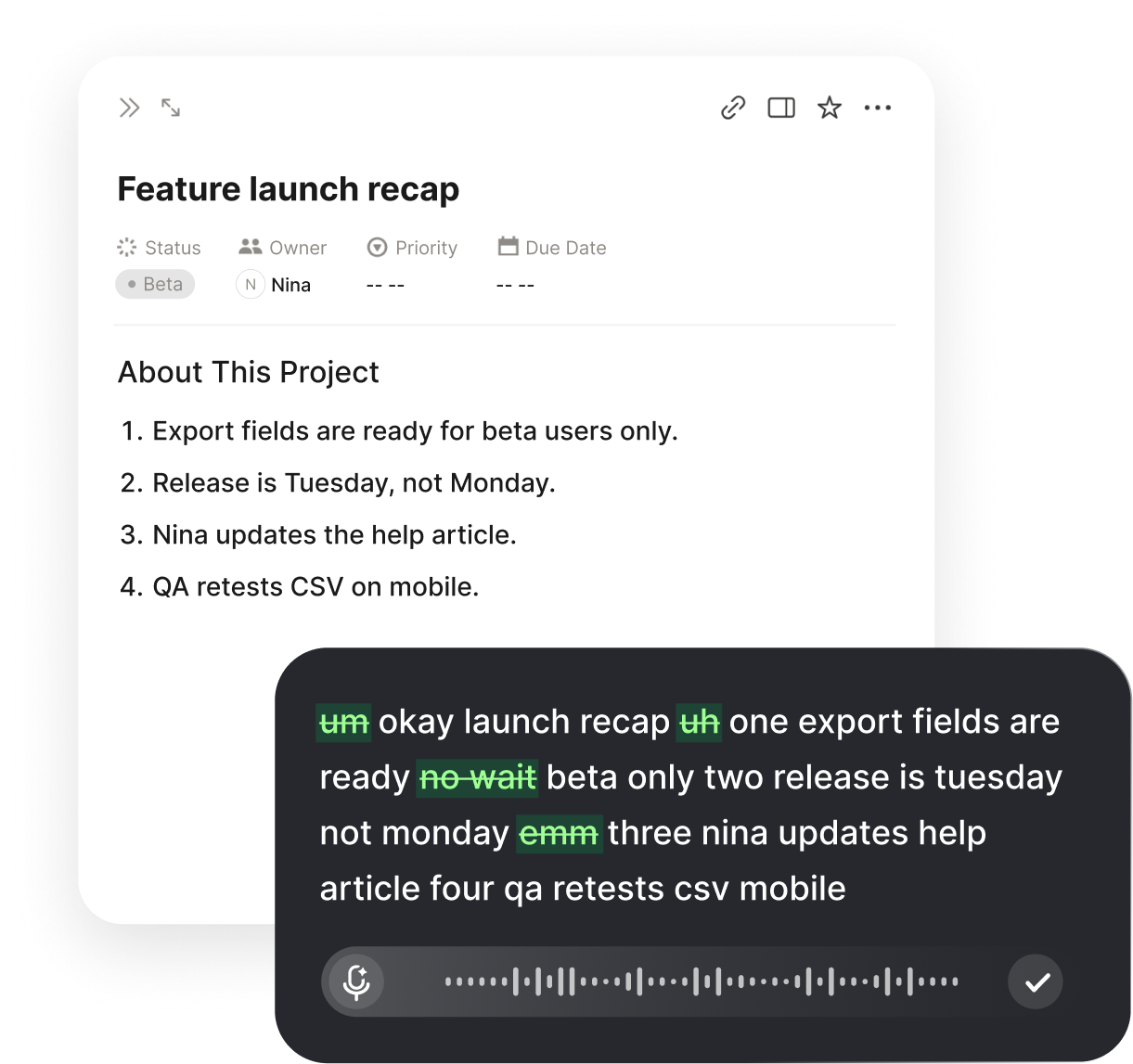
Voiskey is designed specifically for this kind of work. It is not a generic recorder bolted onto a web page. It understands that the text is destined for a chat prompt, so it keeps formatting clean, inserts punctuation on command, and strips out the verbal clutter that normally shows up in raw transcripts.
Installing Voiskey in Chrome
Getting started takes about a minute. Open the Chrome Web Store, search for Voiskey, and click Add to Chrome. Once it installs, pin the Voiskey icon to your toolbar so it is always within reach. The first time you dictate, Chrome will ask for microphone permission; accept it once and you are set for every future session.
After installation, open ChatGPT in a tab and click into the message box as you normally would. Trigger Voiskey with its keyboard shortcut or the toolbar button, and start speaking. Your words stream into the box as you talk. When you pause or stop, the text stays exactly where it landed, ready for you to review or send.
If you prefer a dedicated window, Voiskey also ships as a desktop app for Mac and Windows. The browser extension and the desktop app share the same engine, so whichever you choose, the accuracy and voice commands behave the same way.
Features That Make Dictation Usable
A good dictation tool has to do more than transcribe. It has to produce text you can actually send without cleanup. Voiskey focuses on exactly that, pairing real-time speech recognition with a set of features that keep your output tidy and ready to use in ChatGPT.
Each of these works out of the box, with no configuration required. You can start talking the moment the extension is installed and refine your habits as you go.
Core capabilities at a glance
- Real-time transcription that keeps pace with natural speech, so text appears as you talk rather than after a long delay.
- Voice punctuation commands for periods, commas, question marks, and new paragraphs, letting you structure prompts hands-free.
- Automatic filler-word cleanup that removes um, uh, and false starts before the text reaches ChatGPT.
- High-accuracy recognition that handles technical vocabulary, product names, and fast delivery.
- Support for many languages, so you can dictate in the language you think in.
- A privacy-conscious design that keeps you in control of what you ultimately submit.
Why Accuracy and Cleanup Matter
The difference between a dictation tool you keep and one you abandon usually comes down to accuracy. If you have to fix every third word, speaking is slower than typing and the novelty wears off fast. Voiskey is tuned for high accuracy across accents, speaking speeds, and specialized terminology, so the text that lands in ChatGPT is close to final the moment it appears.
Just as important is what Voiskey removes. Human speech is full of hesitations, repeated words, and half-finished thoughts. A raw transcript captures all of it, which makes for a messy prompt. Voiskey quietly cleans up filler words and false starts, so your prompt reads like intentional writing. That not only looks better, it also helps ChatGPT focus on your actual request rather than parsing around the noise.
Clean input tends to produce clean output. When the model is not distracted by stray ums and duplicated phrases, it can give a more direct answer. Over a full day of prompting, that small quality bump adds up to real time saved.
Beyond ChatGPT: Where Voiskey Works
While this guide focuses on ChatGPT, one of the quiet advantages of Voiskey is that the same dictation works almost everywhere you type in the browser and on the desktop. The habit you build dictating prompts carries over to the rest of your day without any new tools to learn.
That means the keyboard shortcut and voice commands you use in ChatGPT behave the same way in your email, your documents, and your code editor. You learn one tool and use it across your whole workflow, which is a big part of why dictation starts to feel natural rather than like a gimmick you only reach for occasionally.
Common places people dictate with Voiskey
- ChatGPTSpeak long, detailed prompts without typing a word.
- Google DocsDraft documents and notes at the speed of speech.
- GmailDictate replies and new messages hands-free.
- CursorDescribe code changes and prompts inside your editor.
- Slack and NotionFire off messages and capture ideas quickly.
Tips for Your First Week
The fastest way to get comfortable is to treat dictation like a conversation. Speak in complete thoughts, use the punctuation commands as you go, and resist the urge to correct every tiny thing mid-sentence. Review at the end instead. Within a few days, inserting a period or a new paragraph by voice becomes automatic.
Start with prompts you write often. If you regularly ask ChatGPT to summarize, rewrite, or brainstorm, dictate those first. Because the structure is familiar, you will quickly see how much faster speaking is, and you will build confidence before tackling longer, more complex requests. By the end of the week, most people find they reach for the keyboard far less than they expected.
It also helps to set up a comfortable environment. A decent microphone, a quiet room, and a familiar keyboard shortcut make a noticeable difference in both accuracy and comfort. Learn the two or three punctuation commands you use most, and let the rest come naturally over time. There is no need to memorize a long list; the handful you rely on daily will stick almost immediately, and the tool stays out of your way for everything else.
Get Started Today
Adding voice to your ChatGPT workflow does not require a big commitment. Install the extension, grant microphone access, and dictate your next prompt. If it saves you time, keep going; the habit builds itself from there. Voiskey was made to disappear into your workflow so you can focus on thinking and let the typing take care of itself.
Whether you are drafting long prompts, iterating on ideas, or simply tired of typing, a dependable voice to text tool changes how it feels to work with ChatGPT. Give it a try and see how much more you say when speaking is the easy path.
FAQ s
It is a browser add-on that listens to your microphone and types what you say directly into the ChatGPT message box. Instead of tapping out a long prompt on the keyboard, you speak naturally and the extension converts your speech into text in real time. Voiskey does this inside Chrome, so your words appear in ChatGPT as you talk, complete with punctuation and sensible formatting.
Open the Chrome Web Store, search for Voiskey, and click Add to Chrome. Pin the icon to your toolbar so it is always one click away, then grant microphone access the first time you use it. The whole process takes under a minute, and you can start dictating into ChatGPT immediately after the permission prompt is accepted.
Yes. Voiskey offers both a Chrome extension and a desktop app, so you can dictate into ChatGPT in the browser or in a dedicated window. The experience is consistent across both: you hold or toggle the shortcut, speak, and your words land in the active text field with accurate punctuation.
You can. Voiskey supports voice commands for punctuation, so saying period, comma, question mark, or new paragraph inserts the right character or line break. This lets you build structured, multi-line prompts without ever touching the keyboard, which is especially useful for long or detailed ChatGPT requests.
Voiskey is built for high accuracy, even with technical terms, product names, and fast speech. It also cleans up filler words like um and uh automatically, so the text that reaches ChatGPT reads like something you wrote rather than a raw transcript. Accuracy holds up well across accents and many supported languages.
Voiskey is privacy-conscious by design. It processes your speech to produce the text you see and does not treat your dictation as material to repurpose. You stay in control of what you send to ChatGPT, and you only transmit the final text you choose to submit as a prompt.


 Voiskey
Your voice, amplified.
Add the Voiskey voice to text ChatGPT extension to Chrome and start dictating into ChatGPT today.
Use it across macOS, Windows, iOS, and Android