
How to Take Better Notes by Voice
Capture more, type less, and keep notes you will actually use. Speak the idea while it is still fresh, and Voiskey lands clean, readable text right where you already keep notes. Skip the keyboard, keep the thought - your notes end up usable instead of abandoned.
 Voiskey Team
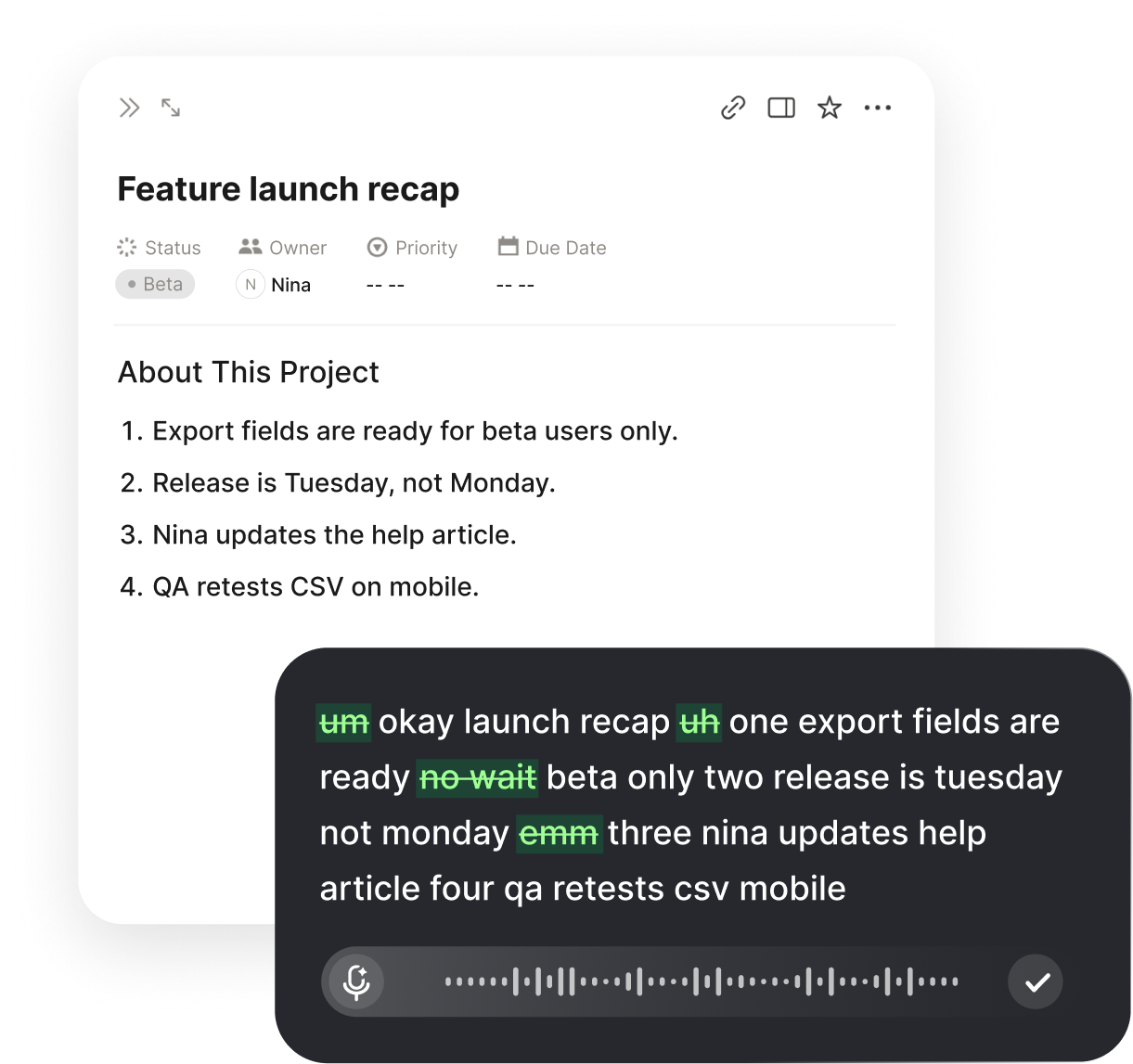
Why Most Notes Get Written and Never Used
Open a notes app on most phones or laptops and you will find the same graveyard: a long list of headlines, half-sentences, and ideas with no endings. The notes were written in a hurry, never revisited, and mostly useless by the time they were needed. That is not a notes app problem.
It is a capture problem. When getting the idea down costs effort, you shorten it, simplify it, or skip it. The result is not a bad tool - it is a workflow where the fastest path was the broken one. Better notes start with a faster way to write things down, not a different place to store them.
The Real Bottleneck: Getting Words Down Before They Fade
A thought has a short shelf life. An idea that surfaces in a meeting, on a walk, or between calls is worth maybe two minutes before it starts to lose detail. Typing at roughly 45 words per minute, you cannot outrun it - you can only capture a fragment.
Speaking is about five times faster. The national average for typing sits around 40-45 wpm, while Voiskey voice input runs at 220+ words per minute. That margin is the whole game: at speaking speed, you can capture the thought whole, with its reasoning, before the moment passes.
Capture Notes the Moment They Happen
The best note is the one written before the context disappears. With a voice note taker, you can turn a thought that crosses your mind into text while you are still having it - standing, walking, or mid-conversation.
You speak plainly, the way you would say it to a colleague. You read it back in seconds, and it is already in the place where you keep your notes. Nothing was sketched, nothing was lost in translation.

Any notes app
Whatever you already use - a system note app, a workspace tool, a text file - voice works wherever you type. Voiskey writes into the app you already trust, so there is nothing new to adopt and nothing new to sync. The note lands where you will actually look for it.
Any moment
At your desk, on a walk, between meetings - the note happens at the speed of thought, not the speed of a keyboard. Say the idea while it is still forming and Voiskey turns it into text you can read later. A two-minute conversation with yourself beats a blank page every time.

Any language
Speak in the language you think in and get native-sounding text, across 100+ languages. Voiskey keeps your meaning and your terms intact, so switching languages never means losing the idea. The notes stay searchable and consistent wherever they were captured.
What a voice capture looks like:
- Place the cursorIn any notes app, anywhere on your device
- Speak the noteSay it the way you would explain it out loud
- Read the clean textFull sentences, punctuation already added
- File and move onTwo taps, back to what you were doing
Hand the Formatting to the Note Taker
Raw speech is messy: fillers, false starts, grammar slips, and punctuation guesses. If you had to clean all of that up by hand, voice notes would never feel faster. The note taker is supposed to do that for you.
Voiskey turns what you say into text that already reads like a note. It removes the fillers and stumbles, fixes grammar slips, and adds punctuation and structure as you go. Output is finished enough to file, share, or search - not another draft to clean up later.
What Voiskey cleans up for you:
- Fillers and stumblesThe urns, ahs, and restarts disappear
- Grammar slipsSentences come out coherent on the first pass
- Punctuation and structureFull stops, commas, paragraphs - already in place
- Tone and word choiceAdapted to fit the intent behind what you said
Keep Your Vocabulary Correct, Every Time
Notes are full of the things that are hard to spell and easy to get wrong: client names, product terms, project codenames, acronyms, and jargon. Every wrong spelling you have to fix is friction you will feel the next time you capture a note.
Voiskey learns your names, jargon, and spelling preferences, so the terms you use every day come out right from the first sentence. Your notes stay written in your vocabulary, your style, and your spelling - not in a general-purpose guess.
Use the Notes Apps You Already Trust
Forgetting where something was saved is almost as costly as not saving it at all. The safest place for your notes is the app you already open: your system notes app, your workspace tool, or that one trusted document.
Voiskey does not ask you to migrate. It writes into whatever app has the cursor, on whatever device you are on - macOS, Windows, iOS, and Android - so the notes you already keep stay there, just faster to fill.
A Simple Voice Notes Routine That Produces Things
Better notes are not about a clever system. They come from a short routine you actually repeat: capture first, decide later, and review on a rhythm.
Capture as things happen - a voice note in the moment, in the app you trust. Once a day, spend five minutes reading those notes and turning them into one of three things: a task, a message, or a reference. The notes that survive are the ones that become something. Voice capture makes sure they were recorded completely enough to become something.
What to Look for in a Good Note Taking App
Good note taking apps are judged on what happens at the moment of capture, not on the size of the feature list. Before you commit to one, check four things.
First, capture speed: can you get a complete thought down in seconds? Second, output quality: does what you capture come out usable, or does it need editing? Third, vocabulary: does the tool learn the names and jargon you use? Fourth, fit: does it work in the app you already use, on the devices you carry?
Voice note taking clears the first bar decisively, and it is why the notes you take start improving the moment you stop typing them.
FAQ s
Not by itself. Voiskey is AI voice typing that turns what you say into clean, formatted text inside the notes apps you already use. It does not replace your notes app - it makes it faster to fill.
Voiskey voice input works at 220+ words per minute, versus roughly 45 words per minute for typing. That gap is what lets you capture a complete thought while it is still fresh.
No. Voiskey writes down the words you speak as you speak them. It does not record or transcribe other people's speech, so it will not capture a meeting or lecture for you - it is a voice input layer for your own thoughts.
Yes. Voiskey turns your voice into native-sounding text across 100+ languages, and you can speak in one language and get text in another when you need to translate.
No. Voiskey works in any text field, on macOS, Windows, iOS, and Android. Your existing notes app, wherever your notes live today, is where the text lands - just without the typing.


 Voiskey
Your voice, amplified.
Capture ideas at speaking speed and keep notes you will actually use. Try it in the notes app you already have.
Use it across macOS, Windows, iOS, and Android