
Best Notes App for Android: Speak Your Notes
The right phone notes app is the one you can speak into. Keep Google Keep, Samsung Notes, OneNote, or a workspace tool and add voice on top, so the text lands where you already look. Capture in a meeting, on a walk, or in a coffee line, then read clean notes later without fighting the glass keyboard.
 Voiskey Team
What Best Notes App for Android Really Means When You Use It Daily
Most roundups of the best notes app for android judge apps by feature lists: folders, tags, formatting, export. But the feature that decides whether you take notes at all is the one nobody lists - how fast you can get words out of your head and into the app.
A notes app you do not reach for is not the best notes app for android, no matter the score it gets in a review. Judged by daily use, the winner is the combination that lets you capture a thought in the seconds you have: the app you trust, plus an input method that keeps up with you.
Typing on Glass Is the Slowest Part of Note Taking
On a phone, every note starts with the glass keyboard: small keys, autocorrect arguments, and hands that are usually busy - walking, carrying a bag, or holding a coffee. The friction is real, and it is why most phone notes end up as three-word fragments.
Voice changes the arithmetic. Speaking is roughly five times faster than typing - Voiskey voice input runs at 220+ words per minute against roughly 45 wpm on a keyboard. On Android, that speed is the difference between capturing the idea and losing it.
Turn Your Android Keyboard Into a Voice Note Taker
The cleanest way to get faster notes on Android is not to replace your notes app, but to upgrade what happens when you tap into it. With Voiskey, the text field you already use becomes the input point - you speak a note and the finished text lands in the note.
You keep your current note-taking setup, your folders, and your habits. What changes is the act of writing: instead of thumb-typing a compressed version of the thought, you say the whole thing out loud and get it back as clean text.
How to take a voice note on Android:
- Open your notes appThe one you already use - nothing to migrate
- Tap the text fieldThen start the voice input
- Speak the noteThe whole thought, in the moment
- Save the clean textPunctuation and structure already handled
From Raw Speech to a Note You Can Actually Read
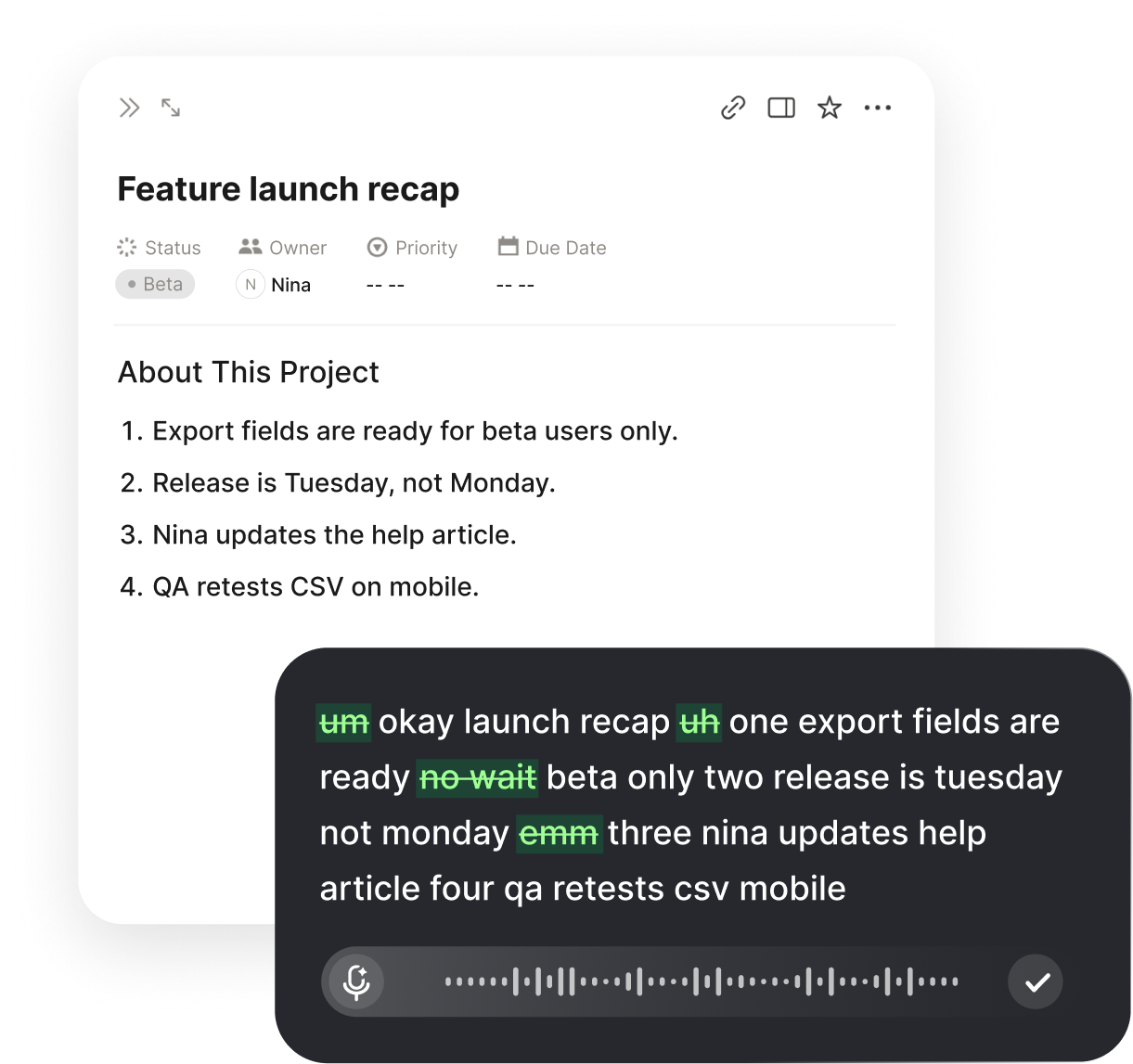
The reason more people do not talk their notes is the old fear of messy transcripts: full of umms and grammar slips and no punctuation. A good voice note taker closes that gap between speaking and writing.
Voiskey removes the fillers and false starts, fixes grammar as it goes, and applies punctuation and formatting while you speak. What appears on your Android screen is a readable note, not a speech log. It also learns your names, jargon, and spelling preferences, so the terms you use stay correct.
Notes Apps That Keep Getting Used
The notes app that wins is the one you open without thinking. Adding voice input to that app does not create a new system to learn - it just removes the slow part of the one you already built.
The same voice experience follows you across devices: the note you capture on the phone can be refined on a Mac or Windows machine later, because Voiskey works wherever you type. Your notes stay in the app you chose, and the input gets faster everywhere.

Your notes app stays
Google Keep, Samsung Notes, OneNote, or a workspace tool - the text lands where you already keep notes. Voiskey writes into the app you already trust, so there is no new place to remember and no new folder to check. Keeping your existing app is the point, not a compromise.
Voice across devices
Capture on Android, refine on Mac or Windows - one voice experience across macOS, Windows, iOS, and Android. Start the note on the phone and open the finished text at your desk, with the same habits on every device. The voice layer travels with you; the notes stay where you put them.
Text that is already clean
No umms, no fragments, punctuation in place. Voiskey turns spoken notes into text you can read next week without translating them. Notes that are already clean get used; notes that are raw get skipped.
What to Check Before You Pick a Note Taking App
When you compare note taking apps for phone use, hold each candidate to the moments that actually matter, not to the settings screen.
Check capture speed - how quickly you can save a full thought. Check output quality - whether the note comes out readable or demands editing. Check vocabulary - whether it learns the names and terms you use. Check continuity - whether it works with the app you trust, on the devices you carry. Voice note taking with Voiskey scores on every one of those, without asking you to move a single note.
FAQ s
Voiskey is not a notes app. It is a voice input layer that turns your speech into finished text inside any notes app on Android - so the notes app you already use becomes fast enough to actually use.
Open the notes app you already use, tap into a text field, and speak. Voiskey converts your speech into clean, formatted text in the note, with punctuation and structure handled as you go.
Yes. Voiskey works in any text field, so it works with Google Keep, Samsung Notes, OneNote, and any other app where you type notes. There is nothing to migrate.
No. Voiskey writes down the words you speak as you speak them. It does not record other speakers or background audio, so it is built for your own thoughts, not for dictating a meeting.
Yes. Voiskey runs on macOS, Windows, iOS, and Android, so the notes you capture on your phone can be refined later on a computer - without changing how you work.


 Voiskey
Your voice, amplified.
Add voice to the notes app you already have on Android and stop typing notes by hand.
Use it across macOS, Windows, iOS, and Android