
Voice to Text for Students
Write at the speed you think
Speak your lecture notes, essays, and emails to professors, and Voiskey turns them into clean text. It is free to start.
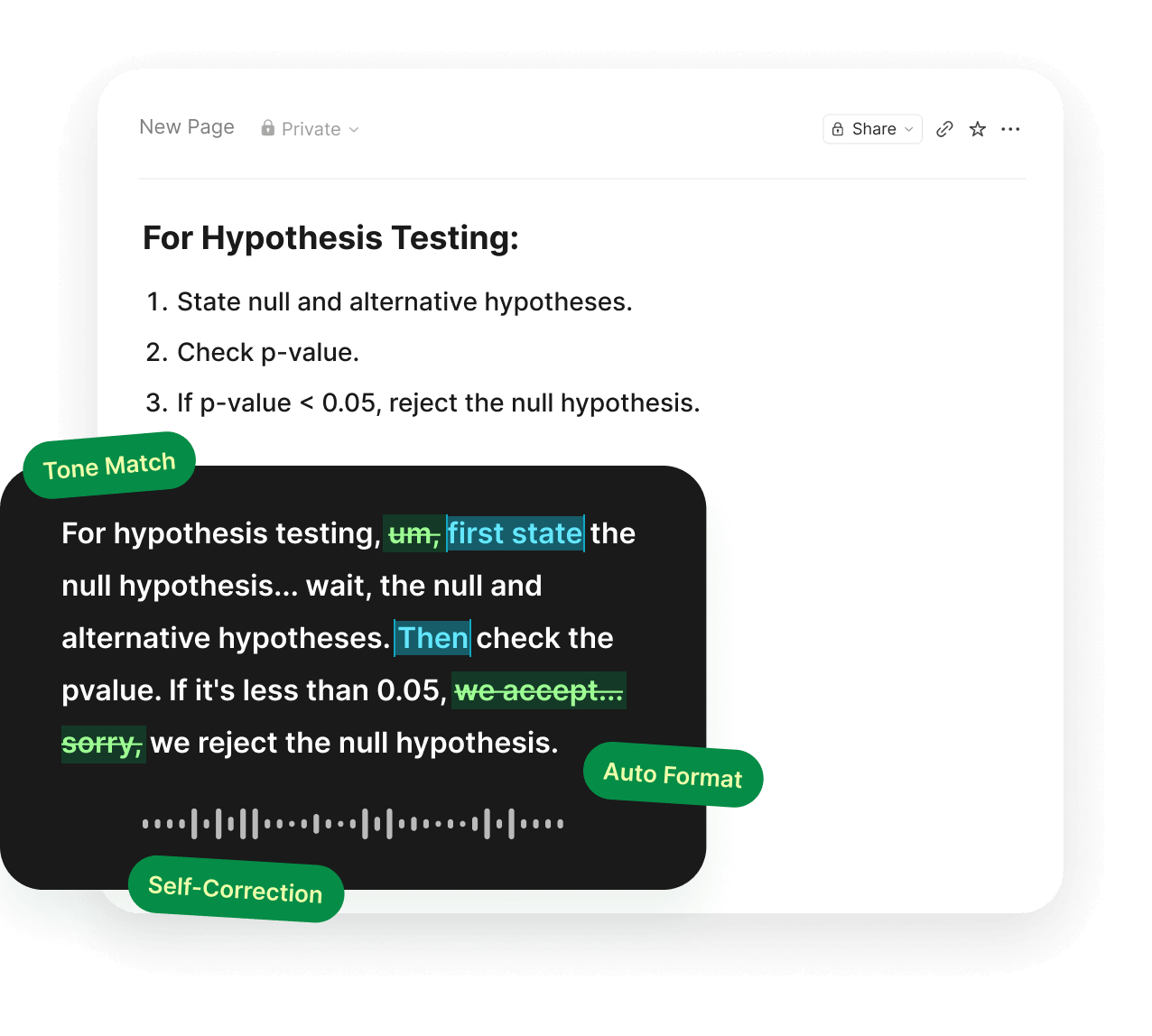
Why Students Use Speech to Text
Most student writing does not start with a clean sentence. It starts with a half-formed thought during a lecture, a paragraph you have rewritten four times, or an email to a professor you have been putting off since Tuesday.
When we asked students to redesign voice input, one team interviewed eight international students first. They rewrite the same message three or four times before sending it. The higher the stakes, the longer the delay. And when they are tired, two languages mix in their head, so untangling that takes real effort.
Speech to text software for students takes out the slowest part of that loop. Speaking runs at around 220 words per minute, typing at around 45. Start rough, pause, restart, correct yourself out loud. Voiskey turns that into text you can use.
What Students Dictate
Lecture notes
Voice to text for lectures works best in the gaps around class. Walk out and talk through what actually mattered while it is still fresh. There is no time limit on a session, so a three-hour seminar can come out in one go.
Essay drafts
Dictate an essay the way you would explain it to a friend who is not in your class. Say the messy version, then rearrange the text afterwards. The words are still yours. All you have changed is how they get onto the page.
Reading notes
Talk through a paper's argument as you go, instead of stopping to type a comment every time you have a thought.
Emails to professors and TAs
The message you have been rewriting since Tuesday takes about thirty seconds to say out loud.
Group projects
Updates, handoffs, and the message explaining what you meant in the last message.
Prompts for AI tools
A good prompt is longer than most people want to type, so it gets shortened into something vague. Say the whole thing instead.
Speech to Text for Students with Disabilities
Typing for hours is not equally easy for everyone. Some students deal with hand or wrist pain. Some find that getting words out through a keyboard is much slower than their thinking. Some are working around a cast or an injury in the middle of a semester. Speaking is a lower-effort path to the same result.
You can dictate in short bursts, pause for as long as you need, speak quietly, and edit the text afterwards, in the apps your coursework already lives in.
Voiskey is a writing tool, not an assistive technology device or a medical product. If you have formal accommodations at your school, check with your disability services office about which tools are approved for your coursework and exams.
Dictate Across Study Apps
Voiskey is a voice keyboard, so it works anywhere you can type. Google Docs and Word for papers. Notion and OneNote for notes. Gmail and Outlook for the email you have been avoiding. Slack, Discord, and iMessage for the group project. ChatGPT and Claude at one in the morning. Overleaf, Zotero, and whatever portal your department decided on. There is no integration to set up.
You also do not have to talk out loud. Whether you're in a quiet library or sharing a room, Voiskey picks up softer speech, including a whisper. That is the difference between a tool you use at home and one you use during the day.
Workflows for Campus Life:
- Class and reading notesVoice typing for notes
- Emails to professors and TAsVoice typing for emails
- Group chats and quick repliesVoice typing for messages
- Project updates and handoffsVoice typing for teams
- Recaps after a study groupVoice typing for meetings
Multilingual Typing for International Students
More than 1.1 million international students study in the United States. For most of them, every email and every assignment carries an extra step. You have the thought in one language, then produce it in another.
Voiskey removes that step. Speak in the language you think in and get the text in the language you have to submit it in. Say it in Mandarin, Korean, Spanish, Hindi, or Arabic, and get clean English on the page.
Tired, nervous, or fast-talking bilingual brains mix the two languages, and when that happens Voiskey still returns one clean version. You do not have to stop and start the sentence over.
100+ languages across 20+ keyboards. Voiskey also learns the names and field-specific terms that matter in your major.
Getting Started with Free Trial
Everyone already gets the same generous gifts. One month of Pro free when you create an account, up to two more months when you invite friends, and 2,000 words a week on the free plan after that, with no expiry date.
No .edu address to supply and no enrolment to verify. You shouldn't have to miss out on student verification just because your school didn't issue you a .edu email.
FAQ s
It takes out the slowest step in student writing, which is producing the first version. You speak several times faster than you type, and Voiskey cleans up the fillers and restarts, so a rough spoken thought becomes text you can edit.
One month of Pro free when you create an account, up to two more months for inviting friends, and 2,000 words a week after that, with no expiry date.
You can keep speaking for as long as you need in a single session.
Yes. Voiskey picks up softer speech, including a whisper, so you can dictate quietly in a shared space.
Yes. Voiskey supports 100+ languages across 20+ keyboards. Speak in your own language and get the text in the language you need to write in, and if two languages come out mixed in the same sentence, Voiskey still returns one clean version.
Voiskey learns names, field-specific vocabulary, and your spelling preferences, so the terms that matter in your major come out the way you write them.
Built-in voice typing gives you the words you said, inside one app. Voiskey cleans up fillers and restarts, adapts formatting and tone to what you are writing, and works across the apps you already use.


 Voiskey
Your voice, amplified.
Speak naturally, write effortlessly, and move faster. Turn your voice into polished, ready-to-use text wherever you work.
Use it across macOS, Windows, iOS, and Android