
Voice to Text for Sales
Log the Call and Write the Next Step With Your Voice
Most of a rep's day goes into writing up what just happened. Say it instead, and Voiskey hands you text you can paste anywhere. Free to start.
Why Sales Reps Dictate
The selling part of sales is spoken. The record of it is typed, and that is where the day goes. Call notes, the CRM update, the internal handoff, the message to the champion who went quiet.
None of it is hard. It is just a lot of typing, and it always lands in the ten minutes between one conversation and the next.
So it gets postponed, and a note written Thursday about a call from Monday is a worse note. The objection behind the objection, the name of the person who actually signs, those fade first.
Speaking runs at around 220 words per minute, typing at around 45. For a paragraph of context that gap decides whether the call gets logged now or never.
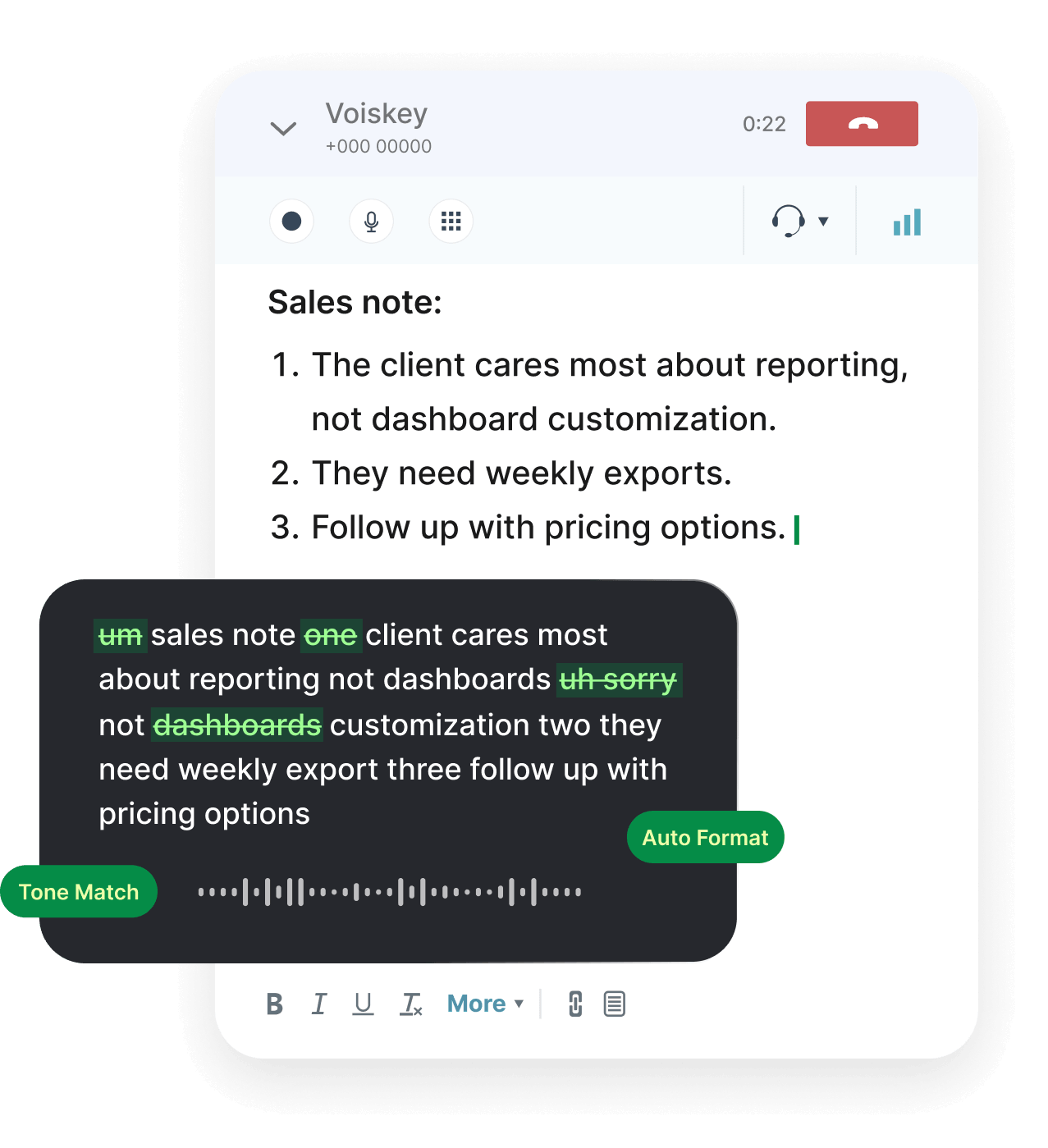
Say the rough version. Correct yourself halfway through. Voiskey clears out the fillers and restarts and hands you something you can paste into the record.
The Ten Minutes After the Call
You are still holding the whole conversation, and you have somewhere to be.
Talk it out instead. What they care about, what they pushed back on, who else is in the room, what happens next and by when. Thirty seconds of speaking produces a record with the reasoning in it, not just an outcome.
Voice to text in Salesforce works the same way it works anywhere else. Click into the call log, the opportunity description, the activity note, or the task field, speak, and the text lands where you were about to type. Voiskey runs at the input level rather than inside one application, so a HubSpot deal record, a Zendesk ticket, and a Slack thread behave identically.
Voiskey will not fill your CRM fields for you. Search for a way to automate crm data entry from sales calls and you will find tools that promise to write the record instead of you. This is the other approach: you say it rather than type it, and you still decide what goes in.
On your phone the same thing happens in the parking lot. Voiskey is a full keyboard on iOS and Android, so say the note before you pull out, or type it there without switching keyboards.
What Else Sales Reps Dictate

Follow-Ups and Replies
The one you have been meaning to send since Tuesday. Say what you want it to do, then read it before it goes.

Proposals and Scoping Notes
Talk through the shape of the deal the way you would explain it to the colleague at the next desk. Where the value is, what is in scope, what you are leaving out.
Prospect Messages
Short and specific. Speaking keeps sentences shorter than typing does, and length is most of what separates a note that gets read from one that gets deleted.
Internal Handoffs
The message to solutions engineering, to legal, to whoever inherits this next. Context is the entire value of a handoff, and the first thing people stop typing when they are in a hurry.
Renewal and QBR Prep
What changed this quarter, what they complained about in March, what you want out of the meeting.
Weekly Pipeline Commentary
The paragraph your manager actually reads, written while you still remember why the number moved.
It Gets the Names Right
A note that spells the account wrong is worse than no note, because someone downstream will search for it and not find it.
Sales vocabulary is unforgiving here. Company names that are two words pretending to be one, product tiers, the internal codename for the deal, the champion whose surname nobody spells right, the acronym your industry uses that no dictionary has seen.
Voiskey learns them. Add an account name, a product name, or a spelling you prefer, and it stops guessing. That vocabulary follows you across devices, which matters more in sales than in most jobs, because half of what you write gets written between meetings on a screen the size of your hand.
Works Where the Deal Lives
Voiskey works anywhere you can type, so there is nothing to add to your CRM and no integration for anyone to approve. Salesforce and HubSpot for the record. Outlook and Gmail for the inbox. Slack for the internal thread. LinkedIn and WhatsApp for the prospect. Zendesk when it becomes a support issue. Word, Notion, and Google Docs for the proposal.
You also do not have to talk at full volume. Voiskey picks up softer speech, including a whisper, so an open-plan floor works as well as the car.
Workflows for a sales week:
- Call notes and prep before a meetingVoice typing for notes
- Follow-ups and client repliesVoice typing for emails
- Prospect DMs and quick repliesVoice typing for messages
- Deal handoffs and internal updatesVoice typing for teams
- Recaps after a discovery callVoice typing for meetings
Writing to Clients Across Languages
If your territory crosses a language line, the slow part is not the thinking. It is producing a sentence in a language you speak well enough to sell in but not well enough to write in quickly.
Voiskey supports 100+ languages and 20+ keyboards, and it does more than swap words. It adjusts word order, register, and the phrasings a native speaker would actually use, so the result reads like it was written rather than translated. You can mix two languages in one sentence and still get clean output in one.
Say it in whichever language it comes to you in. What reaches the client reads the way their side of the market writes.
FAQ s
Nothing. Voiskey is not tied to one system, so a Salesforce call log, a HubSpot deal record, a Zendesk ticket, a LinkedIn message, and a Slack thread all take dictation the same way, and so will whatever you move to next.
No, and that is deliberate. A message to a prospect stays direct, a message to a colleague stays casual, and neither arrives as the same formal paragraph. Some tools polish everything into one house voice, which in sales is the one thing you cannot afford. The words are still yours.
No. Voiskey turns what you say into text at your cursor. It does not read the records in your CRM, the emails in your inbox, or anything else on your screen. What happens to the audio is covered in the Privacy Policy.
A wide range of accents is ordinary input here rather than an edge case. If one account name or industry term keeps coming out wrong, teach it that term once and it stops guessing.
For most reps, yes. Two thousand words a week covers call notes, deal records, and short replies. It goes faster if you also draft long proposals out loud. The free month up front, plus the referral months, is long enough to see where your usage lands.


 Voiskey
Your voice, amplified.
Speak naturally, write effortlessly, and move faster. Turn your voice into polished, ready-to-use text wherever you work.
Use it across macOS, Windows, iOS, and Android