
Voice to Text for Founders
Write Updates, Replies, and Job Posts With Your Voice
Founders write more different kinds of things than anyone. None take long on their own. Switching between them takes the day. Free to start
Eleven Kinds of Writing Before Lunch
Founders do not write more than other people. They write more kinds of things.
An engineer writes about code all day. A lawyer writes documents all day. You write a prompt, then a job post, then a reply to a customer who emailed you personally, then a Slack message that settles an argument, then a paragraph for the investor update you have been avoiding since the 3rd.
None of them takes long. That is exactly why they pile up: nothing on the list is big enough to block out time for, so all of it happens in the gaps, and the gaps are the whole day.
The expensive part is not the typing. It is stopping, loading the context, finding the right tone for whoever this one is going to, and then doing it again nine minutes later for something completely different.
Speaking runs at around 220 words per minute and typing at around 45, but the real gain is smaller than that gap and more useful: the version you say out loud is the one you already had in your head, so there is nothing to load.
A Day in Text Fields
Morning, the prompt
The one where you explain the whole situation to an AI tool before asking it anything. It is longer than you want to type, so it usually gets shortened into something vague.
Mid-morning, the job post
You have described this role out loud four times this week already. Say it a fifth time and keep it.
Before lunch, the customer who emailed you directly
Still you answering, because it is still that kind of company.
Afternoon, the decision in Slack
The decision takes one line. The reason behind it takes five, and the reason is the part people stop typing when they are in a hurry.
Late afternoon, the investor update
The monthly one that slips to the 14th. Say what happened, what the number did, and what you need.
Eleven at night, the note to yourself
The idea that will be the whole roadmap by Friday, if it survives until morning.
Same News, Three Audiences
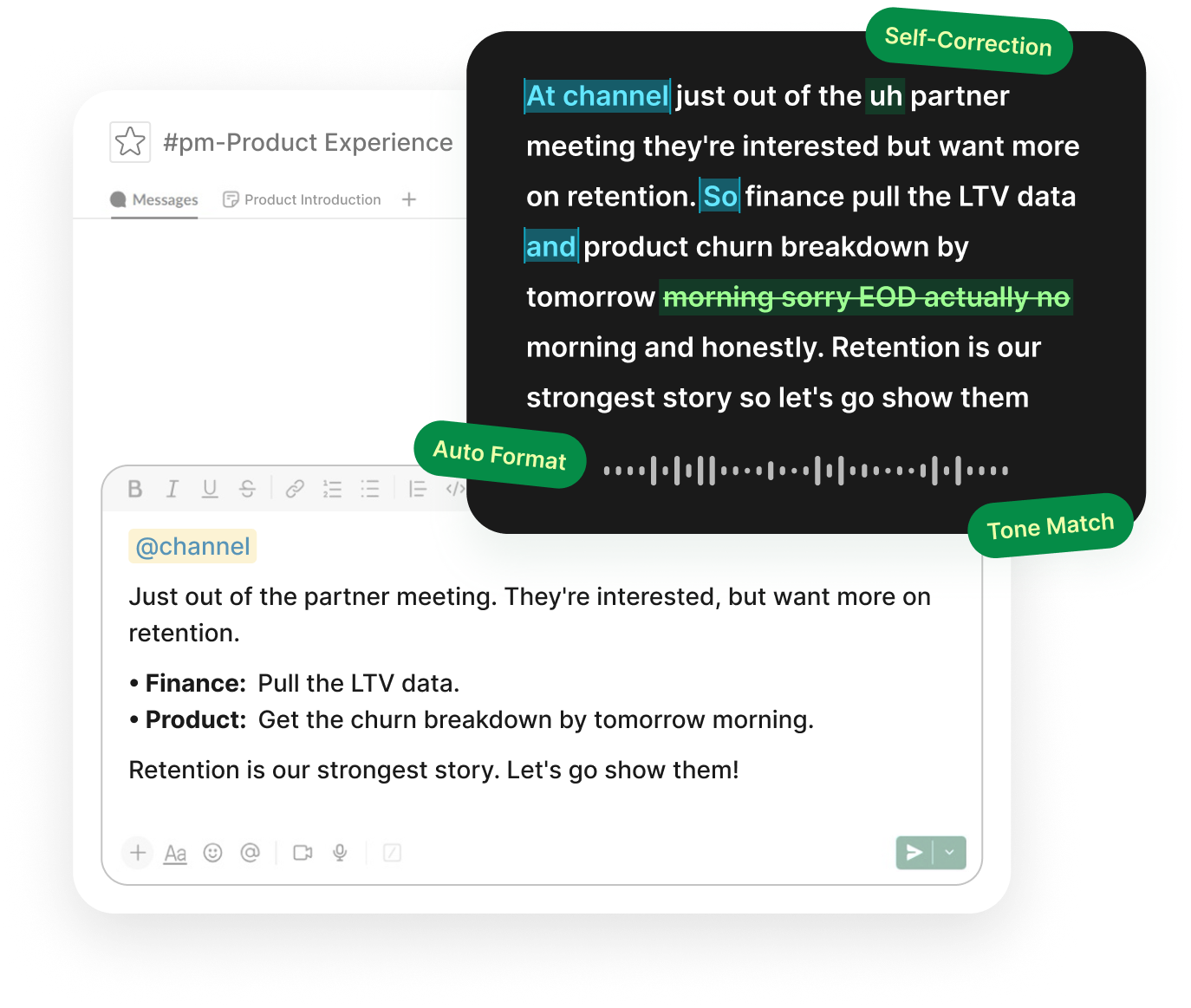
The same piece of news goes out three ways in the same afternoon. The board gets the measured version. The team gets the version that keeps them steady. The candidate you are still closing gets the version that sounds like a company worth joining.
That is three rewrites of something you already understand perfectly, and it is why the second and third ones get sent late.
Voiskey adapts to where you are writing rather than flattening everything into one voice. A message in Slack stays direct, an investor email stays measured, and a note to a friend who invested early stays like a note to a friend. If your board sits in another language, say it in whichever one it comes to you in and send it in theirs, with the phrasing a native speaker would use rather than a word-for-word translation.
What it does not do is change what you meant. The words are still yours.
The Thought You Have in the Car Park
The useful thinking never happens at the desk. It happens on the walk back, in the car park, in the ten minutes before a meeting you are already late for.
By the time you are somewhere you could type it, what is left is a vague memory of having had a good idea.
There is no time limit on a session, so a whole train of thought comes out in one pass instead of three fragments. Say it while it is still the thing you were actually thinking, and edit it later when you are back at a keyboard.
On your phone it is a full keyboard, so the version you speak in the car park and the version you type in a lift work the same way, without switching keyboards. You also do not have to talk at full volume. Voiskey picks up softer speech, including a whisper, which is worth knowing about in a shared office or a lobby.
It Learns Your Company's Words
Every company invents about forty words in its first two years. The product names, the internal codename for the thing you have not launched yet, the metric you made up that nobody else measures, the two investors whose surnames nobody spells right on the first try.
None of them are in a general dictionary, and all of them show up in everything you write.
Voiskey learns them. Add a name, a term, or a spelling you prefer, and it stops guessing. That vocabulary follows you across devices, so what you taught it at your desk is already there when you dictate a note on the way home.
Works Where You Already Are
Voiskey works anywhere you can type, so there is no integration to set up and nothing for anyone to approve, which at your stage is probably you. Slack and Teams for the thread. Gmail and Outlook for the investor email. Notion, Obsidian, Word, and Google Docs for the doc. ChatGPT and Claude for the prompt. Linear and Airtable for whatever you are tracking this week. The browser tab for the tool you started using yesterday.
Voice to text in Notion is worth calling out, because Notion has no dictation of its own and a lot of a founder's thinking lives there.
Workflows for a founder's week
- Thinking, roadmaps, and notes to yourselfVoice typing for notes
- Investor updates and customer repliesVoice typing for emails
- Quick replies and DMsVoice typing for messages
- Team updates and decisionsVoice typing for teams
- Recaps after an investor or customer callVoice typing for meetings
And if you are still the one doing the sales follow-ups, the support replies, the first version of the contract, or the prompts your engineers will refine later, those have pages of their own.
FAQ s
No setup at all, in any of them. Voiskey works at the input level rather than inside a particular app, so a Slack thread, a Notion page, an email, and a text box on a tool that launched last week all behave the same way. The one you adopt next month will work too.
Turn on privacy mode and your voice input is not collected, it is not used to train AI models, and your history stays on your own device. The Privacy Policy sets out how data is handled in detail.
Anyone can install it and start on the same free month, so the usual path is that one person tries it and the rest follow. Nothing has to be set up centrally first.
Enough for a normal week of threads, replies, and notes. New accounts start on Pro for a month, inviting friends adds up to two more, and the free plan after that gives you 2,000 words a week that never expire.


 Voiskey
Your voice, amplified.
Speak naturally, write effortlessly, and move faster. Turn your voice into polished, ready-to-use text wherever you work.
Use it across macOS, Windows, iOS, and Android