
Voice to Text for Customer Support
Answer Tickets, Chats, and Escalations With Your Voice
Support work is typing work, and the queue does not slow down for it. Speaking runs about five times faster. Free to start.
Typing Speed Is Part of the Job Description
Almost nobody has to look up the typing speed for their own job. Support agents do. It shows up in the posting, it shows up in the screening test, and once you are hired it quietly shows up again every time the queue gets long.
Sixty words a minute is a common bar. A fast agent might hit ninety. Speaking runs at around 220, and the keyboard averages around 45, which means the ceiling on this job has never really been how fast you think. It has been how fast your hands can catch up.
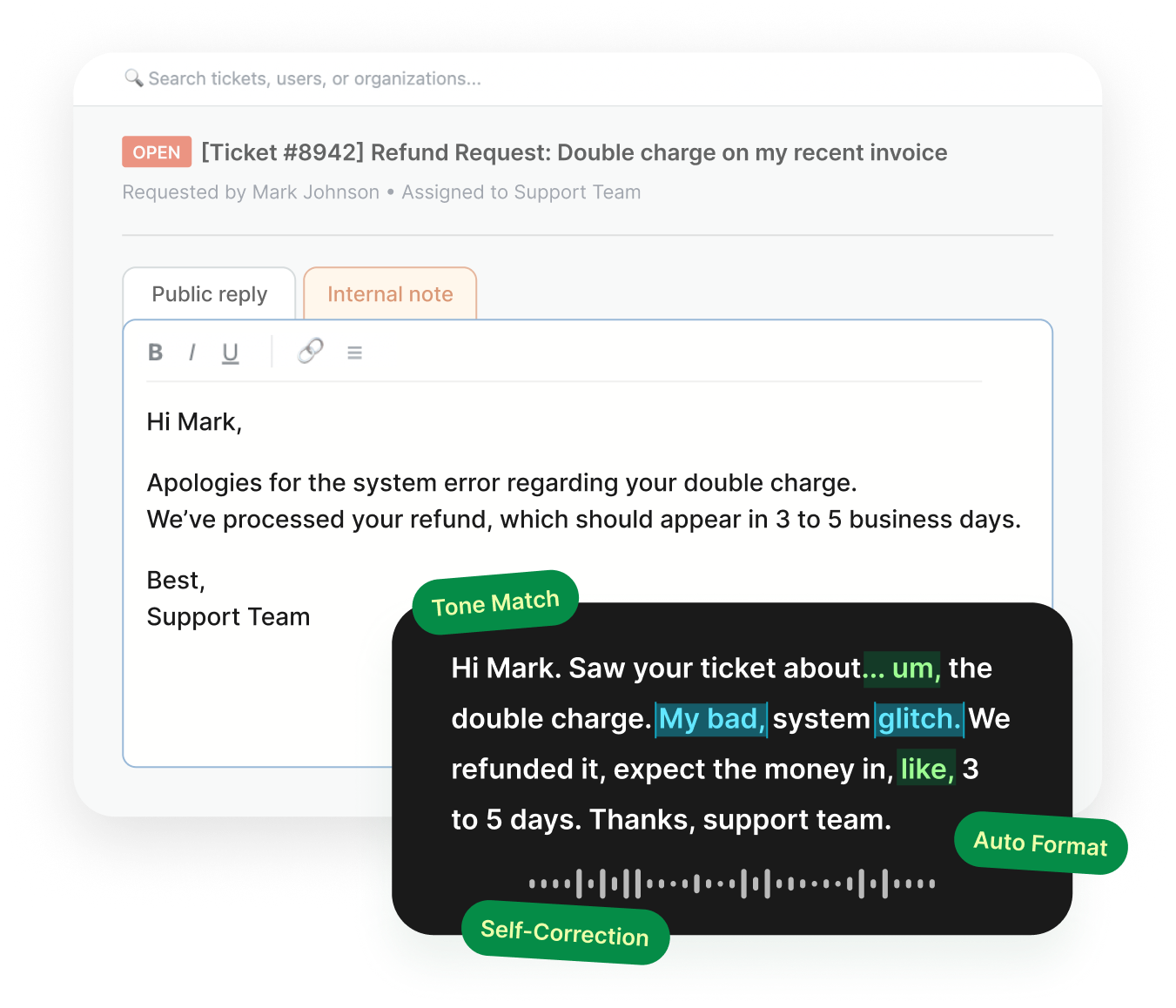
Speech to text for customer service moves that ceiling rather than raising it. You say the reply the way you would say it to the customer if they were standing there, and Voiskey clears out the fillers and false starts and hands you something you can send.
The gap shows up most on the replies that are not templated. A refund explanation, a workaround, an apology that has to sound like a person wrote it. Those are the ones that take four minutes of typing and thirty seconds of talking.
What Support Agents Dictate
Ticket Replies
The ones that need a real explanation rather than a macro. Say what happened, what you did about it, and what the customer should expect next.
Escalations and Handoffs
The internal note that decides whether the next person has to re-read the whole thread. Context is the entire value, and context is the first thing people cut when the queue is long.
Call Wrap-Ups
The three minutes after you hang up, when you still have the whole conversation and the next call is already ringing. Say it before it fades.
Help Center Drafts
The article you have explained out loud forty times and written down zero times.
Bug Reports to Engineering
Steps to reproduce, what the customer expected, what actually happened, what you already ruled out.
Shift Handovers and QA Notes
What is still open, who is angry and why, what the next shift should watch for.
Help Articles and Macros in Word
Every support team has a document nobody wants to write. The help center article for the question that comes in twelve times a week, the macro library that is three months out of date, the onboarding doc for the next hire.
You already know the answer. You have said it out loud dozens of times. The problem has never been the content.
Voice to text in Word works the same way it works anywhere else. Open the document, click into it, and talk. The difference from a plain transcript is what comes out: a spoken explanation lands as a heading, a short setup paragraph, and numbered steps, rather than one unbroken block you then have to break up by hand.
That also holds in Google Docs, Notion, Confluence, and whatever your team keeps its knowledge base in. Voiskey runs at the input level rather than inside one application, so the document does not have to live anywhere in particular.
It Gets the Product Names Right
Support vocabulary is a closed world that no general dictionary has ever seen. Your product's feature names, your internal codename for the bug, the error codes, the SKU, the integration partner whose name is spelled the way a startup spells things.
A reply that gets one of those wrong reads as if you did not understand the problem, which is exactly the impression you were trying to undo.
Voiskey learns them. Add a product name, an error code, or a spelling your style guide insists on, and it stops guessing. That vocabulary follows you across devices, so the terms you taught it on your work machine are already there when you pick up a ticket on your phone.
Works Where the Tickets Are
Voiskey works anywhere you can type, so there is nothing for IT to install and no integration to approve. Zendesk, Intercom, Freshdesk, Gorgias, Front, Help Scout, and Salesforce Service Cloud for the ticket. Outlook and Gmail for the email that came in outside the queue. Slack and Teams for the escalation. Word, Google Docs, Notion, and Confluence for the help article. Jira and Linear for the bug report.
You also do not have to talk at full volume. Voiskey picks up softer speech, including a whisper, which matters on a support floor more than almost anywhere else.
Workflows for a support shift
- Call wrap-ups and shift handoversVoice typing for notes
- Replies to customers who emailed inVoice typing for emails
- Live chat and quick follow-upsVoice typing for messages
- Escalations and internal handoffsVoice typing for teams
- Recaps after a customer callVoice typing for meetings
Answering in the Customer's Language
Support is the most multilingual job in most companies. The team is in one place, the customers are everywhere, and a lot of agents are answering all day in a language they speak well but write slowly.
Voiskey supports 100+ languages and 20+ keyboards, and it does more than swap words. It adjusts word order, formality, and the phrasings a native speaker would actually use, so the reply reads like it was written rather than translated. You can mix two languages in one sentence and still get clean output in one.
Say it in whichever language the answer comes to you in. What reaches the customer reads the way their own support team would have written it.
FAQ s
Less time than most people expect. The first long reply usually lands faster than typing it would have, because you are describing a situation you already understand rather than composing at a keyboard. The short ones catch up within a shift.
Say the new version and keep going. What lands in the ticket is the sentence you meant, not a transcript of you working your way toward it. This is usually the moment people who have tried plain dictation before change their mind about it.
For most agents, yes. Two thousand words a week covers a normal week of replies, escalations, and wrap-up notes. It goes faster if you also draft long help articles out loud. The free month up front, plus the referral months, is long enough to see where your own usage lands.


 Voiskey
Your voice, amplified.
Speak naturally, write effortlessly, and move faster. Turn your voice into polished, ready-to-use text wherever you work.
Use it across macOS, Windows, iOS, and Android